Hello,
Provided you automate your shutters at your own risk, you may do as follows:
The data you need to use, the actual weather condition, is in the so-called payload of the event. That is why it doesn't work the way you tried.
You need to use a python script to extract the payload content and then analyze the condition to decide if the macro shall continue or not. Like in this example:
Code: Select all
def eventHandler(base, pload):
    try:
        if(
            str(pload).find('Mostly Cloudy') > -1 or
            str(pload).find('Cloudy') > -1 or
            str(pload).find('Mostly Cloudy/Windy') > -1
        ):
            pass
        else:
            eg.StopMacro()
            eg.plugins.EventGhost.ShowOSD(u'Stopped macro', u'0;-24;0;0;0;700;0;0;0;1;0;0;2;32;Arial', (255, 255, 255), (0, 0, 0), 0, (0, 0), 0, 3.0, False)
    except:
        eg.StopMacro()
        pass


eg.event.suffix_copy = eg.event.suffix
eg.event.payload_copy = eg.event.payload

eventHandler(eg.event.suffix_copy, eg.event.payload_copy)
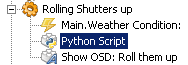
- Image2.png (3.57 KiB) Viewed 6881 times
It works so that only if a valid weather condition is found, the macro will continue an roll your shutters up. Please be aware that Yahoo! Weather has a number of weather condition that you may consider. Check the file 'weather_conditions.py' in the
suntracker plugin folder (The sample in the script above you can easily extend).
If you need a macro also to roll shutters down, you can create such with a script based on the same principle but opposite conditions. But be sure that you consider carefully all conditions that eventually could damage the shutters or anything in the way BEFORE rolling them down (including adults & kids, bad weather conditions, windows closed, no other obstacles in the way etc etc).
BR
