Page 8 of 94
Re: XBMCRepeat XBMC plugin based on the official plugin
Posted: Mon Sep 13, 2010 2:34 pm
by jonib
I have attached a remote.xml, it changes 3,6 and 9 buttons to control the volume when watching fullscreen video only.
Save it in
(XBMC install dir)\portable_data\userdata\keymaps\remote.xml
kricker wrote:That is kind of you.
Kindness had nothig to do with it, I was bored, well I needed something to do after finishing the chicken.

jonib
Re: XBMCRepeat XBMC plugin based on the official plugin
Posted: Mon Sep 13, 2010 2:39 pm
by jesterod
lawl well thank god for bordom also the info butten does not display the info
self edit lol nvm its the skin that didnt show the info.... lame at that i liked that skin
Re: XBMCRepeat XBMC plugin based on the official plugin
Posted: Mon Sep 13, 2010 2:46 pm
by jonib
jesterod wrote:lawl well thank god for bordom also the info butten does not display the info
self edit lol nvm its the skin that didnt show the info.... lame at that i liked that skin
Is the skin
Back Row? as that's what I'm using and I hate the way the info button works.
jonib
Re: XBMCRepeat XBMC plugin based on the official plugin
Posted: Mon Sep 13, 2010 2:53 pm
by jesterod
i replaced te remote.xml and it still does the same thing xbmc 9.11
EDIT:nvm i put it in the wrong place i went system/keymaps no the skin Ellipsis it doesnt even have show info... i like other than that well back to pm3
Re: XBMCRepeat XBMC plugin based on the official plugin
Posted: Mon Sep 13, 2010 3:03 pm
by jonib
jesterod wrote:i replaced te remote.xml and it still does the same thing xbmc 9.11
EDIT:nvm i put it in the wrong place i went system/keymaps no the skin Ellipsis it doesnt even have show info... i like other than that well back to pm3
So it works now? My instruction ware for the new XBMC Dharma version and I forgot to ask which version you used.

jonib
Re: XBMCRepeat XBMC plugin based on the official plugin
Posted: Mon Sep 13, 2010 3:12 pm
by jesterod
yep works great thx. so i have one more question is there a way for eventghost to look if xbmc is running and if not to start it when the display butten is held?
Re: XBMCRepeat XBMC plugin based on the official plugin
Posted: Mon Sep 13, 2010 3:28 pm
by jonib
jesterod wrote:yep works great thx. so i have one more question is there a way for eventghost to look if xbmc is running and if not to start it when the display butten is held?
Sure. The below image shows how I start XBMC, if you need more help I'll describe it better later. The
PVR Menu(so yours would be different) is the event that the button I want to start XBMC with sends.
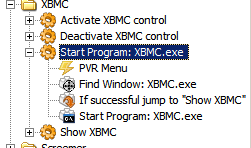
- StartXBMC.PNG (8.75 KiB) Viewed 9292 times
If your remote/receiver supports long presses you can use
EventGhost\Jump if long press action, to start when a button is held down.
jonib
Re: XBMCRepeat XBMC plugin based on the official plugin
Posted: Mon Sep 13, 2010 3:31 pm
by jesterod
kk ill give it a try and i think it does i pressed display and hels it and the lil green arrow was red tell i let go (arrow at the bottem right of eventghost)
EDIT: can you show me the "show xbmc" please
EDIT:2 ok im loseing my self i have
macro
|-XBMCRC.DISPLAY
|-find window xbmc.exe
|-if successful jumpto "bring to front"
|-if butten press is held down for longer than 2.0sec,go to find window xbmc.exe
|-start program xbmc.exe
bring to front
|-bring to front
Re: XBMCRepeat XBMC plugin based on the official plugin
Posted: Mon Sep 13, 2010 3:45 pm
by jonib
jesterod wrote:EDIT: can you show me the "show xbmc" please
Sure, the "Show XBMC" just brings the XBMC window to the front if minimized.
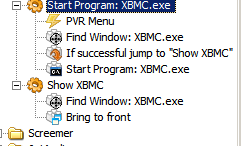
- StartXBMC2.PNG (9.04 KiB) Viewed 9291 times
jonib
Re: XBMCRepeat XBMC plugin based on the official plugin
Posted: Mon Sep 13, 2010 4:00 pm
by jesterod
woot i got it to work

EDIT:sigh now the select butten isnt working in xbmc it works wile a video is playing tho so it has to be a issue in the remote.xml that you gave me but i swear it worked not to long ago after i put it in there
EDIT2:i opend the remote.xml and this is in there so idk why its not working
<global>
<remote>
<select>Select</select>
EDIT3: yep that remote.xml that you gave me is the issue but i dont know how to fix it i just tested it on a second laptop
EDIT4: i fixed it i opend the xml and deleted everything except
Code: Select all
<keymap>
    <FullscreenVideo>
        <remote>
            <three>VolumeUp</three>
            <six>VolumeDown</six>
            <nine>Mute</nine>
            <zero>Number0</zero>
            <one>Number1</one>
            <two>Number2</two>
            <four>Number4</four>
            <five>Number5</five>
            <seven>Number7</seven>
            <eight>Number8</eight>
            <left>StepBack</left>
            <right>StepForward</right>
            <up>BigStepForward</up>
            <down>BigStepBack</down>
            <back>SmallStepBack</back>
            <menu>OSD</menu>
            <start>OSD</start>
            <select>AspectRatio</select>
            <title>CodecInfo</title>
            <info>Info</info>
            <teletext>XBMC.ActivateWindow(Teletext)</teletext>
            <subtitle>ShowSubtitles</subtitle>
            <star>ShowSubtitles</star>
            <language>AudioNextLanguage</language>
            <hash>AudioNextLanguage</hash>
        </remote>
    </FullscreenVideo>
</keymap>
Re: XBMCRepeat XBMC plugin based on the official plugin
Posted: Tue Sep 14, 2010 5:51 am
by jesterod
decided not to edit this time as im not sure you show up in the notfication i have it working perfect now now im wondering how to set up a macro to switch between xbmc like i hold 0 1.5sec and it jumps to a diff ip i hold 1.5sec again and it jumps back to the other
Re: XBMCRepeat XBMC plugin based on the official plugin
Posted: Tue Sep 14, 2010 2:34 pm
by kricker
jesterod wrote:EDIT:sigh now the select butten isnt working in xbmc it works wile a video is playing tho so it has to be a issue in the remote.xml that you gave me but i swear it worked not to long ago after i put it in there
EDIT2:i opend the remote.xml and this is in there so idk why its not working
<global>
<remote>
<select>Select</select>
EDIT3: yep that remote.xml that you gave me is the issue but i dont know how to fix it i just tested it on a second laptop
EDIT4: i fixed it i opend the xml and deleted everything except
...
Did you look at the <FullscreenVideo> section? Normally select is set to <select>AspectRatio</select>.
I just checked the remote.xml file he provided and that is what it is set to do. And it works just fine for me. Change to the default confluence skin and check what happens.
Re: XBMCRepeat XBMC plugin based on the official plugin
Posted: Tue Sep 14, 2010 2:49 pm
by jesterod
kricker wrote:Did you look at the <FullscreenVideo> section? Normally select is set to <select>AspectRatio</select>.
I just checked the remote.xml file he provided and that is what it is set to do. And it works just fine for me. Change to the default confluence skin and check what happens.
no that wassent the problem it was the select wassent working out side of the fulscreenvideo worked fine during the video
global was messed up i fixed it tho with the the code block i put up
Re: XBMCRepeat XBMC plugin based on the official plugin
Posted: Tue Sep 14, 2010 3:05 pm
by kricker
Not sure why that file would make select not work out side of fullscreen video. It works fine for me. Anyhow, it sounds like you are squared away so it doesn't really matter.
im wondering how to set up a macro to switch between xbmc like i hold 0 1.5sec and it jumps to a diff ip i hold 1.5sec again and it jumps back to the other
Can you explain this again? You want a macro to switch between screens within XBMC or between XBMC and another app? I'm not sure what an "ip" is.
Re: XBMCRepeat XBMC plugin based on the official plugin
Posted: Tue Sep 14, 2010 3:10 pm
by jonib
jesterod wrote:i have it working perfect now
Good to hear. The remote.xml was from my XBMC Dharma install, so might be some differences to 9.11.
now im wondering how to set up a macro to switch between xbmc like i hold 0 1.5sec and it jumps to a diff ip i hold 1.5sec again and it jumps back to the other
So you want to control two different XBMCs?
Then you need two XBMCRepeat plugins in the autostart folder, configured to use the right IP numbers.
Then you need to make a macro to enable one XBMCRepeat macro tree and disable the second XBMCRepeat macro tree, and vice versa. Using
Exclusive enable a folder/macro or
Enable/Disable an item.
Hope this helps, if not reply again.
jonib