Page 9 of 94
Re: XBMCRepeat XBMC plugin based on the official plugin
Posted: Tue Sep 14, 2010 3:11 pm
by jesterod
kricker wrote:Can you explain this again? You want a macro to switch between screens within XBMC or between XBMC and another app? I'm not sure what an "ip" is.
i want to switch between computers running xbmc ip=127.0.0.1 like i hold zero for 1.5sec and it starts sending the butten press's to a different version of xbmc
Re: XBMCRepeat XBMC plugin based on the official plugin
Posted: Tue Sep 14, 2010 3:12 pm
by jesterod
jonib wrote:So you want to control two different XBMCs?
Then you need two XBMCRepeat plugins in the autostart folder, configured to use the right IP numbers.
Then you need to make a macro to enable one XBMCRepeat macro tree and disable the second XBMCRepeat macro tree, and vice versa. Using Exclusive enable a folder/macro or Enable/Disable an item.
yea that what i thought and tryed to do but i couldent get it to load 2 copys
Re: XBMCRepeat XBMC plugin based on the official plugin
Posted: Tue Sep 14, 2010 3:27 pm
by jonib
jesterod wrote:yea that what i thought and tryed to do but i couldent get it to load 2 copys
What version of EventGhost do you have?
And when you try to add the second XBMCRepeat what happens?
At least on my EventGhost ver 0.3.7.r1462 I have two XBMCRepeat plugins one controlling XBMC on this computer and the second controlling XBMC on my XBOX.
jonib
Re: XBMCRepeat XBMC plugin based on the official plugin
Posted: Tue Sep 14, 2010 3:35 pm
by jesterod
ok heres what i got but it does not work it switches but both on and off at the same time
Re: XBMCRepeat XBMC plugin based on the official plugin
Posted: Tue Sep 14, 2010 3:38 pm
by jesterod
jonib wrote:At least on my EventGhost ver 0.3.7.r1462 I have two XBMCRepeat plugins one controlling XBMC on this computer and the second controlling XBMC on my XBOX.
thats exactly what i want it to do ver 0.3.7.r1436
Re: XBMCRepeat XBMC plugin based on the official plugin
Posted: Tue Sep 14, 2010 3:44 pm
by kricker
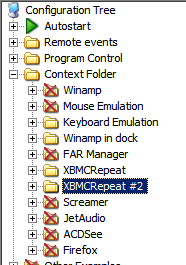
I don't think you want to disable/enable the plugins. You want to switch between the XBMCrepeat macro trees. You should have 2 sets of those in your Context Folder (hopefully that is where you put them).
Context Folder
-XBMCRepeat
-XBMCRepeat#2
Re: XBMCRepeat XBMC plugin based on the official plugin
Posted: Tue Sep 14, 2010 3:58 pm
by jesterod
ok i got it to work
EDIT:added a sound notfiy on switch
Re: XBMCRepeat XBMC plugin based on the official plugin
Posted: Tue Sep 14, 2010 4:03 pm
by jonib
jesterod wrote:ok i got it to work
Damn, I don't like this at all, I made a bunch of screenshots showing how I control stuff and then you go and figure it out.

jonib
Re: XBMCRepeat XBMC plugin based on the official plugin
Posted: Tue Sep 14, 2010 4:06 pm
by jesterod
jonib wrote:jesterod wrote:ok i got it to work
Damn, I don't like this at all, I made a bunch of screenshots showing how I control stuff and then you go and figure it out.
jonib
awww im sorry you can show them if you want

i wouldent mind seeing your config anyway prolly damn cool
Re: XBMCRepeat XBMC plugin based on the official plugin
Posted: Tue Sep 14, 2010 4:17 pm
by kricker
jonib wrote:jesterod wrote:ok i got it to work
Damn, I don't like this at all, I made a bunch of screenshots showing how I control stuff and then you go and figure it out.
jonib
LOL. I figured you were making screenshots of it all, that is why I hurried up and just posted basic text
Re: XBMCRepeat XBMC plugin based on the official plugin
Posted: Tue Sep 14, 2010 4:21 pm
by jonib
jesterod wrote:awww im sorry you can show them if you want
i wouldent mind seeing your config anyway prolly damn cool
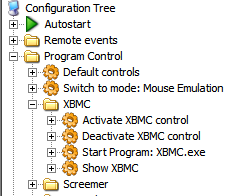
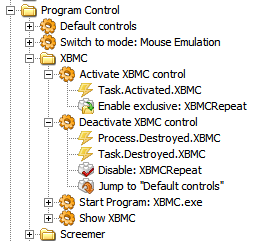
I guess the big difference between mine and your config is that I separate the control of what program is controlled to a separate folder
Program Control
And have the program specific folder in a subfolder
Context folder and the advantage is that the
Enable exclusive action only effects that folder and I can have global macros active.
- XBMC1.PNG (9.8 KiB) Viewed 8167 times
- XBMC2.PNG (9.04 KiB) Viewed 8167 times
- XBMC3.PNG (13.59 KiB) Viewed 8167 times
jonib
Re: XBMCRepeat XBMC plugin based on the official plugin
Posted: Tue Sep 14, 2010 4:22 pm
by jonib
kricker wrote:LOL. I figured you were making screenshots of it all, that is why I hurried up and just posted basic text
I call that cheating.

jonib
Re: XBMCRepeat XBMC plugin based on the official plugin
Posted: Tue Sep 14, 2010 4:25 pm
by jesterod
that looks complicated ass hell yesterday was the first time i used eventghost im not even sure what you doing lol
Re: XBMCRepeat XBMC plugin based on the official plugin
Posted: Tue Sep 14, 2010 4:36 pm
by jonib
jesterod wrote:that looks complicated ass hell yesterday was the first time i used eventghost im not even sure what you doing lol
It's not
THAT complicated, but as my EventGhost controls more than XBMC it needs to be a bit more complicated.

jonib
Re: XBMCRepeat XBMC plugin based on the official plugin
Posted: Wed Sep 15, 2010 9:19 pm
by jesterod
does any one know a way to close an app like kill prossess from eg?
i know it has sothing to do woth this plugin but you guys sem to know what your doing