Page 10 of 37
Re: terRemote - Android remote app for EventGhost
Posted: Thu Nov 29, 2012 1:32 pm
by terRemote
Hi guys,
sorry for not answering earlier. TImes are quite stressful but now at least I could find the time to write an answer to your questions.
@Ulf: Thanks, I did not use the shape-background feature in a while and haven't noticed this. Do you know in which version this occured? I also noticed that, at least on my device, there is some issue with the area for repositioning the widgets. This might have the same cause than your problem and it's the next thing I am going to fix.
@Pastis: In which way do you mean "close"? Do you want to stop a running process or do you want to show the homescreen in the same way as it happens when pressing the home button? Also, do you want to close a specific application or "the one currently on top"? I think all these things could be realized (to some extend, there are always boundaries on non-rooted devices) but knowing your preferences would influence the order of implementing them

@gg48gg: I'm glad to hear that you enjoy the app. A gesture widget is planned. You are correct that if you swipe the background, it navigates from one layout to the next or previous. The new widget could be put anywhere with any size and you could use gestures (even more complicated ones than just one direction) to induce actions. Is this what you had in mind?
As usual, if anyone feels that I still owe him/her an answer to a question, please remind me. I'm never sure whether I lost an email or overlooked a post here or on facebook
http://www.facebook.com/terRemote.
Best
Chris
Re: terRemote - Android remote app for EventGhost
Posted: Fri Nov 30, 2012 1:02 pm
by Rivvern
Hey.
Me and my buddy just bought the Pro version to support you and this great app!
But we are wondering if it is possible to do a state check on all switches to update the switches in the layout. If they are ON or OFF?
Is it possible?
It would be nice if you could create some guides, tips and tricks, tutorials etc.
Keep up the good work!
Re: terRemote - Android remote app for EventGhost
Posted: Fri Nov 30, 2012 3:02 pm
by terRemote
Hi,
anything on which EventGhost can check the state can be checked by terRemote as well. Just create a macro that reacts on the "LayoutStarted.YOURLAYOUTNAME" event and use it to send a message like "check_state" to EventGhost. EG checks the state and sends it back to tR.
You are right that this should be better documented
I'm actually currently working on the documentation. The System layout uses this technique to show the current volume state of Windows. Refer to this
http://www.terremote.com/tutorials/system to set up the System layout and see how it behaves. The same should be possible for your switches as long as EG can check their state.
Thanks for supporting the app!
Chris
Re: terRemote - Android remote app for EventGhost
Posted: Sun Dec 02, 2012 7:10 pm
by terRemote
Just uploaded the new version. There are some bugfixes and finally I managed to implement the function to duplicate a layout.
Also, you can now define background images for buttons. Both features were asked for by users.
@Ulf: The issue is now fixed. You might have to move your buttons a bit since they might be shifted.
Please don't forget to rate the free and the pro version as well as the Tasker plugin if you have not yet done it.
Re: terRemote - Android remote app for EventGhost
Posted: Mon Dec 03, 2012 3:11 am
by rdgerken
Chris,
I sent you a PM about an issue I'm having with ${value} not parsing. On a separate note, is there an option to prevent the IP from coming into eventghost as the first payload value? I'm tying events from terremote into the same macros that I have setup with voxcommando - and I can't do that unless I add a dummy payload value in voxcommando (to match the parameter list of what is coming from terremote) - of course, this is assuming I can get the ${value} to work. I would prefer to not have the android IP coming over as a payload value so that I can reuse my existing macros in EG. I'm very new to all of this, so if I have something wrong, I apologize.
Thanks!
Re: terRemote - Android remote app for EventGhost
Posted: Mon Dec 03, 2012 5:10 pm
by terRemote
Hi,
I sent you a response to your PM. For the question here, first note that the IP is not added by terRemote but by the network receiver plugin of EG. You have to change this, then.
Create a backup of the file "/plugins/NetworkReceiver/__init__.py" in your EG installation directory. (if anything goes wrong, you can then just replace the modified file)
Open an editor (easiest solution: notepad) in administrator mode, then open the original file "__init__.py".
find the two lines that say
and replace them with
.
This would be enough but unfortunately this gives an exception in another line because payloads can now be empty.
Replace the line
Code: Select all
if self.payload[-1] == "withoutRelease":
with
Code: Select all
if len(self.payload) > 0 and self.payload[-1] == "withoutRelease":
Save the file, restart EG. The ip will now not be in the payload, anymore. Note that this is an ad-hoc solution. I can not guarantee that everything else will work as before. I have especially not tested durable events. For basic functionality this seems to work, though.
Hope this helped. Best
Chris
Re: terRemote - Android remote app for EventGhost
Posted: Tue Dec 04, 2012 2:51 am
by rdgerken
Chris,
Thank you for that explanation! I did not realize the receiver plugin was adding that IP in there. It should not be a problem for my setup, as this is the only application I'm currently using the receiver plugin for. While I have you, can you please explain what a "durable" event is? I looked for an explanation to that, and could not find one.
I will try troubleshooting my issue with the info in your PM. If that doesn't work, I may send you an export so that you can review my setup?
Thanks again
Re: terRemote - Android remote app for EventGhost
Posted: Tue Dec 04, 2012 1:10 pm
by terRemote
Hi again
just quickly about the durable events: When pressing down a button, the action is sent to EG with the additional payload "withoutRelease" and when releasing the button, the same event is sent with the only payload bein "ButtonRelease" so that EG can do something while the button is pressed (like moving the mouse in the System layout). This is an EG feature and can be used by some of its actions. terRemote just supports it.
Chris
Re: terRemote - Android remote app for EventGhost
Posted: Wed Dec 05, 2012 1:08 pm
by wo0zy
Hi terRemote,
I've just starting experimenting with your wonderful application! Great work!
I have a quick question if I may. Is it possible to receive network events generated by the "TCPEvents" plugin (
http://www.eventghost.org/forum/viewtop ... =2&p=16803)? I've managed to send network events via the built-in "Network Sender" and can see them arriving in the terRemote Event Log however events generated by TCPEvents do not appear in the log even though I don't get any sending error in EventGhosts logger.
If "TCPEvents" isn't supported ATM is there a chance it will be in the future? If not then perhaps I can achieve my objective using the standard Network Sender with a little help
.
The reason I'm looking a using TCPEvents is because it seems to make adding "eg.event.payload" as a network event payload very straight forward where as with the default Network Sender I've been unable to do this at all and this is something I need to do in order to get now playing (track) information from MediaPortal (using the EventGhostPlus plugin to generate an event within EG) into terRemote.
I have read
http://www.eventghost.org/forum/viewtop ... f=2&t=2904but have been unable to find a way to make this "trick" evaluate eg.event.payload (it just shows the words eg.event.payload as a literal string (if that's the right phrase) rather than the value).
Sorry if this doesn't make much sense. As you can probably tell I'm quite new to EG and have little or no python experience (although I am trying to learn).
Any information you can provide would be greatly appreciated! If you need further information from me please let me know.
Thanks again for all your work on terRemote. I hope there's enough people purchasing "pro" to keep you motivated (or at least in beer!).
Regards,
Wo0zy
Re: terRemote - Android remote app for EventGhost
Posted: Wed Dec 05, 2012 3:04 pm
by terRemote
Hi Wo0Zy,
here's what I use for forwarding an event (while converting it to unicode because of some character issues that might occur)
Code: Select all
<?xml version="1.0" encoding="UTF-8" ?><EventGhost Version="1568"><Action Name="Copy event in unicode">EventGhost.PythonScript(u'event_string = eg.event.string\nif eg.event.payload is None:\n eg.plugins.NetworkSender.plugin.Send(event_string, eg.event.payload)\nelif isinstance(eg.event.payload, str):\n eg.plugins.NetworkSender.plugin.Send(event_string, [unicode(eg.event.payload)])\nelse:\n lst = []\n for pld in eg.event.payload:\n lst.append(unicode(pld))\n eg.plugins.NetworkSender.plugin.Send(event_string, lst)')</Action></EventGhost>
You can just copy this text and insert it in EG as an action.
It's a simple python script with the content
Code: Select all
event_string = eg.event.string
if eg.event.payload is None:
    eg.plugins.NetworkSender.plugin.Send(event_string, eg.event.payload)
elif isinstance(eg.event.payload, str):
    eg.plugins.NetworkSender.plugin.Send(event_string, [unicode(eg.event.payload)])
else:
    lst = []
    for pld in eg.event.payload:
        lst.append(unicode(pld))
    eg.plugins.NetworkSender.plugin.Send(event_string, lst)
so it takes all strings in the payloads, converts them to unicode and passes the resulting list to the sender plugin. Alter the first line if you want a different event string.
I hope this helps your problem. I don't know if terRemote will ever support "TCPEvent". It's more likely that there will be a terRemote plugin for EG that supports this feature.
Let me know if you need more assistance.
Best
Chris
Re: terRemote - Android remote app for EventGhost
Posted: Wed Dec 05, 2012 3:47 pm
by wo0zy
Hi Chris,
That's brilliant! Thank you very much for the fast and detailed response!
After I posted I got it working by writing "eg.event.payload[0]" to a variable (myVar) then creating a python command
eg.globals.evtPayload ="payload "+(eg.ParseString(myVar))+"\nNowPlaying"
then in the Network Sender Map
{eg.globals.evtPayload}
but your script looks far cleaner and more robust!
Now I've got "Now Playing" info in terRemote I can get on with the rest of my layouts

.
BTW I purchased "pro" earlier. It's the least I can do.
Thanks again for your help!
All the best,
Mick.
Re: terRemote - Android remote app for EventGhost
Posted: Thu Dec 06, 2012 12:26 am
by Marbieskarb
I wish there was a more simplified way of designating a pressed image for a button like I posted previously so I can create layouts directly on my phone. What I have been doing is creating my entire layouts with an image editor (gimp) to be used as backgrounds. When I set the gimp created backgrounds in terRemote I assign pressed state buttons on top of the corresponding buttons on the image.
With doing this, it poses a few problems. When you create a button with an image in terRemote there is a border around the image (shape) that cannot be modified. Even if you set the shape as a transparent color there still is an invisible border. The border around the button image doesn't allow me to drag it to the extreme edge of the screen and it also causes alignment issues when attempting to add the button on top of the image background I created in gimp. Is there any way to disable the design "shape" for buttons with images?
I still would like to be able to set a background picture but, only for the pressed state.....If possible, could the pressed state picture have an option to be put on top of the button (foreground) instead of behind (background)......Wishful thinking.
Also, can we have an option to disable gestures to switch to different layouts? Its a welcome feature but its rather clunky right now and not as smooth as your typical android launcher style screen switches. I end up pulling the screen when pressing on a button.
On another note, I do notice that when I hold down buttons it doesn't repeat the events unless I set the option to durable. With durable it does repeat but when you release it, another event is sent. Now, I know that's how durable events are supposed to work in your app but can you have another option that allows a button to repeat when held but, when released no other event is sent? I tried the repeat action in EG but it doesn't work. Maybe I'm doing something wrong and someone can point me in the right direction.
All your help and implementation of features has been greatly appreciated and I'v purchased your app and will recommend to others.
Thanks
Re: terRemote - Android remote app for EventGhost
Posted: Thu Dec 06, 2012 2:57 pm
by terRemote
@Mick: Good to hear that this worked out and thanks for buying the Pro version.
@Marbieskarb:
I wish there was a more simplified way of designating a pressed image for a button
Would it help to make duplicating Designs possible so that you don't have to create a completely new one for each button but just change one picture? I think this would be the easiest way to make life easier for you.
When you create a button with an image in terRemote there is a border around the image (shape) that cannot be modified
This doesn't appear in my version. How exactly do you use it? Is the "normal" background a shape and the pressed background a picture? I might be able to fix this, having more information. Which device and Android version do you use?
I still would like to be able to set a background picture but, only for the pressed state.....If possible, could the pressed state picture have an option to be put on top of the button (foreground) instead of behind (background)
So this means that the icon and text should be invisible while the button is pressed? That might be possible but I don't know where this is relevant. Can you give an example about how you want to use it? I mainly want to know if I understood you correctly.
Also, can we have an option to disable gestures to switch to different layouts?
Yes that's planned. I should have implemented that from the beginning. You will have that possibility along with a "threshold" so that a simple touch will not directly cause a movement. I know that this is an issue on some devices.
I do notice that when I hold down buttons it doesn't repeat the events unless I set the option to durable. With durable it does repeat but when you release it, another event is sent.
This issue will be fixed once I introduce an action for button release. You can then start a timer with an interval action (on "button down") and cancel that timer on "button up". Before that, I will have a look if I am able to make the timer action "durable" so that this feature is easily achievable.
All your help and implementation of features has been greatly appreciated and I'v purchased your app and will recommend to others.
Great, thanks! Always good to hear.
Best
Chris
Re: terRemote - Android remote app for EventGhost
Posted: Thu Dec 06, 2012 7:47 pm
by Marbieskarb
Would it help to make duplicating Designs possible so that you don't have to create a completely new one for each button but just change one picture? I think this would be the easiest way to make life easier for you.
I think I have found a viable solution. It would entail creating a new design for each button. The design would include everything needed and an actual icon wouldn't be selected. Perhaps being able to duplicate the design would save at least a couple of button clicks.
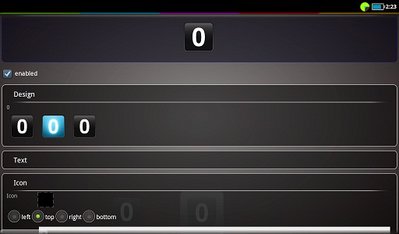
- Design that includes the button press
This doesn't appear in my version. How exactly do you use it? Is the "normal" background a shape and the pressed background a picture? I might be able to fix this, having more information. Which device and Android version do you use?
Attached is a screenshot on how in the actual image/icon within the button cannot reach the extreme edge in teRemote because of the design (shape), even when its transparent or when an icon is NOT selected and the icons are just set within the design as shown above in the first image. I've also posted an example layout I created in gimp to show how the icon is able to reach the extreme edge. I apologize if I didn't articulate this correctly in my previous post.
So this means that the icon and text should be invisible while the button is pressed? That might be possible but I don't know where this is relevant. Can you give an example about how you want to use it? I mainly want to know if I understood you correctly.
I think just adding a design for each button will help achieve what I need to get a button press
Thanks again for your reply.
Re: terRemote - Android remote app for EventGhost
Posted: Fri Dec 07, 2012 3:31 am
by rdgerken
Not sure if this has been explained somewhere, hopefully I'm not duplicating a question.
I have terremote, and I have the tasker plugin for android. When I scan an NFC tag, I have the tasker plugin communicating the event correctly to terremote, per the event log. I'm passing two payloads with it, and it shows up fine in the log. I'm not really wanting to go to terremote, but to EG back on my PC - I was using the HTTP Get method i found in another post, but could not make it work with payloads, so I was wanting to pass it through terremote, since it supports payloads. Can you explain to me how to get that event generated by the tasker plugin to get passed to EG on my PC? I was assuming that it would just happen automatically, but then I realized I hadn't associated that plugin event with any EG server or anything. I see that I can add a macro to pass it through, but that wasn't clear to me how to do that either. And if that is how you do it, then dang, that means I'd have to create a macro for every plugin event that gets generated - and then also, what would be the syntax for the payloads in the terremote macro configuration? I was hoping you'd post a list of all of the ${variable} placeholders for terremote. Hopefully what I'm trying to do makes sense.
Thanks for the help.