Page 2 of 3
Re: File Operations
Posted: Mon Jul 02, 2012 11:56 am
by waffles
Pako wrote:When you use the action "Start periodical reading", so you can not print eg.result. This action does not result, this action only starts the periodic reading.
Content (or certain lines) of file you can only receive as eg.event.payload.
You certainly do not need to actually print the "result".
Perhaps it would be better to write exactly what you need.
Pako
Hello Pako;
Thanks for your reply.
Here is what I would like to do:
I run a media player called TMT5 on my home theater PC (HTPC). TMT5 outputs during operation, i.e. playback of a media file (movie) an ASCII file, containing information about the playback state of the file.
Here is an example:
[States]
State=stop
TotalTitle=11
CurTitle=1
TotalChapter=18
CurChapter=4
TotalTime=1:15:13
CurTime=0:13:32
Video=mpeg2
Audio=ac3
CurSpeed=0.000000
TotalAudio=2
CurAudio=2
AudioLangs=
TotalSubtitle=0
CurSubtitle=0
SubtitleLangs=
Mute=false
Volume=60
TMT continuously updates this file, e.g. the CurTime counter goes up every second by a second, so if I refresh the file 5 seconds later, it should show instead of CurTime=0:13:3
2, ...=0:13:3
7, etc.
I would like to extract some of this information (state, chapter and time information) from the file and broadcast it to my universal remote control, so it can be displayed there. Basically I would like to show the kind of information one finds on a display of a standalone DVD player.
My remote is a iRule app that runs on an iPad (
http://iruleathome.com/). I have 2-way feedback working already with the Broadcast plugin, but only for simple things like whether the HTPC is on or not. I do this by sending a query command from the iRule and EG on my HTPC responds with a simple ON broadcast command.
I guess what I am struggling with most is how to broadcast the information that has been captured by the periodic reading. Unfortunately, I do not know how to use 'eg.event.payload'.
Hope this is clearer now.
TIA!
Re: File Operations
Posted: Mon Jul 02, 2012 4:45 pm
by Pako
I understand.
That's no problem to do it.
But I need more information.
I know nothing about iRule. Unfortunately I am not the owner of the iPad (it is too expensive for me).
I need to know how it works cooperation Broadcaster - iRule.
How do you want to send the requested information?
It has to be (one) character string or only the necessary values ÔÇïÔÇï(and there iRule added some text, or maybe show a table)?
When this is the case B, how individual values ÔÇïÔÇïto be separated?
Pako
Re: File Operations
Posted: Mon Jul 02, 2012 6:47 pm
by waffles
Basically iRule listens to a specified port, which has to be same as set in the Broadcast plugin. This way iRule 'knows' which device sends the feedback (in this case my HTPC).
In iRule you can specify what to do with the feedback. You can parse it, do some basic calculations/conversations/renaming, etc. If you have several feedbacks per device, you want to use identifiers, pre and suffixes so iRule can knows what look for in that string. Example, I would like EG to broadcast "CurTime=0:13:32". In iRule I would specify a feedback with "CurTime=" as prefix. iRule then would display '0:13:32'. (In this particular case I do not need a suffix.)
So my thinking is to have EG do a 'query' for each field in parallel, i.e. for Stat, TotalTime, CurTime, etc. and broadcast the results individually, if they change. I would select 'only at changes' as Event trigger to limit the amount of network traffic (TotalTime does not change during a movie, but CurTime does).
In short, what I am looking for is a way to have EG broadcast the result (complete line) of a particular File operations query. iRule then could handle the rest.
Does this help?
Re: File Operations
Posted: Tue Jul 03, 2012 7:11 am
by Pako
I think it should look like this:
You must (of course) to adapt it.
You also need to ensure that the action "Start periodical reading" was launched at the proper moment.
If you do not mind reading will run always, you can use (for example) the event Main.OnInit.
I do not know the correct name and location of that file.
Here is the contents of the Python Script:
Code: Select all
if not "TMT_states" in eg.globals.__dict__:
    TMT_states = {}
    TMT_states["State"]=""
    TMT_states["CurTime"]=""
    TMT_states["CurChapter"]=""
    TMT_states["TotalChapter"]=""
    eg.globals.TMT_states = TMT_states

port = 33333
import ConfigParser
import io
states = ConfigParser.RawConfigParser()
states.readfp(io.BytesIO(str("\r\n".join(eg.event.payload))))
for key, value in eg.globals.TMT_states.items():
    newValue = states.get("States", key)
    if value != newValue:
        eg.globals.TMT_states[key] = newValue
        eg.plugins.BroadcastListener.Broadcast("%s=%s" % (key, newValue), None, port)
I do not know what you are using a port number.
I hope it helped you.
Pako
Re: File Operations
Posted: Tue Jul 03, 2012 11:47 am
by waffles
I really appreciate your continuous support, Paco!!
I added your code to my file, but get an error message when testing the Python Script:
Python Script
Traceback (most recent call last):
Python script "7", line 13, in <module>
states.readfp(io.BytesIO(str("\r\n".join(eg.event.payload))))
TypeError:
The corresponding line 13 is:
states.readfp(io.BytesIO(str("\r\n".join(eg.event.payload))))
Unfortunately, I am not sure what this means. Can you please help again?
From the little I understand from coding, it seems that you are reading out the entire file and broadcast the content of all variables, even if only one has changed. Is this correct? Unfortunately, the current version of iRule does not seem to be very good in handling large amounts of feedback at once, but rather likes to be spoon-fed. Therefore, I was thinking of limiting the feedback traffic by breaking it down into smaller chunks: TotalChapter or TotalTime needs to be read only once at the beginning of a movie, while State may change once in a while (play/pause), and of course CurTime, which changes every second. To best tackle this, I was wondering if I should duplicate script several times and pare out the parts that do not directly relate to a specific variable, e.g. TotalChapter or CurTime. My HTPC should not have any problems handling this addl. programming overhead.
Does this make sense?
Re: File Operations
Posted: Tue Jul 03, 2012 11:59 am
by Pako
1. Which EG version you use?
2. Please attach your entire EG configuration file.
3. Missing part of the error message TypeError ...
4. Please attach the whole file that is created by TMT5 Player
Pako
Re: File Operations
Posted: Tue Jul 03, 2012 3:00 pm
by waffles
1. EG version: 0.4.1.r1568 (which I believe is the latest)
Code: Select all
<?xml version="1.0" encoding="UTF-8" ?>
<EventGhost Version="1568" Guid="{3606E690-B316-4AAD-A5A6-6A05EF0B5AA2}" Time="1341327281.31">
    <Autostart Name="Autostart" Expanded="True">
        <Plugin Identifier="BroadcastListener" Guid="{5E8DA56B-24AC-4092-9521-169343C5171C}" File="Broadcaster">
            gAIoWAMAAAB1ZHBxAFgPAAAAMjU1LjI1NS4yNTUuMjU1cQFNNYKIWAIAAAAmJnECVQ0xOTIuMTY4LjEuMTAzcQN0cQQu
        </Plugin>
        <Action Name="main (101) 33335, server-backup (102) 3332,  htpc (103) 33333, server (104) 33334, mini (110) 33336, hp (086) 33337">
            EventGhost.Comment()
        </Action>
        <Plugin Identifier="Keyboard" Guid="{59CBD10F-C1D8-4ADB-999B-9B76BA360F1F}" File="Keyboard">
            gAIpLg==
        </Plugin>
        <Plugin Identifier="Timer" Guid="{6149CA99-1FCD-4450-9160-7543BC20CFD3}" File="Timer">
            gAIpLg==
        </Plugin>
        <Plugin Identifier="FileOperations" Guid="{50D933C5-F93B-4A8A-A6CE-95A40F906036}" File="FileOperations">
            gAIpLg==
        </Plugin>
    </Autostart>
    <Folder Name="Broadcasting" Expanded="True">
        <Macro Name="Broadcaster: Broadcast: on">
            <Event Name="udp.alt0" />
            <Action Enabled="False">
                Timer.TimerAction(u'upandrunning', 0, 0, 3.0, u'awake', False, False, 1, u'00:00:00')
            </Action>
            <Action>
                BroadcastListener.Broadcast(u'on', u'', 33333)
            </Action>
        </Macro>
    </Folder>
    <Folder Name="TMT" Expanded="True">
        <Macro Name="File Operations: Start periodical reading: TMTInfo.set -> TMT_States" Expanded="True">
            <Action>
                FileOperations.ReadPeriodically([0, u'C:\\Users\\One\\AppData\\Roaming\\ArcSoft\\ArcSoft TotalMedia Theatre 5\\5.3\\TMTInfo.set', 0, 0, 'cp1252', 1, False, 999, 5.0, u'TMT_States', 3])
            </Action>
        </Macro>
        <Macro Name="File Operations: Abort periodical reading: TMTInfo.set -> TMT_States" Expanded="True">
            <Action>
                FileOperations.AbortPeriodicalRead(u'TMT_States', u'TMTInfo.set')
            </Action>
        </Macro>
        <Macro Name="Python Script" Expanded="True">
            <Action>
                EventGhost.PythonScript(u'if not "TMT_states" in eg.globals.__dict__:\n    TMT_states = {}\n    TMT_states["State"]=""\n    TMT_states["CurTime"]=""\n    TMT_states["CurChapter"]=""\n    TMT_states["TotalChapter"]=""\n    eg.globals.TMT_states = TMT_states\n\nport = 33333\nimport ConfigParser\nimport io\nstates = ConfigParser.RawConfigParser()\nstates.readfp(io.BytesIO(str("\\r\\n".join(eg.event.payload))))\nfor key, value in eg.globals.TMT_states.items():\n    newValue = states.get("States", key)\n    if value != newValue:\n        eg.globals.TMT_states[key] = newValue\n        eg.plugins.BroadcastListener.Broadcast("%s=%s" % (key, newValue), None, port)\n        TMT_states = {}\n        TMT_states["State"]=""\n        TMT_states["CurTime"]=""\n        TMT_states["CurChapter"]=""\n        TMT_states["TotalChapter"]=""\n        eg.globals.TMT_states = TMT_states\n\n    port = 33333\n    import ConfigParser\n    import io\n    states = ConfigParser.RawConfigParser()\n    states.readfp(io.BytesIO(str("\\r\\n".join(eg.event.payload))))\n    for key, value in eg.globals.TMT_states.items():\n        newValue = states.get("States", key)\n        if value != newValue:\n            eg.globals.TMT_states[key] = newValue\n            eg.plugins.BroadcastListener.Broadcast("%s=%s" % (key, newValue), None, port)')
            </Action>
        </Macro>
    </Folder>
</EventGhost>
3. There is nothing past the the 'TypeError:'. That's all there is.
4.
Code: Select all
[States]
State=stop
TotalTitle=11
CurTitle=1
TotalChapter=18
CurChapter=4
TotalTime=1:15:13
CurTime=0:13:32
Video=mpeg2
Audio=ac3
CurSpeed=0.000000
TotalAudio=2
CurAudio=2
AudioLangs=
TotalSubtitle=0
CurSubtitle=0
SubtitleLangs=
Mute=false
Volume=60
I tried to run the EG.xml on another machine, but with the same version of EG, and got the same error message.
Re: File Operations
Posted: Tue Jul 03, 2012 5:08 pm
by Pako
1. In your configuration is missing the event File.TMT_States
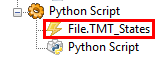
- MissingEvent.png (2.77 KiB) Viewed 9311 times
2. You do not have any events that triggers the action
Start periodical reading. So be sure to run it (at least) manually.
3.
Python Script you are totally spoiled. Initially use my original version without editing.
When it works, you can carefully make small adjustments.
Pako
Re: File Operations
Posted: Tue Jul 03, 2012 5:59 pm
by waffles
Duh!! Yep, I missed the "File.TMT_States" event, which I have now added. It's working now!! Excellent, thank you sooo much for your help and patience!
Re: File Operations
Posted: Mon Nov 26, 2012 6:05 pm
by kct
Hi Pako,
I wanted to do the exact same thing waffles wanted, so i follow your instructions and added your Python Script.
But i'm getting this error message:
Code: Select all
18:00:50            Traceback (most recent call last):
         18:00:50              Python script "1", line 18, in <module>
         18:00:50                eg.plugins.BroadcastListener.Broadcast("%s=%s" % (key, newValue), None, port)
         18:00:50            AttributeError: 'Bunch' object has no attribute 'BroadcastListener'
EG Version: 0.4.1.r1582
Can you help me please?
Thanks
Re: File Operations
Posted: Tue Nov 27, 2012 8:07 am
by Pako
kct wrote:Code: Select all
18:00:50 AttributeError: 'Bunch' object has no attribute 'BroadcastListener'
This means that you probably forgot to add the
Broadcaster plugin to your configuration.
Pako
Re: File Operations
Posted: Tue Nov 27, 2012 10:16 am
by kct
Thanks so much for the quick reply. Yes i forgot the Broadcaster plugin

Now everything is working fine..

Re: File Operations
Posted: Wed Mar 06, 2013 8:24 pm
by eventspook
Time to revive this zombie thread

I have a file, in a DropBox folder, I would like to monitor for changes. Whenever the content changes, I want to read the first line and run an Action. However, it looks like DropBox deletes the file, then renames/recreates it whenever the content changes, and it seems to abort the monitoring task. This is the error I receive:
Code: Select all
Exception in thread DropBox_Thread:
Traceback (most recent call last):
  File "threading.pyc", line 532, in __bootstrap_inner
  File "C:\Program Files (x86)\EventGhost\plugins\FileOperations\__init__.py", line 99, in run
    input = codecs.open(self.fileName,'r',self.inPage, errorList[self.errDecMode])
  File "codecs.pyc", line 870, in open
IOError: [Errno 2] No such file or directory: u'C:\\Users\\eventghost\\Desktop\\_\\My Dropbox\\f\\test.txt'
Unless I can trap this error, and restart the thread, are there any other suggestions I can try, before having to resort to timers?
Re: File Operations
Posted: Fri Mar 15, 2013 4:55 pm
by Pako
I try, but no problem occurs.
Probably I'm trying the wrong way.
Can you please write, how I can reliably reproduce the problem?
Pako
Re: File Operations
Posted: Fri Mar 15, 2013 6:10 pm
by eventspook
It looks like the file gets deleted, then recreated by DropBox. So I guess you would have to try to delete the file you are watching and wait a few seconds. It should error out.
If this plugin is just a timed file reader, it shouldn't be an issue, but maybe it has a handle/lock on the file, which would cause problems if the file is deleted.