Page 2 of 23
Re: Webserver
Posted: Thu Aug 22, 2013 4:20 am
by blaher
I get a little error, and although it doesn't affect my trigger, I just thought I'd ask what the 'Persistent values: {}' thing is.
14:01:43 Plugin: Webserver
14:01:43 Persistent values: {}
Cheers
Re: Webserver
Posted: Sat Aug 31, 2013 2:12 pm
by Pako
blaher wrote:I get a little error, and although it doesn't affect my trigger, I just thought I'd ask what the 'Persistent values: {}' thing is.
14:01:43 Plugin: Webserver
14:01:43 Persistent values: {}
This is not a bug, it's feature.
The new version of the plugin added many new features.
One of them is to use a persistent and temporary variables.
When the plugin starts, it lists the vocabulary of persistent variables ...
Pako
Re: Webserver
Posted: Sat Aug 31, 2013 7:00 pm
by Sem;colon
Pako wrote:
One of them is to use a persistent and temporary variables.
When the plugin starts, it lists the vocabulary of persistent variables ...
Pako
I did get that, but I'm also a bit confused - I don't really understand why it's showing up on startup, because it doesn't seem to save the dictionary somewhere before EG is closed, so it will be always empty or am I wrong?
Re: Webserver
Posted: Sun Sep 01, 2013 4:58 am
by Pako
Sem;colon wrote:I did get that, but I'm also a bit confused - I don't really understand why it's showing up on startup, because it doesn't seem to save the dictionary somewhere before EG is closed, so it will be always empty or am I wrong?
I am confused by your question ...
Okay, let's do a little demonstration. For example, we want to know the number of restarts program EventGhost:
1) Create the following macro:
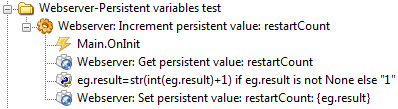
- PerVal_01.png (8.29 KiB) Viewed 8722 times
2) Close EventGhost (of course you have to confirm saving the changes)
3) Start and again close the EventGhost.
Note that the following dialog appears:
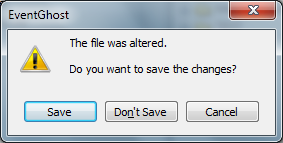
- PerVal_03.png (15.22 KiB) Viewed 8722 times
4) Now it depends on whether you accept the saving. If yes, after next restart you will see this:
I hope now it's clear.
Pako
Re: Webserver
Posted: Sun Sep 01, 2013 1:39 pm
by zetat
Hi is there anyway I can get global variables from eventghost with this plugin?
Use it to create a dynamic web page, that can get current status on applications and sensors?
Re: Webserver
Posted: Sun Sep 01, 2013 1:52 pm
by Pako
zetat wrote:Hi is there anyway I can get global variables from eventghost with this plugin?
Use it to create a dynamic web page, that can get current status on applications and sensors?
With global variables, this plugin worked since its first version.
You can find examples here in this forum.
However, for dynamic web pages is much better to use persistent and/or temporary variables that were introduced from EventGhost release r1630.
I will soon publish an example web page that uses most of the new options.
Pako
Re: Webserver
Posted: Tue Sep 03, 2013 7:08 pm
by Sem;colon
Pako wrote:I hope now it's clear.
Hi Pako,
yes, but it doesn't seem to work with Win8 Pro x64 (I did save but the dict is empty at startup).
I tried it also on Win 7 and there it works.
So maybe a problem with Windows 8.
Re: Webserver
Posted: Wed Sep 04, 2013 5:00 am
by Pako
Sem;colon wrote:I tried it also on Win 7 and there it works.
So maybe a problem with Windows 8.
No, it will probably be something else.
I had the opportunity to try it in exactly the same OS (Win8 Pro x64) and it worked correctly.
I forgot to point out one important fact.
Both types of variables (persistent and temporary) support only type string (or unicode).
That's why it seems so complicated:
eg.result = str(int(eg.result) +1).
If required a different type, the conversion must provide a programmer of the web page and the cooperating portions in EventGhost.
So I decided after bad experiences with the stability of persistent variables module with
Webocket suite plugin.
Pako
Re: Webserver
Posted: Wed Sep 04, 2013 9:08 pm
by Sem;colon
Hi Pako,
thank you, it could be that this caused the problem!
I tested it with a new EG tree and there it worked, just with my configuration it didn't.
But now, after a clear all variables in the Persistent variable manager of the webserver plugin, it works.
Maybe I tried to store something that was not string...
btw. I think a function "save EventGhost configuration tree" would come in handy with the new persistent variables.
For example I have EG running on a server and I usually don't use the GUI to shut it down (I shut it down or restart by using EventGhost

) so I won't be prompted to save; would be cool to have the possibility to automate that properly.
Re: Webserver
Posted: Thu Sep 05, 2013 3:33 am
by blaher
Sem;colon wrote:
btw. I think a function "save EventGhost configuration tree" would come in handy with the new persistent variables.
viewtopic.php?f=9&t=3881 is a good plugin for automating a save.
Re: Webserver
Posted: Thu Sep 05, 2013 5:00 am
by Pako
I purposely did not use autosave.
It would be easy, I tried it and it worked.
But there may be cases that the user (for example) trying something and then wants to go back to the original configuration (so that he does restart). If the autosave was used, it would not be possible. I think that the user should decide whether he wants or does not want to save the configuration tree.
However - if more people interested in it - I can incorporate this feature as option.
Pako
Re: Webserver
Posted: Thu Sep 05, 2013 2:20 pm
by Sem;colon
Pako wrote:However - if more people interested in it - I can incorporate this feature as option.
Of course as option
OK, next time I will search the forum before requesting a "new" function

Thank you blaher, I think this will do!

Re: Webserver
Posted: Sat Sep 07, 2013 8:12 pm
by zetat
Pako wrote:zetat wrote:Hi is there anyway I can get global variables from eventghost with this plugin?
Use it to create a dynamic web page, that can get current status on applications and sensors?
With global variables, this plugin worked since its first version.
You can find examples here in this forum.
However, for dynamic web pages is much better to use persistent and/or temporary variables that were introduced from EventGhost release r1630.
I will soon publish an example web page that uses most of the new options.
Pako
I really can't understand how I would use the variable. I have tried to add a python command after a HTTP event that says "lrwinstate = true" but I get this error:
Error in Action: "LrWinState = true"
Traceback (most recent call last) (1630):
File "<string>", line 1, in <module>
NameError: name 'true' is not defined
How do I get the page to indicate the state of the variable, if for instance the lrwinstate = true then I will have a message that says the light is on, and if lrwinstate = false then the message on the page will say that the light is off.
Re: Webserver
Posted: Sat Sep 07, 2013 8:17 pm
by jonib
zetat wrote:How do I get the page to indicate the state of the variable, if for instance the lrwinstate = true then I will have a message that says the light is on, and if lrwinstate = false then the message on the page will say that the light is off.
I know nothing about the Webserver plugin. But in Python true and false need to be written True and False. Don't know if this helps you.
jonib
Re: Webserver
Posted: Sat Sep 07, 2013 8:42 pm
by Pako
zetat wrote:I really can't understand how I would use the variable. I have tried to add a python command after a HTTP event that says "lrwinstate = true" but I get this error ...
I understand that if there is no documentation, so difficult to work.
But for me it is difficult to create documentation. I do not speak English.
I see that you are in a hurry. However - can you clarify what you are trying?
You can write a specific case, how you want to proceed?
If I'm going to know, so I'll be able to advise you.
For now, your question is too general.
Can you work with javascript and ajax?
Without this, it will not work.
Pako