Page 2 of 3
Re: Samsung TV's
Posted: Thu Mar 11, 2010 12:18 am
by kingtd
Harman Kardon supports serial on their receivers as well. I wrote an Eventghost plugin that works with the common AVR series. Not sure how far down the product line the serial port is available though. -T
Re: Samsung TV's
Posted: Fri Mar 18, 2011 11:51 am
by aireca
I can convine this cable with the winlirc proyect?
winlic uses pin 1, 7 & Ground(5)
this cable uses pins 2, 3 & Ground(5)
You think that there will not be problem??
Re: Samsung TV's
Posted: Mon Oct 31, 2011 4:31 pm
by jitterjames
Do you have any idea if it will be possible to control these new "smart TVs" from 2010 or later via ethernet? There are apps for iphone etc. that do it, though I don't know how sophisticated they are.
My new Smart Samsung is coming tomorrow (model UN46D6000). I think it has ex-link but since it's going to be hooked up to ethernet anyway this would be the ideal solution.
If I'm going to use serial I need to get both a usb to serial device and a serial to ex-link cable (although I guess I could make my own - it looks fairly straightforward).
Re: Samsung TV's
Posted: Sat Jan 28, 2012 7:47 pm
by lappen
I have some problems, as In the tv doesn't do what the plugin wants it to do or as it doesn't do nothing .
I soldered my own cable according to the diagram posted, (though it wasnt clear if the pin numbering was from the soldering pins or from the connector side). I interpreted it as from the soldering pin side.
The cable was to short, though I had an old cable laying around as I used for extension, it could be that cable or the soldering that messes it up but I get the debug in hyperterminal when powering on the tv so atleast something is right.
I have a samsung A series lcd, 2008 something
Any suggestions on how I could make this work?
I'm guessing the cable is correct as I see the debug in hyperterminal
Re: Samsung TV's
Posted: Sun Jan 29, 2012 4:39 pm
by lappen
I resoldered the cable by the pin"out" instead, last try was pin"in".. Seems I don't even get a connection with the TV now so I guess the plugin only works with the newer samsungs tv's :/
Re: Samsung TV's
Posted: Sun Jan 29, 2012 5:31 pm
by lappen
If the exlink 3pin (2,3,5) pinout is the same as the RS232 (2,3,5) pinout something is wrong.
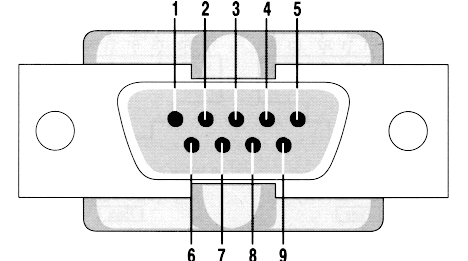
I'm starting to think the exlink file on the first page is mirrored (pin in) so 2,3,5 would be 4,3,1 according to this picture? Could anyone confirm? (also read my previous post as I could atleast receive debug info before i resoldered the cable pinout instead of pinin=
Re: Samsung TV's
Posted: Sun Jan 29, 2012 6:39 pm
by jitterjames
I believe the image you just posted is showing the female pinout, whereas the image at the beginning is showing the male pinout, since the exlink cable would be male at the db9 end.
I haven't actually tried it myself though, so I'm just describing what I see.
Re: Samsung TV's
Posted: Sun Jan 29, 2012 6:57 pm
by lappen
jitterjames wrote:I believe the image you just posted is showing the female pinout, whereas the image at the beginning is showing the male pinout, since the exlink cable would be male at the db9 end.
I haven't actually tried it myself though, so I'm just describing what I see.
Below the connection table on the right side it says "NOTE DB9F SOLDER TYPE" (female), not sure if I interpret it incorrectly though

Re: Samsung TV's
Posted: Sun Jan 29, 2012 7:10 pm
by lappen
Argh you were partly correct about the pinout, seems i followed the DB9M not the DB9F so it was correct the first time I soldered though it didn't work.
So the schematic on the first side seems to show a DB9F on the connecting end not the solder side (which would mean DB9M on the connecting end)
DB9M
1-5
6-9
DB9F
5-1
9-6
Re: Samsung TV's
Posted: Mon Jan 30, 2012 3:29 am
by hotbuddha
jitterjames wrote:I am currently RF blasting to my WestingHouse (thanks to Stottle) and it works pretty well, but I cannot for example turn the TV off from another room unless I know for sure that it is already on.
Please try this code (attached) should go into plugins\System. I made the change to use it for hot plugging when the monitor is plug/unplugged, but on my LG TV it throws an event when the TV is turned on/off. Using this you can write some small python code which will store in a global variable the state of the monitor which should be pretty reliable.
Re: Samsung TV's
Posted: Mon Jan 30, 2012 11:59 pm
by lappen
I think the cable is working now, i've posted a thread on AVS forum to help start debugging as it seems to be alot of people controlling the tv in different ways. Will post back if I get it to work
The post is located here
http://www.avsforum.com/avs-vb/showthre ... st21572670
Re: Samsung TV's
Posted: Wed Feb 19, 2014 9:26 pm
by jchennales
Hi everyone,
Sorry to post on an old topic, but I've been trying to search for this and got nowhere.
I have the plugin working ok, I can send commands from EventGhost to the TV and they work as expected. Now, this is not what I really want. What I would very much like to do is control the PC with the TV's remote. Is this at all possible? I tried all the different RS232 modes from the service menu but I get nothing in the serial link when I press buttons in the remote.
If anyone knows how to do this please let me know. Thanks!
Regards,
Julian
Re: Samsung TV's
Posted: Thu Feb 20, 2014 1:20 am
by techoguy
if your tv supports HDMI-CEC, check this post out
http://eventghost.org/forum/viewtopic.p ... de52642d7f
it will require another device though.
As for using only the RS-232, I have no idea.
Re: Samsung TV's
Posted: Wed Feb 26, 2014 3:40 pm
by jchennales
I appreciate the thought, but what I am looking at is using the serial connection. HDMI-CEC is supported by the TV and I agree that it is the most "correct" solution, but it just costs too much. Before doing that I would get a cheaper USB IR receiver and be done with it.
It's kind of frustrating, because when you think about it, I have the TV connected via HDMI but the video card does not support CEC natively, I have a TV tuner with an IR receiver but the driver only supports the bundled software which I hate, and now I have the TV connected via serial link and I can actually send commands to the TV but not the other way around! I know the rambling is off-topic, but well, it helps

In any case, I might end up getting an MCE remote or whatever, but in this thread I would like to see some info on the serial link used to control the PC. If I end up finding anything on that I will post it. My guess is that if the TV doesn't send anything there can be no piece of software that can work around that, but maybe a modified firmware on the TV or something like that? When I have some free time I am reading about SamyGo, but I haven't made much progress yet.
Thanks!
Re: Samsung TV's
Posted: Wed Feb 26, 2014 6:41 pm
by barnabas1969
I have a Samsung PN64D8000 TV. I have used the serial port to control it, and I can tell you that it DOES NOT send commands that it receives from the TV remote to the serial port.
I'm using the internal Pulse-Eight CEC adapter. It was only like 48 bucks. The new EG plugin for it works great.