Page 2 of 6
Re: OSE (On Screen Explorer)
Posted: Sat Mar 20, 2010 4:36 am
by molitar
Pako, worked great but I had to modify the command line option some.. so before starting mpc I added a python command... eg.result = '"' + eg.path + '"' + ' /play'' . The path has to be in quotes and /play has to follow it to start playing automatically.
Re: OSE (On Screen Explorer)
Posted: Fri Jul 02, 2010 10:06 pm
by molitar
Pako I got some strange problem with OSE now.. Here is how the eg.results file is saving as.
D: Incomplete\Bleach 275+\Bleach - 180 [DB].avi
Note that is not a \ so file is not playing.
Re: OSE (On Screen Explorer)
Posted: Sat Jul 03, 2010 5:38 am
by Pako
That's interesting. But how can I fix this, if I do not have enough information from you.
I mainly need to know what the right file path. If I will be able to simulate the same problem,
it should be easy to find bug.
Pako
Re: OSE (On Screen Explorer)
Posted: Sat Jul 03, 2010 7:52 pm
by molitar
Pako wrote:That's interesting. But how can I fix this, if I do not have enough information from you.
I mainly need to know what the right file path. If I will be able to simulate the same problem,
it should be easy to find bug.
Pako
it should be D:\Incomplete\Bleach 275+\Bleach - 180 [DB].avi not D: Incomplete\Bleach 275+\Bleach - 180 [DB].avi. I'm not sure if this is an error with EventGhost when it captures the path or OSE. that is the value I am getting when I do a print of the eg.result but what is interesting the only way I got path out correctly was to do the events like this.
eg.path = '"' + eg.result + '"' + ' /play'
print eg.path
Start Application: C:\Program Files\Combined Community Codec Pack\MPC\mpc-hc.exe (Command Line Options) {eg.path}
I was than able to get the path out with D:\ and not the funky D: character. Now this is with windows in Japanese Locale mode so not sure if that is what is causing the first backslash to be some funky character or what. Now if I tried eg.result I got that funky character in place of the backslash.
Re: OSE (On Screen Explorer)
Posted: Sun Jul 04, 2010 5:11 pm
by Pako
molitar wrote: Now this is with windows in Japanese Locale mode ...
Yes, if you have the Japanese locale, this may be the cause of the problem.
In that case, it will be difficult for me to fix the bug (I do not know if there is a bug in the plugin OSE).
Please try the following test:
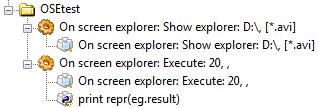
- OSEtest.jpg (10.04 KiB) Viewed 8895 times
And send a message that appears in the log.
I get this:
Code: Select all
u'D:\\Incomplete\\Bleach 275+\\Bleach - 180 [DB].avi'
Pako
Re: OSE (On Screen Explorer)
Posted: Fri Jul 16, 2010 11:18 am
by zian
I LOVE this plug-in.
I would like it even more if a file could be deleted from the scroll window.
Also...
If it could be made to show in full screen... or at least if everything behind the scroll window could be blacked out.
Thanks for the very cool plug-in that I have been wanting for quite some time.
Re: OSE (On Screen Explorer)
Posted: Fri Jul 16, 2010 12:45 pm
by Pako
zian wrote:I LOVE this plug-in.
That made me very happy. Sometimes I have a feeling that my time spent on it (not just on the OSE plugin) was completely unnecessary.
zian wrote:I would like it even more if a file could be deleted from the scroll window.
Yes, I understand, and should not be hard, this feature to add.
zian wrote:If it could be made to show in full screen... or at least if everything behind the scroll window could be blacked out.
I please you to explain in other words, with regard to my bad English (short and simple sentences, examples, pictures etc.).
Pako
Re: OSE (On Screen Explorer)
Posted: Sat Jul 17, 2010 10:11 am
by Pako
The
new version (0.2.3) has incorporated a
new feature -
Delete file.
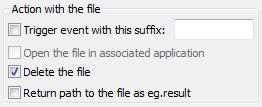
- OSE.DeleteFile.jpg (6.58 KiB) Viewed 8851 times
I reflected on the confirmation dialog, but I did not use it. It would be unduly complicated.
However, accidentally deleted file can be restored because the
file is only moved to the Recycle bin.
Pako
Re: OSE (On Screen Explorer)
Posted: Sat Jul 17, 2010 7:50 pm
by molitar
Ok I got it working but note I had to add "/Play" to the result to make it read and work correctly for directory. Doubt I will use the delete feature myself but nice addition to OSE. Now you will notice in how I execute the directory I also have a show for display 1 or display 2 based on if it's fullscreen or not.
Your code you gave me before still works good for it but I have to get new values if I move the windows display around any. Just too bad Python just doesn't have no direct calls to get a windows state. All I did was create it as it's own macro and whenever I do volume changes or show any OSD including OSE I make a call to the macro to check if fullscreen or not.
Code: Select all
from win32gui import GetWindowPlacement

FindWin = eg.WindowMatcher(None, None, u'MediaPlayerClassicW' , None, None, None, True, 0.0, 0)
hwnd = FindWin()

def GetWindowStatus(hwnd):
    showList  = (None, "Normal", "Minimized", "Maximized")
    placement = GetWindowPlacement(hwnd)
    #unrem the below line to display the placement values that you need for the if placement[4] line
    #print placement

    if placement[4] == (1680, 1048, 3600, 2128):
        return "Fullscreen"
    else:
        return showList[placement[1]]

eg.globals.WindowsState = GetWindowStatus(hwnd[0])
print "Windows State = " + eg.globals.WindowsState
Re: OSE (On Screen Explorer)
Posted: Sun Jul 18, 2010 6:49 am
by Pako
@molitar:
I'm sorry but I did not understand your post.
You expect from me any advice?
Pako
Re: OSE (On Screen Explorer)
Posted: Sun Jul 18, 2010 1:04 pm
by zian
Pako wrote:The new version (0.2.3) has incorporated a new feature - Delete file.
Sweeeet!!!
I'll give it a try and LOVE OSE even more.
Thanks (((Pako)))
ps...
I'll try to put my 2nd wish/request (full screen "mode" for OSE) in simpler terms and repost in after a while.
pss...
Thanks (((Pako)))
Re: OSE (On Screen Explorer)
Posted: Mon Jul 19, 2010 3:20 am
by molitar
Pako wrote:@molitar:
I'm sorry but I did not understand your post.
You expect from me any advice?
Pako
No I was showing what I had to do to make directory play work. I had to take the result and add the value of \Play and it worked.. also taking the result and adding the value the directory corrected itself to d:\ and not that funky square character. Also was thanking you for the code earlier that allowed me to have some work around to determining that mpc is in full screen to change the display value. It's kind of a round about method but it does work to a degree.
Re: OSE (On Screen Explorer)
Posted: Wed Aug 11, 2010 5:39 am
by kalia
Pako,
This is a great plugin. Thank you.
I have been using OSM (which is a good plugin) for a long time now, but I could never figure out how to use OSE until now.
Could you add the feature to "Delete Folder" also.
Thanks!
Re: OSE (On Screen Explorer)
Posted: Mon Aug 23, 2010 12:30 pm
by Pako
I just returned from vacation.
kalia wrote:Could you add the feature to "Delete Folder" also.
I'll look at it and hopefully it will be soon.
Pako
Re: OSE (On Screen Explorer)
Posted: Mon Aug 23, 2010 4:42 pm
by Pako
The
new version (0.2.4) has incorporated a
new feature -
Delete folder.
Pako