Page 2 of 2
Re: Switch King Plugin
Posted: Sat Dec 29, 2012 8:26 pm
by woggy
Gyld wrote:woggy wrote:Okey, try V0.1.0
The REST API is not consequent at the time being so it's a bit hard to extract the information. If you enable ONLY "Debug mode" the ID numbers should come in sequence and not skip any number.
I really appreciate your efforts in trying to get this to work! Awesome nice!
Unfortunately I must announce that I still get lots of errormessages even with v0.1.0
Snap 2012-12-29 at 18.56.23.png
If I understood you correctly, it was JUST debug you wished to be check?
Snap 2012-12-29 at 18.56.45.png
hmm, does everything work if you disable the Debug mode and enable the events?
Re: Switch King Plugin
Posted: Sat Dec 29, 2012 8:56 pm
by Gyld
woggy wrote:
hmm, does everything work if you disable the Debug mode and enable the events?
It looks like it works.
But I have a data source that is constantly reporting "0.0" I do not know what it is. Could it have something to do with the error messages?
Re: Switch King Plugin
Posted: Sun Feb 10, 2013 5:45 pm
by gus
Hi!
First of all, thank┬┤s for this great plugin!
I have a problem when a use a Data Source Events in a macro. When the event appere, ex: Switchking.DataSource.HemmaBorta '0' ,the value will not follow to the macro when I'll move it. It will only show Switchking.DataSource.HemmaBorta. If I'll add '0' manually to the macro event it will not work.
Please advice.
Regards Rickard
EG plugin V.0.1.0
EG Software:
Program Version: 0.4.1.r1609
Build Time: s├Â, 20 jan 2013 14:18:00
Python Version: Stackless Python 2.6.5 final 0
wxPython Version: 2.8.12.0
System
Operating System: Microsoft Windows 7 Ultimate, 32-bit (build 7600)
CPU: Intel(R) Atom(TM) CPU D525 @ 1.80GHz
RAM: 3062 MB
Re: Switch King Plugin
Posted: Sun Feb 10, 2013 6:44 pm
by krambriw
Since the real information you are looking for actually is in the payload of the event, you have to add a little python script in each macro to evaluate this (Value can be either '0' or '1').
I' ll post some examples shortly that will help you with this.
BR Walter
Re: Switch King Plugin
Posted: Sun Feb 10, 2013 6:58 pm
by krambriw
You can try the following:
1) First, change so that the events in the macro looks fine (remove the '0' and '1' that you have added manually).
2) The events in both macros should then read "Switchking.DataSource.HemmaBorta"
3) Create a python script in both macros with the content from below. Be careful and position the scripts right after the event, this order is important.
What will happen is that when the event comes in, it will be evaluated by the script and if the payload is 'not_the_expected' the macro will stop execution.
In this way, only the expected macro will execute depending on the payload value.
Code: Select all
#Macro for 'Systemlaege borta'

thePayload = eg.event.payload

if thePayload <> '0':
    eg.StopMacro()
Code: Select all
#Macro for 'Systemlaege hemma'

thePayload = eg.event.payload

if thePayload <> '1':
    eg.StopMacro()
Re: Switch King Plugin
Posted: Sun Feb 10, 2013 9:15 pm
by gus
krambriw wrote:You can try the following:
1) First, change so that the events in the macro looks fine (remove the '0' and '1' that you have added manually).
2) The events in both macros should then read "Switchking.DataSource.HemmaBorta"
3) Create a python script in both macros with the content from below. Be careful and position the scripts right after the event, this order is important.
What will happen is that when the event comes in, it will be evaluated by the script and if the payload is 'not_the_expected' the macro will stop execution.
In this way, only the expected macro will execute depending on the payload value.
Code: Select all
#Macro for 'Systemlaege borta'

thePayload = eg.event.payload

if thePayload <> '0':
    eg.StopMacro()
Code: Select all
#Macro for 'Systemlaege hemma'

thePayload = eg.event.payload

if thePayload <> '1':
    eg.StopMacro()
It worked, thank's!!
Re: Switch King Plugin
Posted: Mon Feb 11, 2013 9:00 am
by gus
Is it possible update the script so its not execute the macro if the payload was the same as the previous event?
I have a 1-wire system that is updating the current payload every 30 minutes.
Re: Switch King Plugin
Posted: Mon Feb 11, 2013 11:27 am
by krambriw
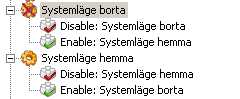
In each macro, add two actions, one for 'Enable an item' and one for 'Disable an item'
First time the event comes in and the payload is as expected, that macro will run and then disable itself as well as enabling the other macro. In this way the macros will be toggled disabled/enabled so that they can only be executed once until the other has been executed again.
Hope you understand...
The picture below gives maybe a better description
- Image2.jpg (5.89 KiB) Viewed 7713 times
Re: Switch King Plugin
Posted: Mon Feb 11, 2013 5:49 pm
by gus
Briljant!!
Thank's a lot

/Rickard
Re: Switch King Plugin
Posted: Thu May 09, 2013 5:28 pm
by ajajblaj
Hi,
i am using SK server 3.2.1.0 on a Windows 7, 64 bit machine and ver. 1.0 of the EG scrip in EG (0.4.1.r1610).
I am trying to receive events (data value changes, system mode, etc) but after several hours i still not get it to work. I do not receive any events from SK server in the Event Ghost interface.. I am using the standard port on the same server and i am able to change data sources, turn on/off, dim devices etc.
Also found a small bug on line 264, however not related to my above issue..
def SetDataSource(self,grpnm,value):
URL = '/datasources/' + self.dsids[grpnm] + '/addvalue?value=' + value
self.connect(URL,"RESTDataSource")
Have been looking into to the EG log file.
Have manually changed data source values through a web server (get requests) but nothing seems to happens in EG.
Also tried to switch-on the REST debug mode, a lot of information, and mostly it responds like this..
12050 ...Collection initated
12051... was unsucessfull.. Collection failed.
Anyone have any thoughts how to proceed to get it work?
Re: Switch King Plugin
Posted: Sun May 26, 2013 10:30 am
by kalinkamaen
Hello guys.
I realy love this eventghos and together with switchking its realy awesome.
But i have a problem with switchking plugin.
I have a Nexa on/off code switch that i have programed in tellstick and switchking.
When i push the nexa button on or off i do not see any event on eventghost. But if i
push the same button in switchking with computer i can se both events in eventghost.
If I enable Debug mode in Switchking plugin, i can see the information in eventghost, but
not as an event.
Running switch king sever 3.2.1
Eventgost server 0.4.1.r1610
How can i get the nexa switch to show event in eventghost?
Re: Switch King Plugin
Posted: Tue Nov 14, 2017 1:14 am
by Lilak
Hello!
Is this plugin working with the latest version of SwitchKing?
Jonas