Page 2 of 3
Re: Raspberry Pi
Posted: Mon Apr 20, 2015 5:01 pm
by Pako
I do not own Raspberry Pi and now I have no opportunity to work with RPi.
As soon as possible, I will deal with it.
Pako
Re: Raspberry Pi
Posted: Fri Apr 24, 2015 6:55 pm
by Pako
Finally, I had the opportunity a few hours to play with RPi.
I think that most bugs are fixed.
You can download the new version (0.4).
Paramiko subfolder inside the folder RaspberryPi (meaning, of course, including content) is already worthless and you can delete it.
The buttons "Reboot" and "Power off" should work even if the RPi runs on ArchLinux.
Please do not hesitate with any feedback.
Pako
Re: Raspberry Pi
Posted: Fri Apr 24, 2015 7:08 pm
by kalia
Hello Pako,
Thank you for updating the plugin. I tried using the new version and get the following error when clicking on "Add New" in Plugin Item Settings window.
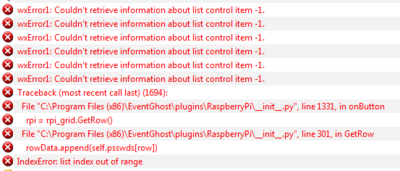
- pi error
Thanks,
kalia
Re: Raspberry Pi
Posted: Fri Apr 24, 2015 7:55 pm
by Pako
Thank you for the warning.
I have not tried a case where RPi list is empty ...
Corrected version (0.5) is available.
Pako
Re: Raspberry Pi
Posted: Sat Apr 25, 2015 5:20 pm
by Luca Brasi
hey guys,
don't know maybe I am just stupid but I cant figure out how to send a couple of commands to my raspberry.
I have HarmonyHubCotntrol installed there. So I want to issue those commands
Code: Select all
cd HarmonyHubControl
./HarmonyHubControl [email protected] Pass 192.168.1.210 issue_device_command 22977625 3D
./HarmonyHubControl [email protected] Pass 192.168.1.210 issue_device_command 22977625 Ok
./HarmonyHubControl [email protected] Pass 192.168.1.210 issue_device_command 22977625 DirectionUp
./HarmonyHubControl [email protected] Pass 192.168.1.210 issue_device_command 22977625 Ok
the first command will be accepted but whenever I try to fire one of the others I get
Code: Select all
19:18:11      bash: ./HarmonyHubControl: Is a directory
19:18:11
19:18:11      Fehler in Befehl: "Raspberry Pi: Send command: mmrp01: ./HarmonyHubControl [email protected] Pass 192.168.1.210 issue_device_command 22977625 3D"
19:18:11      Traceback (most recent call last) (1700):
19:18:11        File "C:\Program Files (x86)\EventGhost\eg\Classes\ActionBase.py", line 170, in CallWrapper
19:18:11          return self(*args)
19:18:11        File "C:\Program Files (x86)\EventGhost\plugins\RaspberryPi\__init__.py", line 1552, in __call__
19:18:11          return self.plugin.rpiCommand(ix, cmd, dis)
19:18:11        File "C:\Program Files (x86)\EventGhost\plugins\RaspberryPi\__init__.py", line 1074, in rpiCommand
19:18:11          res = self.cmd_session(client, cmd, ign)
19:18:11        File "C:\Program Files (x86)\EventGhost\plugins\RaspberryPi\__init__.py", line 1004, in cmd_session
19:18:11          return res.decode("utf-8")
19:18:11      AttributeError: 'NoneType' object has no attribute 'decode'
I tried putting the command into quotes and stuff like that to no avail.
Do you have any idea?
Re: Raspberry Pi
Posted: Sat Apr 25, 2015 7:30 pm
by Sem;colon
Hello Luca Brasi,
can you please try if the general SSH plugin can do the job?
viewtopic.php?f=9&t=6021
..I'm just curious
Re: Raspberry Pi
Posted: Sun Apr 26, 2015 9:44 am
by Luca Brasi
Hi sem;colon and Pako,
no I was not aware of your plugin! But I checked and it works perfectly. Thanks!
I guess your plugin suits my task better than the Raspberry Pi one so Pako I guess it's up to you to decide if you wanna investigate any further...
Thank you guys
Re: Raspberry Pi
Posted: Sun Apr 26, 2015 3:01 pm
by Pako
Luca Brasi wrote:I guess your plugin suits my task better than the Raspberry Pi one so Pako I guess it's up to you to decide if you wanna investigate any further...
Of course, I would like to improve RPI plugin.
But I do not know how to invoke the same error, what appears to you.
I'm trying - for example - this:
and everything is OK.
Pako
Re: Raspberry Pi
Posted: Sun Apr 26, 2015 4:45 pm
by Luca Brasi
I think I got it figured out. Hope I can explain...
The error is caused by the logic of my commands.
I took them from a putty command list. Putty will take it, open a ssh session to the rpi and issue the commands. All in this same session.
So my first command will make the rpi to go into a folder called HarmonyHubControl and the consecutive commands will be executed there.
./HarmonyHubControl is a script inside home/myuser/HarmonyHubControl
On the other hand, I guess, the rpi plugin will open a session for each command I have in my macro. Which looks like this
Code: Select all
<?xml version="1.0" encoding="UTF-8" ?>
<EventGhost Version="1700">
    <Macro Name="3D" Expanded="True">
        <Action>
            RaspberryPi.SendCommand(1, u'mmrp01', u'cd HarmonyHubControl', 0)
        </Action>
        <Action>
            RaspberryPi.SendCommand(1, u'mmrp01', u'./HarmonyHubControl [email protected] Pass 192.168.1.210 issue_device_command 2291625 3D', 0)
        </Action>
        <Action>
            RaspberryPi.SendCommand(1, u'mmrp01', u'./HarmonyHubControl [email protected] Pass 192.168.1.210 issue_device_command 2291625 Ok', 0)
        </Action>
        <Action>
            RaspberryPi.SendCommand(1, u'mmrp01', u'./HarmonyHubControl [email protected] Pass 192.168.1.210 issue_device_command 2291625 DirectionUp', 0)
        </Action>
        <Action>
            RaspberryPi.SendCommand(1, u'mmrp01', u'./HarmonyHubControl [email protected] Pass 192.168.1.210 issue_device_command 2291625 Ok', 0)
        </Action>
    </Macro>
</EventGhost>
So the first command will work cause it finds a folder called HarmonyHubControl in my home folder.
But the second one will be executed from the home folder as well. Where HarmonyHubControl is a folder an not a script.
Code: Select all
eg.plugins.RaspberryPi.SendCommand(1, u'mmrp01', u'./HarmonyHubControl [email protected] Pass 192.168.77.210 issue_device_command 22977625 3D', 0)
will lead to the error
Code: Select all
19:18:11 bash: ./HarmonyHubControl: Is a directory
So if I leave out the folder change in the first line and go with the absolute path in the consecutive lines it works
My previous commands work in the ssh plugin cause it works different. There a session is opened and the commands will all be executed within this session.
So I guess your plugin is fine. It just wasn't clear to me how it works. Don't know if that should be made clearer at any point or if you might consider a change in the plugin.
Bottom line is that you could just leave it as is and users might find this post if they go down the same road as I did...
Re: Raspberry Pi
Posted: Sun Apr 26, 2015 5:33 pm
by Pako
Yes, your explanation is correct.
This plugin uses for each individual command a separate session.
This I do not plan to change.
But I will consider whether it will be possible to send multiple commands at once (within a single action).
Pako
Re: Raspberry Pi
Posted: Sun Apr 26, 2015 5:39 pm
by Luca Brasi
That'd be cool.
I was researching for the same thing earlier today.
Found this site with info
http://thornelabs.net/2013/08/21/simple ... r-ssh.html
Maybe can be of use for you as well.
Re: Raspberry Pi
Posted: Sun Apr 26, 2015 6:59 pm
by Pako
The new version (0.6) is available.
Action Send command can now contain multiple lines (multiple commands).
Note:
It can be confusing that the results of all the commands are grouped together.
Pako
Re: Raspberry Pi
Posted: Tue May 12, 2015 8:57 am
by Phil
Working well for me, thanks!
Re: Raspberry Pi
Posted: Mon Jun 15, 2015 9:04 pm
by Phil
Hi
A couple of questions with this..
The Enable and Disable Rpi. is that purely for the list of observed values? so if I have disabled all those I dont need to worry about enabling or disabling? (for some reason the core voltage or core temperature fails, not sure if its a time out issue).
I just got a unicornhat for my pi (
http://shop.pimoroni.com/products/unicorn-hat) and this plugin seems a great way to get it to display messages from EG

thanks again Pako
Re: Raspberry Pi
Posted: Mon Jul 13, 2015 11:33 am
by Phil
Hi
Im keen to use this to run a line of code to backup a few pi's on a weekly basis.
The script uses the command sudo dd if=/dev/mmcblk0p2 of=/media/backup/backup.img bs=1M which then backs up the whole of the SD card to a network location.
However, during this period eventghost is locked up and showing the yellow symbol in the bottom corner. As its backing up 8gb it takes some time, is there a way for me to send this command to the pi and leave it to do its thing?
The whole command I send involves first mounting the drive, then the backup then unmount using && between commands, if this makes any difference.
thanks