Page 2 of 6
Re: PHX01RN remote control plugin
Posted: Mon Dec 30, 2013 10:26 am
by WharfRat
EventGhost 0.4.1.r1610 should be fine, it's what I use now.
Re: PHX01RN remote control plugin
Posted: Mon Dec 30, 2013 8:41 pm
by Kartix
Hi WharfRat, I followed your instructions and got it installed. That went well and everything is in place.
Took me some minutes to understand how to assign the My TV button on the remote to start xbmc, as I'm new to eventghost. I figured how to assign remote keys to actions, just need to do it for every action. Play, stop, etc was working without eventghost but now needs to be assigned to work properly. Is that how it's supposed to be?
I see the emulate keystrokes are repeating itself constantly.
If I press up once it act as I pressed it 16 times.
Clicking the toggle option fixed that behavior, but I thought the switching mode feature is no longer active with your plugin.
Still learning how to use it.
Re: PHX01RN remote control plugin
Posted: Tue Dec 31, 2013 3:57 pm
by Kartix
Another question...
I see I have "Windows Driver Package - EventGhost PHX01RN (01/26/2010 1.0.2.0)" in my add/remove programs despite not installing previous versions of the PHX01RN plugin. Does it need to be there?
Re: PHX01RN remote control plugin
Posted: Tue Dec 31, 2013 6:00 pm
by WharfRat
Hi Kartix...
I followed your instructions and got it installed. That went well and everything is in place.
It's nice to hear that.
... I'm new to eventghost.
So am I, about 2 months now.
Play, stop, etc was working without eventghost but now needs to be assigned to work properly. Is that how it's supposed to be?
Yes. That's what you do for all the things you want to control in EventGhost. You could use the MyMusic button as the Play button if you wanted to.
You should assign buttons for all the Macros that you want to use, but you may not need all the Macros. I assume that you have one of the XBMC plugins added to your configuration tree. I do not have XBMC so I don't know what Macros those 2 plugins have.
Each of the remote controls generate different events for their buttons. So the various programs cannot know what those events would be. The Remote Event Mapper plugin is an attempt to get around that problem.
I actually use Remote Event Mapper, because I also use the Desktop Remote, as well as web pages as remotes for the Webserver, and for receiving remote events from other networked computers via the Network Event Receiver / Network Event Sender.
It is simpler with Remote Event Mapper, since I only have to map one set of common events names from it to the programs, instead of 4 event names for each of the 4 event sources.
I see the emulate keystrokes are repeating itself constantly.
If I press up once it act as I pressed it 16 times.
Yes, I was aware of the repeating events in 'mouse' mode - there is a note of it in part IV of the forum postings. It was just a little laziness on my part to fix it before I submitted it to the EventGhost forums.
The good news: v3.0.1 fixes that bug, see the link in part III.
Clicking the toggle option fixed that behavior, but I thought the switching mode feature is no longer active with your plugin.
The 'feature' is still removed, so we can still use the blue Toggle button as an event.
I see I have "Windows Driver Package - EventGhost PHX01RN (01/26/2010 1.0.2.0)" in my add/remove programs despite not installing previous versions of the PHX01RN plugin. Does it need to be there?
Yes.
By the way, thank you, I really appreciate all the input that you are giving me.
Give the new version a try and tell me what you think.
WharfRat.
Re: PHX01RN remote control plugin
Posted: Tue Dec 31, 2013 6:02 pm
by WharfRat
PHX01RN v3.0.1 is now available.
It fixes the problem mentioned in part IV about repeating cursor events.
Please see part III for the link to the new version.
Re: PHX01RN remote control plugin
Posted: Tue Dec 31, 2013 6:03 pm
by WharfRat
I just want to mention a few more technical details about the PHX01RN.
When the blue Toggle button is pressed, the DRC48RC6 transmits data to the W-01RN as well, although Windows usually only gets the button up codes. This can be verified by looking at the flashing LED on the W-01RN. So it seems that it is the W-01RN which traps the button down code from the Toggle button to change the mode between cursor and mouse modes. In other words, the mode does not change within the DRC48RC6 itself.
This is good news, because those who have learning remote controls do not have to worry about different codes for different modes.
Re: PHX01RN remote control plugin
Posted: Tue Dec 31, 2013 6:11 pm
by WharfRat
Here is something you might find useful.
I have created three alternative plugins for the PHX01RN. You might not want them, but here they are.
They all use the same WinUSB configuration as PHX01RN v3.0, which simplifies the process of changing the plugin.
You only need to copy the __init__.py contained in each .zip archive to the PHX01RN plugin folder, and then restart EventGhost.
PHX01RN v0.x.x just displays the button codes which it receives. I used something similar to create the PHX01RN v3.0 plugin.
PHX01RN v1.x.x is a modified version of the plugin which BitMonster created. It uses 2 self.winUsb.Device().AddHardwareId() statements and 2 callbacks. Everything else is the same. You can see that it was not very useful. (Plus it also caused major problems when we tried fixing things!)
PHX01RN v2.x.x is a modified version of the plugin which olurz created. Only the 2 self.winUsb.Device().AddHardwareId() statements have been changed. This makes comparison between PHX01RN v2.0 and PHX01RN v3.0 very easy. Some of the event names differ from the PHX01RN v3.0 event names.
(Edit: Oops, I obviouly mispelled the achive name when I created it.)
When you have finished playing with them, just copy __init__.py from PHX01RN v3.0 to the plugin folder, and then restart EventGhost.
Please vote for your favorite version so that we can tell Pako which one to include in the next version of EventGhost.
I downloaded it once just as a test, and Kartix did it once (I assume) also, but there have been more downloads than those two.
My vote does not count for obvious reasons.
Thanks, WharfRat.
Re: PHX01RN remote control plugin
Posted: Tue Dec 31, 2013 7:19 pm
by Kartix
You put a lot of work in the plugin and explaining it. Much appreciated.
I definitely vote for WharfRat plugin to be the main PHX01RN plugin.
I did use the xbmc2 plugin to set up the keys I use, all works well.
Had the Imon remote before and they had a software with a very easy lay out to assign remote keys to any application.
Still trying to figure it out with eventghost which is more complicated obviously.
Added the VLC plugin as well and started assigning keys to it. I noticed that If I press stop on the remote it trigger actions for both xbmc and VLC, instead for only the active program. Is that the right method or I mixed something?
Re: PHX01RN remote control plugin
Posted: Tue Dec 31, 2013 8:57 pm
by WharfRat
Added the VLC plugin as well and started assigning keys to it. I noticed that If I press stop on the remote it trigger actions for both xbmc and VLC, instead for only the active program. Is that the right method or I mixed something?
Now it starts getting interesting.
I will start another topic in the General forum to show you some nice tricks you can use.
I will let you know where to find it once I have got something together to show you.
Happy New Year!
Re: PHX01RN remote control plugin
Posted: Wed Jan 01, 2014 11:39 am
by Kartix
Great, looking forward for it
Happy New Year
Re: PHX01RN remote control plugin
Posted: Thu Jan 02, 2014 2:07 pm
by WharfRat
Kartix...
I have that page of tricks over here
viewtopic.php?f=2&t=5949.
Is the new version of the plugin OK?
Re: PHX01RN remote control plugin
Posted: Thu Jan 02, 2014 11:13 pm
by Kartix
Yes, the new version is perfect

Took a quick look in your techniques thread. Very informative guide, should be useful for many.
I will try it out soon.
The VLC plugin didn't work for me so I don't have much switching to do between programs right now.
Thanks again WharfRat, really impressive work.
Re: PHX01RN remote control plugin
Posted: Fri Jan 03, 2014 10:25 am
by WharfRat
The VLC plugin works for me on the computers that are set up for EventGhost. I did have a problem with Volume Up, Volume Down and Mute, but I changed those Macros to use emulated keystrokes Actions instead.
VLC v2.0.5 Twoflower is what I have now on both machines (Windows XP and Windows7).
I do know that you have to enable the VLC RC interface and use localhost:1234 as the TCP command input.
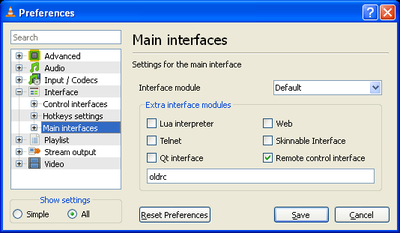
- VLC interfaces
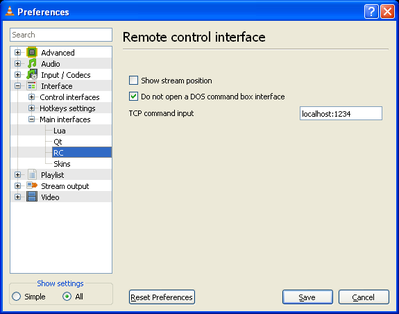
- VLC RC settings
See if that works...
Re: PHX01RN remote control plugin
Posted: Fri Jan 03, 2014 8:21 pm
by Kartix
Using the latest VLC 2.1.2
I tried this the other day but with 127.0.0.1 and it didn't work.
Now I wrote localhost as you suggested and it does work.
Thanks for the help.
Seems it works fine beside the full screen option which keeps crashing vlc.
I set this specific option as emulate keystroke and it works without crashing. Weird but problem solved...
Re: PHX01RN remote control plugin
Posted: Sat Jan 04, 2014 4:43 pm
by incongruent
You sir are a god. I remember screwing around with my P01RN remote a year or two ago and running into a brick wall. But today (only a short time after you posting this which is a cool coincidence), I followed your instructions and I'm LOVING IT.
Thanks dude.