Update, finally got it to work. After following the steps of disabling driver signature, I had to run eventghost as administrator to give it the privileges it needs to install a driver. All is good now and this plugin works as intendeddrerock wrote:I got it to work with the Generic HID plugin. Apparently the way to goTalguy wrote:I can't get this working in windows 10 either. I followed the directions exactly
Notice: This forum has been recovered from an old backup, so some content, links, and dates may be outdated. The forum is currently read-only while we restore sign-in and registration functionality. Details
If you find this forum valuable and would like to help keep it online, donations to help cover hosting and domain costs are greatly appreciated, but never expected. You can support the forum through Buy Me a Coffee or Ko-fi. Thank you for helping preserve the EventGhost community.
If you find this forum valuable and would like to help keep it online, donations to help cover hosting and domain costs are greatly appreciated, but never expected. You can support the forum through Buy Me a Coffee or Ko-fi. Thank you for helping preserve the EventGhost community.
Tivo Slide Pro Plugin (Windows 7, 8, 8.1 64-bit Support!)
Re: Tivo Slide Pro Plugin (Windows 7, 8, 8.1 64-bit Support!

Re: Tivo Slide Pro Plugin (Windows 7, 8, 8.1 64-bit Support!
I have been trying to get this working for 2 weeks, with little luck. My first try resulted in the buttons appearing in the event log, but not kicking off any macros (see attached image).
My second try got further. Several buttons are not only seen, they also work in WMC (Up, Down, Left, Right). However, Select still does not work, so it ends up moot.
My second install also added other items without my asking (X10: Generic X10, Zoom Player, Winamp, Task Create/Switch Events). Note that in my first attempt I was able to create the TiVo Slide Pro Keyboard Simulation folder, in my second attempt I am no longer able to add the folder for keyboard simulation.
I've tried adding macros myself, I've tried editing the XML file for the TiVo plugin, and I've tried a couple other things. None have worked. What might I be doing wrong?
My setup for this install is:
My second try got further. Several buttons are not only seen, they also work in WMC (Up, Down, Left, Right). However, Select still does not work, so it ends up moot.
My second install also added other items without my asking (X10: Generic X10, Zoom Player, Winamp, Task Create/Switch Events). Note that in my first attempt I was able to create the TiVo Slide Pro Keyboard Simulation folder, in my second attempt I am no longer able to add the folder for keyboard simulation.
I've tried adding macros myself, I've tried editing the XML file for the TiVo plugin, and I've tried a couple other things. None have worked. What might I be doing wrong?
My setup for this install is:
- Intel NUC6i5SYH (i5 CPU with Iris 540 GPU)
16GB RAM
128GB SSD
3TB HDD
Logitech K400 keyboard
TiVo Slide Pro
wired internet connection
- Attachments
-
- 2nd install
-
- 1st install
Re: Tivo Slide Pro Plugin (Windows 7, 8, 8.1 64-bit Support!
I find that every time I unplug the TiVo Slide Pro's dongle from my Windows 7 machine, it loses its connection to the TivoSlidePro Plugin. Took me a while to figure out how to solve it, but it seems pretty similar to a prior problem I had with the original TiVo Slide. I slapped this code into a Python script to detect which components of interest are plugged in, firing a more accurate event I can handle separately:gduboff wrote:Looking for help with this plugin on my W7 machine.
[...]
I did a system restore to reinstall the driver and EG and disabled windows attempting to download the driver on its own, but still same result. At what point did you plug in the dongle in this process and is it ok to let Windows try to find a driver on its own or does this need to be disabled?
Thank you in advance.
(Note: this code is triggered on a "System.DeviceAttached" or "System.DeviceRemoved" event)
Code: Select all
if not eg.event.payload:
    print "Not a Device Event"
    exit

else:
    DeviceID = eg.event.payload[0]
    DeviceStatus = eg.event.suffix
    DeviceIDLength = len(DeviceID)
    #print DeviceIDLength
    #print DeviceID

    if DeviceIDLength == 130:
        #  TiVo Slide, possibly
        #  \?\\HID#{00001124-0000-1000-8000-00805f9b34fb}_VID   &0002150a_PID&1200&Col04#9&653599b&0&0003#{4d1e55b     2-f16f-11cf-88cb-001111000030}
        #       (above line broken into 50-character segments; that was the particular device I was working on, at the time)
        #print "TiVo Slide, possibly"
        #[SOLVED] 'TiVo Slide'      VID = 2150, PID = 1200
        #         'TiVo Slide Pro'  VID = 2150, PID = 1203
        if DeviceID[47:68] == "VID&0002150a_PID&1200":
            #  It IS a TiVo Slide!
            #print "It IS a TiVo Slide!"
            if DeviceStatus == "DeviceAttached":
                #print DeviceID[0][73]
                if DeviceID[73] == "1":
                #    eg.TriggerEvent(DeviceID[0][47:74], prefix = DeviceStatus)
                    print "DeviceAttached:", "TiVoSlideRemote"
                    eg.TriggerEvent("Attached", prefix = "TiVoSlideRemote")
            elif DeviceStatus == "DeviceRemoved":
                #print 'DeviceRemoved:', eg.event.payload [0][73]
                #if DeviceID[0][73] == "6":
                #    eg.TriggerEvent(DeviceID[0][47:74], prefix = DeviceStatus)

                #print "DeviceRemoved:", "TiVoSlideRemote"
                eg.TriggerEvent("Removed", prefix = "TiVoSlideRemote")
        else: print DeviceID[47:68]
    elif DeviceIDLength == 88:
        #  XBox 360 Wireless Controller, possibly
        #  \?\\HID#VID_045E&PID_02A1&IG_00#7&157cbfb0&0&0000#     {4d1e55b2-f16f-11cf-88cb-001111000030}
        #print "XBox 360 Wireless Controller, possibly"
        if DeviceID[8:25] == "VID_045E&PID_02A1":
            #  It IS an XBox Controller!
            #print "It IS an XBox Controller!"
            if DeviceStatus == "DeviceAttached":
                #print "DeviceAttached", "XBox360WirelessController"
                eg.TriggerEvent("Attached", prefix = "XBox360WirelessController")
            elif DeviceStatus == "DeviceRemoved":
                #print "DeviceRemoved", "XBox360WirelessController"
                eg.TriggerEvent("Removed", prefix = "XBox360WirelessController")
    #else: print "No match to TiVo Slide or XBox 360 Wireless Controller with a DeviceID of " DeviceID
    elif DeviceIDLength == 71:
        #TiVo Slide Pro Dongle:
        #\\?\USB#VID_150A&PID_1203#140825#{a5dcbf10-6530-11d2-901f-00c04fb951ed}
        if DeviceID[8:25] == "VID_150A&PID_1203":
            #Then this is the TiVo Slide Pro's dongle being plugged in/unplugged, so let's trigger those events
            if DeviceStatus == "DeviceAttached":
                eg.TriggerEvent("Attached", prefix = "TiVoSlideProDongle")
            elif DeviceStatus == "DeviceRemoved":
eg.TriggerEvent("Removed", prefix = "TiVoSlideProDongle")Then, in my TiVo Slide Pro folder, I fire a disable, enable action after detecting the Pro's dongle has been plugged in:
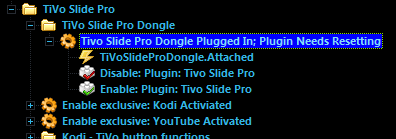
Anytime there is a solid green light on my dongle, I get no response from Eventghost. Things are right when there is no light and any button press on the remote triggers a flash of the dongle's green light.
Re: Tivo Slide Pro Plugin (Windows 7, 8, 8.1 64-bit Support!
Feel free to delete the Zoom Player & Winamp. X10 might be useful, but I'd delete it since you look like you're on the right track with this plugin. You'll need the Task Create/Switch Events plugin to keep track of which program you're sending input to via your remote/Eventghost, so keep that one.Bibbit wrote:I have been trying to get this working for 2 weeks, with little luck. My first try resulted in the buttons appearing in the event log, but not kicking off any macros (see attached image).
My second try got further. Several buttons are not only seen, they also work in WMC (Up, Down, Left, Right). However, Select still does not work, so it ends up moot.
My second install also added other items without my asking (X10: Generic X10, Zoom Player, Winamp, Task Create/Switch Events). Note that in my first attempt I was able to create the TiVo Slide Pro Keyboard Simulation folder, in my second attempt I am no longer able to add the folder for keyboard simulation.
I've tried adding macros myself, I've tried editing the XML file for the TiVo plugin, and I've tried a couple other things. None have worked. What might I be doing wrong?
]
Once you have the plugin installed (like a previous poster, I had luck granting Eventghost Administrator privileges in order to successfully install the Tivo Slide Pro plugin), you need to add actions. Your first pic shows the event for the directions firing as well as the Select button; the problem is the Select button isn't handled, whereas the direction buttons are. I'd suggest making a folder specifically for the events of your remote to help keep things clean, make obvious the things you've added, and discern what might be crap worthy of deleting. Create a macro for Select, press the button on the TiVo Slide Pro remote to get it to show up in the log, drag that event from the log to your macro, and add an "Emulate Keystrokes" action, selecting Return under the "Special key tool" drop-down box, click the Insert button then OK.
You'll need to repeat this process for all the buttons on the remote, so it becomes a pain in the ass, especially when you start doing the slide-out keyboard & realize you need to handle 3 events for most of those keys: a lower case, an upper case and a symbol. I'd be happy to share mine, but be warned: I'm trying to handle Kodi (use to be called XBMC: a great free HTPC frontend), YouTube, Netflix (if they have anything I can use to navigate their damn website with other than a friggin mouse!) and possibly Steam, among others. So there's quite a bit I'm trying to handle, and I hope to make it so I can use the remote for everything except gaming with a controller or touch-typing with a full-sized keyboard; essentially everything the family would use an HTPC for controlled from a remote while sitting on the couch.
-
DavidBlackledge
- Posts: 1
- Joined: Sat Nov 30, 2019 9:14 pm
Re: Tivo Slide Pro Plugin (Windows 7, 8, 8.1 64-bit Support!)
I don't know if maybe this is related to the website crash, but I just tried to use this plugin and when it tried to download the driver it got a 404 error. I don't see anything in the plugin code that identifies what the URL is, so there is still a lot for me to learn about EG, apparently.
I disabled driver signing using the "test mode" technique I read about, and ran EG as administrator before this happened.
Before this I was trying to use the Generic HID which works a little OK, but it just leaves the numbers as a keyboard passthrough (I want all remote input captured for other purposes) and doesn't capture the Clear button at all. (this is a non-Slide TiVo RF remote for a Roamio)
I paired the remote with my PC using a "TiVo USB-RF Dongle Slide Pro" I just got from Amazon/Weaknees.
My output from my attempt to install the plugin is:
Any help with getting the driver?
I disabled driver signing using the "test mode" technique I read about, and ran EG as administrator before this happened.
Before this I was trying to use the Generic HID which works a little OK, but it just leaves the numbers as a keyboard passthrough (I want all remote input captured for other purposes) and doesn't capture the Clear button at all. (this is a non-Slide TiVo RF remote for a Roamio)
I paired the remote with my PC using a "TiVo USB-RF Dongle Slide Pro" I just got from Amazon/Weaknees.
My output from my attempt to install the plugin is:
Code: Select all
Task.Activated.EventGhost
Plugin: Tivo Slide Pro
   Error starting plugin: Tivo Slide Pro
   Driver not found!
Exception in thread Thread-5:
Traceback (most recent call last):
  File "threading.pyc", line 801, in __bootstrap_inner
  File "threading.pyc", line 754, in run
  File "C:\Program Files (x86)\EventGhost\eg\Classes\TransferDialog.py", line 281, in ThreadRun
    todo = self.CreateActions()
  File "C:\Program Files (x86)\EventGhost\eg\Classes\TransferDialog.py", line 152, in CreateActions
    size = self.HttpGetSize(src)
  File "C:\Program Files (x86)\EventGhost\eg\Classes\TransferDialog.py", line 175, in HttpGetSize
    testFile = urllib2.urlopen(path)
  File "urllib2.pyc", line 154, in urlopen
  File "urllib2.pyc", line 435, in open
  File "urllib2.pyc", line 548, in http_response
  File "urllib2.pyc", line 473, in error
  File "urllib2.pyc", line 407, in _call_chain
  File "urllib2.pyc", line 556, in http_error_default
HTTPError: HTTP Error 404: Not Found

Task.Deactivated.EventGhost