Page 2 of 8
Re: Nmap
Posted: Mon Jun 02, 2014 11:08 am
by Pako
HTPCanwender wrote:May my german Windows Version cause the Problem? The Folder c:\Program Files (x86) is shown in the Explorer as c:\Programme (x86).
It looks like a very important information!
Please try to set the plugin as follows:
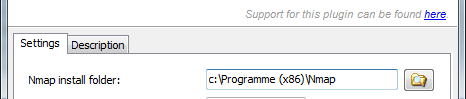
- Nmap-Programme.png (7.53 KiB) Viewed 7170 times
Thanks, Pako
Re: Nmap
Posted: Mon Jun 02, 2014 12:05 pm
by HTPCanwender
It did not help. I copied the Nmap program to the folder c:\Nmap without any result. Here is the log from 0.5a
13:58:21 repr(cmd) = [u'""C:\\Nmap\\nmap.exe""', u'-sn', u'-PE', u'-PO', u'-n', u'192.168.1.0/24']
13:58:21 Nmap.DataUnavailable
13:58:21 Main.OnInit
13:58:21 repr(data) = u'Der Befehl "\\"\\"C:\\Nmap\\nmap.exe\\"\\"" ist entweder falsch geschrieben oder\r\nkonnte nicht gefunden werden.\r\n'
13:58:21 Nmap.DataAvailable
and the log from 0.5b
14:01:38 Nmap.DataUnavailable
14:01:38 repr(self.myExe) = u'"C:\\Nmap\\nmap.exe"'
14:01:38 Main.OnInit
14:01:38 repr(data) = u'Der Befehl "\\"C:\\Nmap\\nmap.exe\\"" ist entweder falsch geschrieben oder\r\nkonnte nicht gefunden werden.\r\n'
14:01:38 Nmap.DataAvailable
Re: Nmap
Posted: Mon Jun 02, 2014 12:12 pm
by Pako
HTPCanwender wrote:repr(self.myExe) = u'"C:\\Nmap\\nmap.exe"'
It looks like a typo.
Log should look like this:
Code: Select all
repr(self.myExe) = u'"C:\\Programme (x86)\\Nmap\\nmap.exe"'
Pako
Re: Nmap
Posted: Mon Jun 02, 2014 1:10 pm
by HTPCanwender
The answer is excactly as you wrote (Version 0.5b)
15:04:34 repr(self.myExe) = u'"C:\\Programme (x86)\\Nmap\\nmap.exe"'
But are the "\\" at the beginning of the path before the c: ok?
15:04:35 repr(data) = u'Der Befehl "\\"C:\\Programme (x86)\\Nmap\\nmap.exe\\"" ist entweder falsch geschrieben oder\r\nkonnte nicht gefunden werden.\r\n'
Re: Nmap
Posted: Mon Jun 02, 2014 4:42 pm
by Pako
HTPCanwender wrote:But are the "\\" at the beginning of the path before the c: ok?
This is not correct and this is really weird. I have no explanation for it.
I created the same directory on my C drive and I get this log:
Code: Select all
18:32:45   repr(self.myExe) = u'"C:\\Programme (x86)\\Nmap\\nmap.exe"'
18:32:49   repr(data) = u'\r\nStarting Nmap 6.46 ( http://nmap.org ) at 2014-06-02 18:32 ...
18:33:15   repr(self.myExe) = u'"C:\\Programme (x86)\\Nmap\\nmap.exe"'
18:33:17   repr(data) = u'\r\nStarting Nmap 6.46 ( http://nmap.org ) at 2014-06-02 18:33 ...
18:33:45   repr(self.myExe) = u'"C:\\Programme (x86)\\Nmap\\nmap.exe"'
18:33:57   repr(data) = u'\r\nStarting Nmap 6.46 ( http://nmap.org ) at 2014-06-02 18:33 ...
18:34:15   repr(self.myExe) = u'"C:\\Programme (x86)\\Nmap\\nmap.exe"'
18:34:25   repr(data) = u'\r\nStarting Nmap 6.46 ( http://nmap.org ) at 2014-06-02 18:34 ...
18:34:45   repr(self.myExe) = u'"C:\\Programme (x86)\\Nmap\\nmap.exe"'
18:34:50   repr(data) = u'\r\nStarting Nmap 6.46 ( http://nmap.org ) at 2014-06-02 18:34 ...
It is quite obvious that everything works properly.
I do not know what to do at this moment, I'll think about it.
Pako
Re: Nmap
Posted: Mon Jun 02, 2014 6:19 pm
by HTPCanwender
Hi Pako,
I wrote the path for the Nmap.exe directly into the plugin.
Code: Select all
def worker(self, oldT):
        #print "Nmap worker thread"
        print "repr(self.myExe) =",repr(self.myExe)
        res = self.popen("c:\\Program Files (x86)\\Nmap\\Nmap.exe", "-sn -PE -PO  -n %s" % self.ipRng)
Here is the result:
Code: Select all
20:05:02   Autostart
20:05:02   Main.OnInit
20:05:08   Nmap.DataUnavailable
20:05:08   repr(self.myExe) = u'"C:\\Programme (x86)\\Nmap\\nmap.exe"'
20:05:11   repr(data) = u'\r\nStarting Nmap 6.46 ( http://nmap.org ) at 2014-06-02 20:05 Mitteleurop\xe4ische Sommerzeit\r\nNmap scan report for 192.168.1.1\r\nHost is up (0.0040s latency).\r\nMAC Address: 00:1F:3F:4D:67:95 (AVM GmbH)\r\nNmap scan report for 192.168.1.10\r\nHost is up (0.0010s latency).\r\nMAC Address: 00:11:E5:00:78:20 (KCodes)\r\nNmap scan report for 192.168.1.20\r\nHost is up (0.0020s latency).\r\nMAC Address: 00:80:92:4E:AB:8D (Silex Technology)\r\nNmap scan report for 192.168.1.103\r\nHost is up (0.23s latency).\r\nMAC Address: 24:77:03:8A:45:88 (Intel Corporate)\r\nNmap scan report for 192.168.1.245\r\nHost is up (0.00s latency).\r\nMAC Address: 00:1C:10:66:7C:57 (Cisco-Linksys)\r\nNmap scan report for 192.168.1.50\r\nHost is up.\r\nNmap done: 256 IP addresses (6 hosts up) scanned in 3.02 seconds\r\n'
20:05:11   Nmap.DataAvailable
20:05:15   repr(self.myExe) = u'"C:\\Programme (x86)\\Nmap\\nmap.exe"'
20:05:18   repr(data) = u'\r\nStarting Nmap 6.46 ( http://nmap.org ) at 2014-06-02 20:05 Mitteleurop\xe4ische Sommerzeit\r\nNmap scan report for 192.168.1.1\r\nHost is up (0.0010s latency).\r\nMAC Address: 00:1F:3F:4D:67:95 (AVM GmbH)\r\nNmap scan report for 192.168.1.10\r\nHost is up (0.00088s latency).\r\nMAC Address: 00:11:E5:00:78:20 (KCodes)\r\nNmap scan report for 192.168.1.20\r\nHost is up (0.0030s latency).\r\nMAC Address: 00:80:92:4E:AB:8D (Silex Technology)\r\nNmap scan report for 192.168.1.103\r\nHost is up (0.27s latency).\r\nMAC Address: 24:77:03:8A:45:88 (Intel Corporate)\r\nNmap scan report for 192.168.1.245\r\nHost is up (0.0030s latency).\r\nMAC Address: 00:1C:10:66:7C:57 (Cisco-Linksys)\r\nNmap scan report for 192.168.1.50\r\nHost is up.\r\nNmap done: 256 IP addresses (6 hosts up) scanned in 3.27 seconds\r\n'
20:05:45   repr(self.myExe) = u'"C:\\Programme (x86)\\Nmap\\nmap.exe"'
20:05:47   repr(data) = u'\r\nStarting Nmap 6.46 ( http://nmap.org ) at 2014-06-02 20:05 Mitteleurop\xe4ische Sommerzeit\r\nNmap scan report for 192.168.1.1\r\nHost is up (0.0020s latency).\r\nMAC Address: 00:1F:3F:4D:67:95 (AVM GmbH)\r\nNmap scan report for 192.168.1.10\r\nHost is up (0.0044s latency).\r\nMAC Address: 00:11:E5:00:78:20 (KCodes)\r\nNmap scan report for 192.168.1.20\r\nHost is up (0.0010s latency).\r\nMAC Address: 00:80:92:4E:AB:8D (Silex Technology)\r\nNmap scan report for 192.168.1.245\r\nHost is up (0.0050s latency).\r\nMAC Address: 00:1C:10:66:7C:57 (Cisco-Linksys)\r\nNmap scan report for 192.168.1.50\r\nHost is up.\r\nNmap done: 256 IP addresses (5 hosts up) scanned in 2.68 seconds\r\n'
20:05:47   Nmap.Away.lenovo T530 '24:77:03:8A:45:88'
20:06:15   repr(self.myExe) = u'"C:\\Programme (x86)\\Nmap\\nmap.exe"'
20:06:17   repr(data) = u'\r\nStarting Nmap 6.46 ( http://nmap.org ) at 2014-06-02 20:06 Mitteleurop\xe4ische Sommerzeit\r\nNmap scan report for 192.168.1.1\r\nHost is up (0.0010s latency).\r\nMAC Address: 00:1F:3F:4D:67:95 (AVM GmbH)\r\nNmap scan report for 192.168.1.10\r\nHost is up (0.0010s latency).\r\nMAC Address: 00:11:E5:00:78:20 (KCodes)\r\nNmap scan report for 192.168.1.20\r\nHost is up (0.0010s latency).\r\nMAC Address: 00:80:92:4E:AB:8D (Silex Technology)\r\nNmap scan report for 192.168.1.245\r\nHost is up (0.0020s latency).\r\nMAC Address: 00:1C:10:66:7C:57 (Cisco-Linksys)\r\nNmap scan report for 192.168.1.50\r\nHost is up.\r\nNmap done: 256 IP addresses (5 hosts up) scanned in 2.69 seconds\r\n'
20:06:45   repr(self.myExe) = u'"C:\\Programme (x86)\\Nmap\\nmap.exe"'
20:06:47   repr(data) = u'\r\nStarting Nmap 6.46 ( http://nmap.org ) at 2014-06-02 20:06 Mitteleurop\xe4ische Sommerzeit\r\nNmap scan report for 192.168.1.1\r\nHost is up (0.0010s latency).\r\nMAC Address: 00:1F:3F:4D:67:95 (AVM GmbH)\r\nNmap scan report for 192.168.1.10\r\nHost is up (0.0010s latency).\r\nMAC Address: 00:11:E5:00:78:20 (KCodes)\r\nNmap scan report for 192.168.1.20\r\nHost is up (0.0020s latency).\r\nMAC Address: 00:80:92:4E:AB:8D (Silex Technology)\r\nNmap scan report for 192.168.1.103\r\nHost is up (0.011s latency).\r\nMAC Address: 24:77:03:8A:45:88 (Intel Corporate)\r\nNmap scan report for 192.168.1.107\r\nHost is up (0.0020s latency).\r\nMAC Address: 54:42:49:D9:CE:75 (Sony)\r\nNmap scan report for 192.168.1.245\r\nHost is up (0.0010s latency).\r\nMAC Address: 00:1C:10:66:7C:57 (Cisco-Linksys)\r\nNmap scan report for 192.168.1.50\r\nHost is up.\r\nNmap done: 256 IP addresses (7 hosts up) scanned in 2.26 seconds\r\n'
20:06:47   Nmap.Present.Sony ('54:42:49:D9:CE:75', u'192.168.1.107')
20:06:47   Nmap.Present.lenovo T530 ('24:77:03:8A:45:88', u'192.168.1.103')
The modifyed plugin is working. I hope this will help you to find the reason for this behaviour.
Yours
Re: Nmap
Posted: Mon Jun 02, 2014 6:37 pm
by Pako
HTPCanwender wrote:The modifyed plugin is working. I hope this will help you to find the reason for this behaviour.
I do not know, we'll see.
In any case, I'm glad you can use this plugin now.
I suppose you suppress unwanted print using the comment.
One more question:
What operating system do you have?
Pako
Re: Nmap
Posted: Mon Jun 02, 2014 6:58 pm
by HTPCanwender
Windows 7 Professional SP1 German
Re: Nmap
Posted: Mon Jun 02, 2014 7:02 pm
by HTPCanwender
... and Windows 7 Home Premium SP1 German. Both show the same behaviour.
Re: Nmap
Posted: Tue Jun 03, 2014 2:51 pm
by Pako
HTPCanwender wrote:The modifyed plugin is working. I hope this will help you to find the reason for this behaviour.
Can you please try version 0.5c?
Please pay attention to the parameter setting "Nmap install folder".
It appears that in your case is properly:
C:\Program Files (x86)\Nmap.
Pako
Re: Nmap
Posted: Tue Jun 03, 2014 8:04 pm
by HTPCanwender
Yes, you did it. The plugin works now.
I selected the Nmap install Folder
C:\Program Files (x86)\Nmap
with the browser opened with the directory Icon.
Here is the log:
Code: Select all
21:53:53   ---> Willkommen beim EventGhost <---
21:53:55   Autostart
21:53:55   Nmap.DataUnavailable
21:53:55   Main.OnInit
21:53:55   repr(self.myExe) = u'"C:\\Program Files (x86)\\Nmap\\nmap.exe"'
21:53:55   repr(cmd) = u'"C:\\Program Files (x86)\\Nmap\\nmap.exe" -sn -PE -PO -n 192.168.1.0/24'
21:53:57   repr(data) = u'\r\nStarting Nmap 6.46 ( http://nmap.org ) at 2014-06-03 21:53 Mitteleurop\xe4ische Sommerzeit\r\nNmap scan report for 192.168.1.1\r\nHost is up (0.0010s latency).\r\nMAC Address: 00:1F:3F:4D:67:95 (AVM GmbH)\r\nNmap scan report for 192.168.1.10\r\nHost is up (0.0010s latency).\r\nMAC Address: 00:11:E5:00:78:20 (KCodes)\r\nNmap scan report for 192.168.1.20\r\nHost is up (0.0020s latency).\r\nMAC Address: 00:80:92:4E:AB:8D (Silex Technology)\r\nNmap scan report for 192.168.1.60\r\nHost is up (0.0010s latency).\r\nMAC Address: 48:5B:39:75:76:D0 (Asustek Computer)\r\nNmap scan report for 192.168.1.103\r\nHost is up (0.053s latency).\r\nMAC Address: 24:77:03:8A:45:88 (Intel Corporate)\r\nNmap scan report for 192.168.1.107\r\nHost is up (0.00s latency).\r\nMAC Address: 54:42:49:D9:CE:75 (Sony)\r\nNmap scan report for 192.168.1.245\r\nHost is up (0.0020s latency).\r\nMAC Address: 00:1C:10:66:7C:57 (Cisco-Linksys)\r\nNmap scan report for 192.168.1.50\r\nHost is up.\r\nNmap done: 256 IP addresses (8 hosts up) scanned in 2.03 seconds\r\n'
21:53:57   Nmap.DataAvailable
Thank you
Re: Nmap
Posted: Wed Jun 04, 2014 4:17 am
by Pako
HTPCanwender wrote:Thank you
I thank you for your patience.
In the opening post is a new fixed version 0.5 (without unnecessary print).
Is possible that the problem had more people, but nobody reported it.
I believe that the plugin will be useful for you.
Please write here your experiences (after some time of use) !
Pako
Re: Nmap
Posted: Wed Jun 04, 2014 4:07 pm
by HTPCanwender
Hi Pako,
could you please add a field at the configuration window to set the time between the Nmap scans? As you supposed, it is not easy to get a stable result due to the power saving modes of the devices in the network.
Yours
Arnd
Re: Nmap
Posted: Wed Jun 04, 2014 9:31 pm
by tnt
Hi Pako,
I am a little newbie in EventGhost, but Thanks a lot for you plugin development! When I was thinking about a way to integrate nmap and EventGhost, you already made a plugin!
I would like to ask for a new feature: the possibility to trigger a event when a unknown host is online, not with the MAC Address,but with a generic name. I want to make a intrusion detector, so I want to send a alert every time a unknown device is online in my network.
Thanks
Re: Nmap
Posted: Thu Jun 05, 2014 7:57 am
by Pako
HTPCanwender wrote:Hi Pako,
could you please add a field at the configuration window to set the time between the Nmap scans? As you supposed, it is not easy to get a stable result due to the power saving modes of the devices in the network.
I can - of course - the option to add.
However - I'm not sure that will do what you expect.
When I tested it, I found that from time to time the duration of scanning was much longer than usual (also up to 40 seconds).
You can test different periods.
Use a test version 0.6a and change the period (line 1160) as needed.
If you find that it's really useful, I will add that option.
The question is, what should be the step of changes (say 10 seconds would be enough)?
tnt wrote:I would like to ask for a new feature: the possibility to trigger a event when a unknown host is online, not with the MAC Address,but with a generic name. I want to make a intrusion detector, so I want to send a alert every time a unknown device is online in my network.
I'm not sure if I understand it.
If you assign names to all your (authorized) devices, then every event as
Nmap.Connected [some MAC address] will mean, that in the network has connected some new device.
That's not enough for you?
Pako