Page 2 of 2
Re: Webserver - Z-Way
Posted: Fri Jan 22, 2016 10:14 am
by Sem;colon
Hi Phil,
You updated to version v2.2.0, I guess?
I have the same version and the option is still there (like it's described in the installation manual)
Maybe you need to use a different/newer browser? I had that issue once with an old version of Firefox.
Re: Webserver - Z-Way
Posted: Fri Jan 22, 2016 10:35 am
by Phil
Thanks for letting me know it should be there.
Not a browser issue but I've found in the 'my settings' section there is a tickbox for 'show system apps' which must be ticked
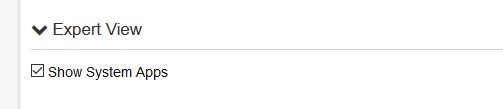
- Expert
- view.jpg (11.66 KiB) Viewed 6505 times
Re: Webserver - Z-Way
Posted: Fri Jan 22, 2016 10:42 am
by Sem;colon
aaah, good to know, I'll update the documentation then

Re: Webserver - Z-Way
Posted: Fri Jan 22, 2016 10:52 am
by Phil
No worries.
Next hurdle...
This uses the webserver plugin, and when you configure this plugin you have to specify a file. I presume that is a file located in the webserver plugins website folder?
So i've got a file in there called dot.html so in the z-way webserver ive put dot.html
when I add the host I get the error
10:47:20 Webserver - Z-Way ERROR: Host "RaZberry" can't be added!(connection not possible)
I have two of the standard webserver add ins running, the first is on port 83 and the second on a random port. 83 does not have internet access.
Any suggestion?
Re: Webserver - Z-Way
Posted: Fri Jan 22, 2016 11:02 am
by Phil
Doh.
You'd think I could go to the effort of reading one page of the posts! It was the basic authentication tick that was shown on page one.
I worry myself sometimes.
Sorted
Re: Webserver - Z-Way
Posted: Fri Jan 22, 2016 11:21 am
by Phil
Spoke too soon. Im not getting any error when I add the razberry now but im not getting any information from it nor able to control it.
Re: Webserver - Z-Way
Posted: Fri Jan 22, 2016 3:00 pm
by Sem;colon
It always uses the first instance of the webserver plugin.
So, you configured and executed the AddHost action on EventGhost side and you don't get any events or error?
Is maybe the checkbox at the bottom of EventGhost checked that hides all unassigned events?
Re: Webserver - Z-Way
Posted: Tue Jan 26, 2016 10:04 pm
by Telorast
Nice plugin. Just installed and only had to find the tip about checking the "Basic auth not required when Websocket..." checkbox to get it to work. You should add that and that Webserver plugin is required in the Installation Manual.
My only concern right now is that my log is getting hard to follow with so many events and I have to trigger on all of them to find the few events that are interesting.
Edit: Created a Room and user account for EventGhost, then moved all the devices I'm interested in into that room and limited access to only that room for the EventGhost user. Helped a lot with the spam problem.
Re: Webserver - Z-Way
Posted: Fri Jan 29, 2016 11:04 am
by Phil
After some more playing I suspect the javascript is not running properly on the addin. Is there any way for me to test this?
I've proved there is network connection between the server and pi, and i dont have hide events turned on.
I think I read somewhere there are javascript issues with 2.2.0
Maybe some test in the script at the EG end to test communication would be good.
Re: Webserver - Z-Way
Posted: Sat Jan 30, 2016 10:06 am
by Sem;colon
Hi Phil,
I have the same version, and it works.
Maybe it helps if you follow the manual step by step from the beginning again.
If you are using any basic authentication, try to remove it for testing.
If the connection to Z-Way fails, there should be an error, anyway, I attached a modified version of the plugin which prints the result when you add a host. Can you show me that printed message?
Also a added a newer version of the manual.
Re: Webserver - Z-Way
Posted: Mon Feb 01, 2016 2:38 pm
by Phil
Hi
I get this
14:36:49 Webserver - Z-Way: Add a Z-Way host: RaZberry
14:36:50 [[u'2', u'0', u'48', u'1'], [u'2', u'0', u'49', u'1'], [u'2', u'0', u'49', u'3'], [u'3', u'0', u'37'], [u'3', u'0', u'48', u'1'], [u'3', u'0', u'49', u'1'], [u'3', u'0', u'49', u'3'], [u'4', u'0', u'37']]
I have a fibaro motion sensor which does temperature and other stuff, I assume I should get data from that when I request it?
I also have two on off sockets.
(not a great empire of z-wave just yet, plenty of 433mhz im trying to retire!)
Re: Webserver - Z-Way
Posted: Mon Feb 01, 2016 7:26 pm
by Sem;colon
hmm, but this looks good, your Z-Way server properly connected to your EG.
The javascript seems to work.
But you say you don't get any events, Not even when you connect, right?
Did you try the other things I suggested?
Are you using the webserver for anything else? Maybe the port you use is blocked by your windows firewall?
Re: Webserver - Z-Way
Posted: Sat Oct 29, 2016 10:41 pm
by Sem;colon
New Version!
v0.32:
- Some bug fixes
- The plugin is now in the .egplugin format
Re: Webserver - Z-Way
Posted: Fri Jan 27, 2017 9:35 pm
by Sem;colon
New version!
v0.40.1:
- Configures it's own instance of the WebServer plugin now, no need to add the Webserver plugin to your config anymore to use this plugin!
- Plugin configuration dialog changed (if you do an update, you should open it and configure the new settings)
- Some feedback events may have changed a bit
Get it from the first post!
Re: Webserver - Z-Way
Posted: Thu Mar 19, 2020 5:14 pm
by Sem;colon
Hello everyone,
new version!
v0.42.0:
- Added support for CentralScene
- Added support for Battery
- Some feedback events may have changed a bit
get it from the first post!