Page 2 of 2
Re: Screamer Radio
Posted: Mon Jul 19, 2010 7:31 am
by Pako
This is a bug (non - ASCII filepath). Thank you for the report.
Please download the
corrected version.
Pako
Re: Screamer Radio
Posted: Mon Jul 19, 2010 7:48 am
by mcdanne82
Hi
It still seems that some thing is wrong.
I downloaded the new version but eventghost complained on the path to the langue file so I changed it in the XML to "C:\Screamer\Screamer Radio\languages\......." insted of only "languages\.." Now I can start screamer från EG but when I execute the command for play I get a new error
Code: Select all
      Fel i åtgärd: "Screamer Radio: Play"
      Traceback (most recent call last) (1462):
        File "C:\Program\EventGhost\eg\Classes\ActionBase.py", line 168, in CallWrapper
        File "C:\Program\EventGhost\plugins\ScreamerRadio\__init__.py", line 484, in __call__
        File "C:\Program\EventGhost\eg\Classes\WindowMatcher.py", line 192, in FindMatch
        File "C:\Program\EventGhost\eg\Classes\WindowMatcher.py", line 167, in Find
      OverflowError: long int too large to convert to int
Re: Screamer Radio
Posted: Mon Jul 19, 2010 9:27 am
by Pako
That's odd.
Please try several times, including a new startup ScreamerRadio.
Error occurs every time you try?
Please attach your file "screamer.xml".
Pako
Re: Screamer Radio
Posted: Mon Jul 19, 2010 10:04 am
by mcdanne82
I have tried this many times, with restarts of EG and screamer but I get the same error.
Have tried to install screamer to a new path but I get same error
Re: Screamer Radio
Posted: Mon Jul 19, 2010 10:54 am
by Pako
So it will probably be difficult.
According to XML, it seems that you have ScreamerRadio installed in C:\Screamer\Screamer Radio.
I installed the SR into the same folder and I used your xml file.
Then I started SR and tested the plugin. It works without problems.
Only when I will able to induce your problem on my computer, then I'll hopefully be able to fix the "bug" (really just a plugin causing the problem?).
What is your operating system?
Do you have a chance to try it on another computer?
Have you tried the program Radio?Sure! ?
Pako
Re: Screamer Radio
Posted: Fri Apr 13, 2012 2:55 pm
by slikus
Hello, I would like to display an picture of the radio broadcasting, when changing favorite, I'd also change the picture, I tried but without success, can you retrieve the name of the radio in an event "eventghost " via Start_SR_Event? cordially
Re: Screamer Radio
Posted: Sun Sep 14, 2014 12:06 pm
by Juris
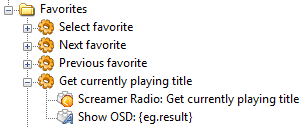
Hello, I admit I am not very experienced here yet, can You please explain how exactly to do this:
" It is therefore very easy using the "Show OSD" to display the name of the song or station played. " ?
Thank You in advance!
Re: Screamer Radio
Posted: Mon Sep 15, 2014 3:04 pm
by Pako
Here is an example:
- SRadio.png (6.32 KiB) Viewed 4917 times
Re: Screamer Radio
Posted: Mon Sep 15, 2014 7:13 pm
by Juris
Thanks for help (i must say, I already figured that out myself). I wonder is there some way to have OSD activated every time song changes on radio? Screamer is doing something that with taskbar pop-up baloon.
Re: Screamer Radio
Posted: Tue Sep 16, 2014 4:46 am
by Pako
Juris wrote:I wonder is there some way to have OSD activated every time song changes on radio?
It is possible, of course.
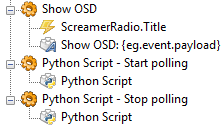
But it is necessary to use polling, because ScreamerRadio does not provide events.
Here's one possible solution:
- SRadioPolling.png (6.6 KiB) Viewed 4907 times
Content
Start polling script:
Code: Select all
period = 2
eg.globals.SRadioTitle = None
def polling():
    title = eg.plugins.ScreamerRadio.GetPlayingTitle()
    if title != eg.globals.SRadioTitle:
        eg.globals.SRadioTitle = title
        if title != 'Screamer Radio v0.4.4':
            eg.TriggerEvent("Title", prefix="ScreamerRadio", payload=title)
    eg.globals.SRadioPolling = eg.scheduler.AddTask(period, polling)
polling()
Content
Stop polling script:
Code: Select all
if "SRadioPolling" in eg.globals.__dict__:
    try:
        eg.scheduler.CancelTask(eg.globals.SRadioPolling)
    except:
        pass
script you can start (for example) using the event Main.OnInit,
or together with the launch ScreamerRadio.
Pako
Re: Screamer Radio
Posted: Tue Sep 16, 2014 7:48 am
by Juris
Thank You, Pako, for very good informative answers! Much appreciated.