Page 11 of 17
Re: MQTT Client
Posted: Tue Aug 01, 2017 8:07 am
by kgschlosser
no worries.
a container data type list, tuple, dict, str, unicode can be tested in a Boolean True/False manner to see if there is data in the container or not.
example:
Code: Select all
test = 'test string'

if test:
    print 'there is data'

test = ''

if not test:
    print 'there is no data'
Re: MQTT Client
Posted: Tue Aug 01, 2017 11:41 am
by Foune
I think it won't work. The current code actually fills "result" when parsing my MQTT message, so your condition "if result:" will be true. The error comes at "str(result[4])" because there are 3 items in my message : I changed "str(result[4])" to "str(result[0])" (in case res_key must provide the domoticz ID, I'm not sure), the MQTT plugin crashes one step further. I still ignore why this code is triggered during message sending, the message is correctly delivered even when it crashes.
Re: MQTT Client
Posted: Tue Aug 01, 2017 12:00 pm
by kgschlosser
I am not sure if the creator of this plugin is still offering support for it. but he would know. hopefully he will chime in
but You are correct in your assessment of if it works or not. I wasn't thinking
I am not sure if the exception you are getting is an IndexError but I am going to base this fix on that. if it is a different error you can replace the IndexError with the exception name you are getting
Code: Select all
            def on_message(client, userdata, msg):
                event = literal_eval(msg.payload)
                result = []
                allowed = [
                    "Battery",
                    "RSSI",
                    "dtype",
                    "id",
                    "idx",
                    "name",
                    "nvalue",
                    "stype",
                    "svalue1",
                    "svalue2",
                    "switchType",
                    "unit"
                ]
                for item in allowed:
                    try:
                        result.append(event[item])
                    except:
                        pass
                try:
                    res_key = msg.topic + ', ' + str(result[4])
                    res_base = str(msg.qos)+" "+str(result)
                    ProcessEvent2(msg, False, 0.0, res_key, result)
                except IndexError:
                    pass
                return
Re: MQTT Client
Posted: Tue Aug 01, 2017 1:20 pm
by krambriw
Hello friends,
I just saw this and for sure, this is something I can support,
When you are publishing a message to a MQTT broker and subscribe to the same topic, you will for sure receive your own message, maybe this is what you have done? This is not wrong in principle but in this case, what seems missing, is support for the message structure that is received.
Could you somehow "debug" so that we can have a view of how the message is structured when it arrives from the broker? You could insert a "print event" statement like in this example and then put a response here in the forum showing examples of the event structure
Best regards, Walter
Code: Select all
        def on_message(client, userdata, msg):
            if msg.topic.find('domoticz') != -1:
                event = literal_eval(msg.payload)
                print event
                result = []
/code]
Re: MQTT Client
Posted: Tue Aug 01, 2017 2:29 pm
by Foune
This is a clever idea as I spent a bit more time on the MQTT plugin and could'nt find any link between the message sending and this code. Only in message reception.
BUT
I didn't subscribe to the topic domoticz/in , and I know I've never received any domoticz/in MQTT message in Eg.
Nevertheless
Yesterday I tried to subscribe to domoticz/in in Eg, for testing purpose. With no luck, I could'nt receive any message (I had already tried some month ago).
So, something looks strange with Eg and domoticz/in . The domoticz/in MQTT messages I started to generate yesterday are perfect clones of the Tasmota devices I use everyday. I could check that they are identical in the domoticz log.
Example :
Code: Select all
Topic: domoticz/in, Message: {"idx":14,"nvalue":1,"svalue":""}
Anyway, I'll look at this tonight.
Re: MQTT Client
Posted: Tue Aug 01, 2017 5:56 pm
by krambriw
Please also provide the python script command you use to publish.
Re: MQTT Client
Posted: Wed Aug 09, 2017 2:09 pm
by ToxMox
I just started using this plugin today (great plugin btw!) with beebotte.com as the mqtt broker. Currently my payloads are coming in as JSON. For example u"{"data":"cbs", "ispublic":true}.
For now I guess I will parse eg.event.payload using python's JSON parser but I think it would be great to have a JSON parsing built into the plugin to grab the separate items into payload segments.
My python parsing code btw:
Code: Select all
import json
print(eg.event.payload)
parsed_json = json.loads(eg.event.payload)
print(parsed_json['data'])
Re: MQTT Client
Posted: Thu Aug 10, 2017 3:19 pm
by ToxMox
I'm currently using 1.1.0 using non ssl connection to my mqtt broker but I'd prefer to connect ssl/tls which isn't working for me in 1.1.0 because I have a single cert file.
I removed all mqtt plugin actions and installed 1.2.0 but when I add the plugin EG just hangs not responding.
This is on Windows 10 x64 Creator's Edition and EG version 0.4.1.r1722.
Re: MQTT Client
Posted: Thu Aug 10, 2017 4:58 pm
by krambriw
And you did remember to copy the paho folder to lib27/site-packages ??? (If you did not delete the old one manually, it is still there and a newer version is included in the 1.2.0 plugin)
I use EG version 0.5.0 rc1 but I think it should work ok also in older versions. As example, this is my setting connecting to mycloudmqtt using username, password and a single certificate
BR Walter
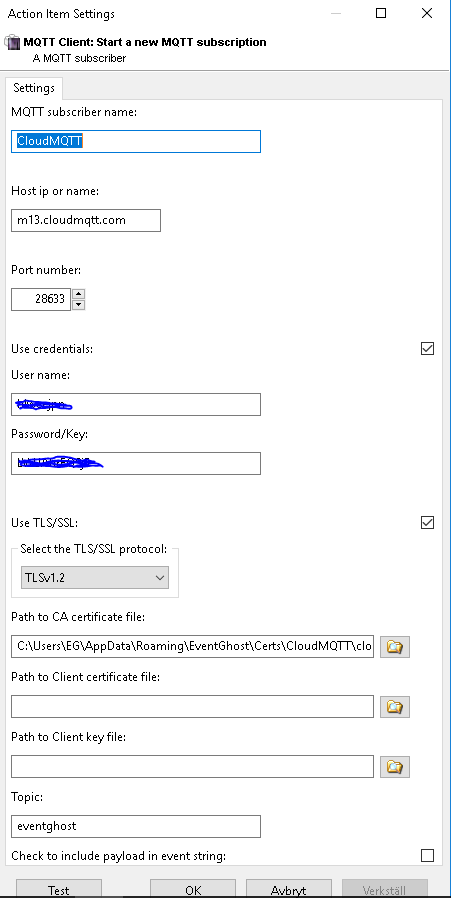
- Skärmklipp.PNG (17.38 KiB) Viewed 4924 times
Re: MQTT Client
Posted: Thu Aug 10, 2017 5:03 pm
by ToxMox
krambriw wrote:And you did remember to copy the paho folder to lib27/site-packages ??? (If you did not delete the old one manually, it is still there and a newer version is included in the 1.2.0 plugin)
I use EG version 0.5.0 rc1 but I think it should work ok also in older versions. As example, this is my setting connecting to mycloudmqtt using username, password and a single certificate
BR Walter
Skärmklipp.PNG
Well I started with 1.2.0 then downgraded to 1.1.0. I'll play around some more and maybe move to the latest RC. I didn't mention that in my last post but yeah I started with 1.2.0 which froze EG so I downloaded 1.1.0 which worked but then I realized I need the improved cert stuff so tried 1.2.0 again.
Re: MQTT Client
Posted: Thu Aug 10, 2017 5:57 pm
by ToxMox
krambriw wrote:And you did remember to copy the paho folder to lib27/site-packages ??? (If you did not delete the old one manually, it is still there and a newer version is included in the 1.2.0 plugin)
I use EG version 0.5.0 rc1 but I think it should work ok also in older versions. As example, this is my setting connecting to mycloudmqtt using username, password and a single certificate
BR Walter
Skärmklipp.PNG
So I just tried this:
1) Completely uninstall EG
2) Remove EG folders from Program Files (x86) and ProgramData
3) Installed RC1
4) Installed 1.2.0
5) Copied Paho folder to lib27/site-packages (BTW I didn't see anywhere instructions to do this until you asked in your post)
6) Add plugin to EG
7) Try to add a client action and get the following errors in my console:
http://i.imgur.com/chm8Hm6.png
Re: MQTT Client
Posted: Fri Aug 11, 2017 11:41 am
by krambriw
I suspect I made a bug
I was not able to reproduce the error but I think I found what could cause the problem. I have modified the plugin (new version 1.2.1)
Re: MQTT Client
Posted: Sun Aug 13, 2017 5:58 pm
by yokel22
Krambriw, do you mind sharing your mqtt client script your using on the raspberry pi?
Re: MQTT Client
Posted: Sun Aug 13, 2017 6:28 pm
by krambriw
Here is a simple python script that gets the weather at my location, connects to a mqtt broker and publish it. The example connects to a local mqtt broker in the rpi on port 1883 but you can change as you like
1) Create a python file and copy & paste the script below, save and transfer the python file to /home/pi
2) You need also to copy pywapi.py to the rpi /home/pi (you can find it in my plugin SunTracker)
3) You need also to copy mosquitto.py to the rpi /home/pi (you can find it here
http://krambriw.net/Release/MQTT%20Clie ... 20version/ )
You can then run the script in a command prompt under Linux in a rpi, type python name_of_script.py
Best regards, Walter
Code: Select all
import pywapi
import mosquitto
import string

def send_mqtt_message(topic, msg):
    client = mosquitto.Mosquitto("Weather")
    client.connect(mqtt_host, port)
    for i in range(5):
        result, mid = client.publish(topic, msg, 0)
        if result == 0:
            break
    client.disconnect()
    del client


def CheckWeatherCondition():
    weather_data = None
    currCondition = "Undefined"
    try:
        weather_data = pywapi.get_weather_from_weather_com('SWXX0256')
        print weather_data
        currCondition = (weather_data['current_conditions']['text'])
    except:
        pass
    return currCondition


mqtt_host = '127.0.0.1'
port = 1883
topic_out = '/weather'
weather = CheckWeatherCondition()
send_mqtt_message(topic_out, str(weather))
Re: MQTT Client
Posted: Sun Aug 13, 2017 6:34 pm
by yokel22
Thanks, that saved me a bunch of time.
