Page 14 of 28
Re: TellStick Duo
Posted: Mon Apr 07, 2014 10:39 pm
by Fritte
First of all I want to thank you for a fantastic job.
Without this plugin the Duo would not even be as near as useful to me as it is now.
I have a small feature request.
I frequently use the GoodMorning function as a wakeup light in my bedroom. But I only got one dimmable there. So what I'm asking for is that when the GoodMorning function reaches 100% in dim level it will send an event to eventghost so I also can turn on a few extra lights and maby even start the radio to wake me up.
Re: TellStick Duo
Posted: Tue Apr 08, 2014 6:57 am
by krambriw
Dear Fritte, Nice to hear,
Attached is a beta version with the requested feature. I have added code so that an event is sent when GoodMorning (and GoodNight) actions have finished.
I am not sure what is the best format of the event but in this version the device name is included and the device Id is in the payload. Please suggest if you see other better formatting.
Please test and check if you think it is working as expected (I have difficulties testing right now since my TellStick Duo is busy sitting in a Raspberry Pi doing other tests)
BR
Re: TellStick Duo
Posted: Wed Apr 09, 2014 8:07 am
by Fritte
Thanks.
But I get the following error.
Code: Select all
10:04:25   Exception in thread GoodMorning:
10:04:25   Traceback (most recent call last):
10:04:25     File "threading.pyc", line 532, in __bootstrap_inner
10:04:25     File "threading.pyc", line 484, in run
10:04:25     File "C:\Tools\EventGhost\plugins\TellStickDuo\__init__.py", line 2050, in GoodMorningThread
10:04:25       self.TriggerEvent(
10:04:25   AttributeError: 'GoodMorning' object has no attribute 'TriggerEvent'
10:04:25
Re: TellStick Duo
Posted: Wed Apr 09, 2014 9:12 am
by krambriw
Ooops, my fault

Try the attached version, it worked for me
Code: Select all
10:34:35   Good Morning action finished
10:34:35   Main.Good Morning action finished: Front row '106'
10:34:35   TellStickDuo.Front row.DIM u"selflearning-dimmer:nexa.106.100"
Besides, just to give you some additional ideas, you could actually have managed already with the older version. Looking at the log, the following is seen
Code: Select all
10:34:35 TellStickDuo.Front row.DIM u"selflearning-dimmer:nexa.106.100"
As you can see, each time the dim level is changed, an event is generated with the actual dim level. When finished, the dim level is 100 in case of the GoodMorning action.
With a simple python script inside a macro it is easy to evaluate the actual dim level and either stop or allow the macro to continue the execution:
Code: Select all
def eventHandler(base, pload):
    dim_level = int(pload.split('.')[2])
    if dim_level == 100:
        pass
    else:
        eg.StopMacro()

eg.event.suffix_copy = eg.event.suffix
eg.event.payload_copy = eg.event.payload

eventHandler(eg.event.suffix_copy, eg.event.payload_copy)
A typical macro sample:
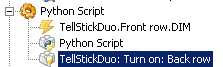
- Image2.jpg (4.07 KiB) Viewed 7171 times
Either way, you now have two options,
Best regards, Walter
Re: TellStick Duo
Posted: Wed Apr 09, 2014 11:06 am
by Fritte
Thanks. Will try the new one when I get home.
The problem with using the TellstickDuo. event is that it will be triggerd every time the lights is dimmed to 100% and notjust only when the GoodMorning is finished.
Re: TellStick Duo
Posted: Wed Apr 09, 2014 1:20 pm
by krambriw
You are correct, that case would then also have to be considered by a script solution. Therefore, this new event will simplify things, I agree.
Best regards, Walter
Re: TellStick Duo
Posted: Wed Apr 09, 2014 6:47 pm
by Fritte
It works just fine.
Big thanks.
Re: TellStick Duo
Posted: Wed Aug 20, 2014 9:15 pm
by pabben
Thank you very, very much for a great plugin!
There is a action called "Bell". What is this?
Re: TellStick Duo
Posted: Thu Aug 21, 2014 5:23 am
by krambriw
Thanks Pabben,
The 'Bell' action is for starting a door bell, like this one:
http://www.nexa.se/LML-710.htm
Re: TellStick Duo
Posted: Thu Aug 21, 2014 12:21 pm
by pabben
I am using this bell (
http://www.nexa.se/MLR-1105-Batteridriven.htm ) but it does not work very well with eventghost and the tellstickduo-plugin tells me that "i have no device supporting bell".
I use switchking where the bell is set up as a on/off-device.
When i activate the bell in switchking is always work, but doing the same in eventghost gives me a success rate of about 5% (meaning that i only open the door for every 20th visitor

).
Eventghost log tells me the same message when using EG and SK ( TellStickDuo.Ringeklokke.ON u"selflearning-switch:nexa.23.0" )
Any idea of what's wrong?
Re: TellStick Duo
Posted: Thu Aug 21, 2014 2:19 pm
by krambriw
Any idea of what's wrong?
Yes, I think the problem is that Telldus Center doesn't support self-learning Bell types. If you check, also in latest Telldus center, you can only define Bells of the old type with a house code. Newer self-learning types need to be defined as self-learning on/off.
It could be that the Bell needs more than just one 'On' command. You could manually try to send several 'On' commands with a second delay in between and see if that helps. If so, you could create a macro that does this for you with the number of 'On' commands it needs (several 'On' actions with a Wait in between each of them).
Alternatively it could be better to use SK to trigger the Bell if this works reliable. Could it be possible to setup a rule in SK that triggers the Bell when you change a data source value from EG?
Best regards, Walter
Re: TellStick Duo
Posted: Fri Aug 22, 2014 4:32 pm
by pabben
Main issue is that SwitchKing is very slow. From the moment the "activate bell-button" is pressed, it takes from 10-30 seconds before the bell react.
I made a connection to the bell directly from the "acitvate-button" (not through SK og EG). That sorted it out. I still get the "bell activated" event i EG so it sorts out my problem.
Thank you again for your help

Re: TellStick Duo
Posted: Fri Oct 03, 2014 12:54 pm
by krambriw
New version in the first post
Improved GoodMorning & GoodNight actions:
- configurable max level for GoodMorning action
- selectable option for the GoodNight action to start dimming from the current known (Telldus Center) level
Firedectector / firealarm - tellstick / nexa
Posted: Fri Nov 21, 2014 8:40 am
by eddiex666
Hi,
first: would it be possible to create a forum catalog for devices??? (to sort all question in to one place)
I have tellstick duo and nexa gateway, what "fire warning" unit that I can use with this systems?
i would like:
- fire warnings units that are wireless connected , 8 detectors...
- if alarm (or battery low) , thay can send RF (433,92) to my tellstick or nexa...
I know that Nexa has many units, but I would like to know what type i can use.
Greetings Eddie
Re: Firedectector / firealarm - tellstick / nexa
Posted: Fri Nov 21, 2014 9:18 am
by krambriw
Dear Eddie, you could have posted this into the correct TellStickDuo plugin section so that we get ALL Q&A bundled together. It will not help others in the long run if we are scattering the board with questions all over.
To answer your Q this time, the simple answer is NO, not with the TellStickDuo. But if you purchase a RFXtrx433E all of this is supported (at least the fire alarm signals). The Nexa Gateway is anyway not supported by EventGhost.
I know that Nexa has many units, but I would like to know what type i can use.
These are questions you should post to Telldus and RFXCOM directly (I think they do even have lists of supported devices)
Best
PS Jonib or admin, if you read this topic, would it be possible that you move it to the TellStickDuo plugin topic?