Page 14 of 34
Re: PushBullet plugin (Pako)
Posted: Thu Oct 23, 2014 4:12 pm
by tadeyo_man
how can i use the new features of grab clipboard...any walkthrought on it i can't able to made it successfull... always show no datas.
Re: PushBullet plugin (Pako)
Posted: Fri Oct 24, 2014 5:08 am
by Pako
It's strange - for me it works correctly.
How do you give the image to the clipboard?
I use the "
Print Screen" key (or "
Alt Print Screen" double touch).
Also there is a possibility to send a picture from website.
It depends on what browser you are using. Always is a suitable item in the context menu. For example, it may look like this:
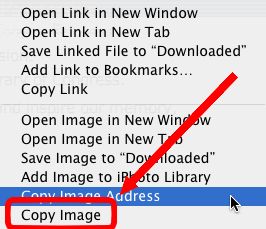
- CopyImage.png (15.8 KiB) Viewed 6197 times
In this case, the correct choice is "Copy Image".
Pako
Re: PushBullet plugin (Pako)
Posted: Sat Oct 25, 2014 3:50 am
by photosis
Hi Pako, great plugin!
I'm trying to send a push notification after EG runs a python script that copies files out of subfolders to one main folder. Here is a snipet that returns the name of each file copied afterwards.
Code: Select all
import shutil
import os

FileName = ''.join(eg.event.payload)
isFolder = os.path.isdir(FileName)
DestFolder = 'M:\\Sort\\'

if not isFolder:
    shutil.copy(FileName, DestFolder)
    print os.path.basename(FileName) + ' copied.'
elif isFolder:
    for root, dirs, files in os.walk(FileName):
        for f in files:
            if CopyFileCheck(f):
                shutil.copy(root+'\\'+f,DestFolder)
                print f + ' copied.'
I would like to have these results pushed in a note so i receive the list of files instead of only the EG trigger path, but I'm having trouble figuring out how to pass the list as a variable or write it to a text file that would then go into a pushbullet note. Can you point me in the right direction?
Re: PushBullet plugin (Pako)
Posted: Sat Oct 25, 2014 6:31 am
by Pako
Get a list is easy.
I think it is unnecessary to store the result into a file.
So the modified script might look like this:
Code: Select all
import shutil
import os

FileName = ''.join(eg.event.payload)
isFolder = os.path.isdir(FileName)
DestFolder = 'M:\\Sort\\'

result = u""
if not isFolder:
    shutil.copy(FileName, DestFolder)
    result += os.path.basename(FileName.decode(eg.systemEncoding)) + ', '
else:
    for root, dirs, files in os.walk(FileName):
        for f in files:
            if CopyFileCheck(f):
                shutil.copy(root+'\\'+f,DestFolder)
                result += f.decode(eg.systemEncoding) + ', '
eg.result = result[:-2]+ ' copied.'
In the following PushBullet plugin action you can use
{eg.result} .
Note:
I do not know what it means "CopyFileCheck()".
Pako
Re: PushBullet plugin (Pako)
Posted: Sun Oct 26, 2014 4:59 am
by photosis
Amazing! That works great! I didn't realize you could call result from the plugin.
Can you point me in the direction of how best to indicate the base folder name? I'm trying to make a push massage that reads like:
FOLDER has copied containing the following files: FILE1, FILE2, etc...
Sorry about leaving the file check code in there. It was a depreciated function from a different version of the script that excluded files that said "sample"
Re: PushBullet plugin (Pako)
Posted: Sun Oct 26, 2014 9:40 am
by thealon
Hi pako,thank you for great plugin
I'm using this script to send message to windows media center
Code: Select all
import socket
TCP_IP = '127.0.0.1'
TCP_PORT = 1982
BUFFER_SIZE = 4096
s = socket.socket(socket.AF_INET, socket.SOCK_STREAM)
MESSAGE = "Dialog|3|30|Hello MCE User|This is a message!"
s.connect((TCP_IP, TCP_PORT))
s.send(MESSAGE)
data = s.recv(BUFFER_SIZE)
print data
How can I show the Information from pushbullet event?
Re: PushBullet plugin (Pako)
Posted: Sun Oct 26, 2014 9:44 am
by Pako
photosis wrote:Can you point me in the direction of how best to indicate the base folder name?
Unfortunately, I do not know what you call the "base folder name".
So here are two options how we can modify the script:
Code: Select all
result = u""
if not isFolder:
    shutil.copy(FileName, DestFolder)
    result += os.path.basename(FileName.decode(eg.systemEncoding)) + ', '
else:
    result += 'Folder "%s" has copied containing the following files: ' % FileName
    for root, dirs, files in os.walk(FileName):
Code: Select all
result = u""
if not isFolder:
    shutil.copy(FileName, DestFolder)
    result += os.path.basename(FileName.decode(eg.systemEncoding)) + ', '
else:
    baseName = os.path.split(FileName)[1]
    result += 'Folder "%s" has copied containing the following files: ' % baseName
    for root, dirs, files in os.walk(FileName):
Pako
Re: PushBullet plugin (Pako)
Posted: Sun Oct 26, 2014 9:58 am
by Pako
thealon wrote:How can I show the Information from pushbullet event?
Can you please specify where you want to place information from PushBullet events?
I also do not know
what information.
There are many different events.
Can you please add at least a screenshot?
Pako
Re: PushBullet plugin (Pako)
Posted: Sun Oct 26, 2014 10:24 am
by thealon
[import socket
TCP_IP = '127.0.0.1'
TCP_PORT = 1982
BUFFER_SIZE = 4096
s = socket.socket(socket.AF_INET, socket.SOCK_STREAM)
MESSAGE = "Dialog|3|30|Hello MCE User|This is a message!"
s.connect((TCP_IP, TCP_PORT))
s.send(MESSAGE)
data = s.recv(BUFFER_SIZE)
I want to place information from PushBullet events in the yellow Highlighte
I want to show ordinary message like
PushBullet.Note.Hello ['', None, u'ujCPr3p5BFksjAa6CVa7P2', u'Galaxy Nexus', '2014-10-26 12:18:04']
And if it's Possible caller id
Thanks
Re: PushBullet plugin (Pako)
Posted: Sun Oct 26, 2014 11:29 am
by Pako
You can do it, for example, this way:
Code: Select all
title = eg.event.suffix.split(".")[-1]
txt = eg.event.payload[0]
sender = eg.event.payload[-2]
MESSAGE = "Dialog|3|30|Hello MCE User|%s, %s from %s" % (title, txt, sender)
Pako
Re: PushBullet plugin (Pako)
Posted: Tue Oct 28, 2014 9:24 pm
by jonasbegood
OMG, this fixes everything. Very nice plugin!
This will help me control my home automation system. With the combination of pushbullet and IFTT I can trigger "Welcome home"-light etc from my girlfriends iPhone.
Are you planning to add multi-user support? So in example I can have both API of myself and my gfs pushbullet? That would be great, because I can then make some features for myself as well.
Re: PushBullet plugin (Pako)
Posted: Wed Oct 29, 2014 7:34 am
by Pako
jonasbegood wrote:Are you planning to add multi-user support?
This is an interesting idea.
It did not occur to me that anyone could need.
But the solution is actually quite easy.
That you can even do it yourself.
Open the file
...\EventGhost\plugins\PushBullet\__init__.py through any plane text editor (notepad.exe suits).
Find the section
eg.RegisterPlugin and there change the entry
canMultiLoad to
True.
Then restart EventGhost.
Now you can add another instance of the plugin into your configuration.
I will make this change in the next version.
Pako
Re: PushBullet plugin (Pako)
Posted: Thu Nov 06, 2014 7:55 pm
by Pako
New version (0.1.7) released.
News:
- - bugfixes
- - multiload of plugin enabled
- - added action "Send SMS"
Notes:
This relates to the fact that Pushbullet has a new cool feature :
Send Texts Right From Your Computer.
Pako
Re: PushBullet plugin (Pako)
Posted: Wed Nov 12, 2014 9:48 am
by nissse
Hello Pako
I have been using your plugin now for some weeks and love it. Thank you.
I have a question:
Is there a way to run Macros in EG based on package name ? Ex only run Macro if the phone is ringing not when I get a email
Background:
I'm using XBMC and the pushbullet plugin (
http://forum.kodi.tv/showthread.php?tid=204567) to mirror the phones to xbmc.
I have a Samsung note 3 and everything works great but my girlfriend have a galaxy nexus and when someone is calling her it only displays:
"Incoming Call" and not the contact name as when someone calls my phone.
I can see in EG that it is different on her phone and my phone.
Her phone shows: "13:38:20 PushBullet.Mirror.Amanda [u'Incoming call\n', u'Galaxy Nexus'"
My phone shows: "13:23:12 PushBullet.Mirror.Mirror [u'Amanda\n', u'Samsung SM-N9005'"
As a workaround I was going to try using EG to push to XBMC but I only want to push incoming calls using EG and use xbmc addon for everything else.
To get the name of the caller I use "{eg.event.suffix.split(".")[-1]}"
Re: PushBullet plugin (Pako)
Posted: Wed Nov 12, 2014 11:02 am
by Pako
I'm not sure if I understand your situation correctly.
However - something like this:
should help.
A new event will be triggered and that you can assign to a macro.
Pako