Page 18 of 38
Re: SunTracker - with moving ghost
Posted: Tue Sep 04, 2012 6:56 pm
by cheater
Hallo,
sorry for answering so late.
K├Ânntest du mir eventuell mal hier eine vorkonfigurierte Datei hochladen. Ich habe leider immernoch Probleme.
Ich m├Âchte folgendes realisieren:
Mit Eventghost die Maus bewegen um, zum Sonnenaufgang einen Zeitraffer einer Canon A800 (mit CHDK) zu starten.
Eventghost muss also zu Sonnenaufgang in einer Software auf den Startknopf dr├╝cken.
Thank you!
Re: SunTracker - with moving ghost
Posted: Wed Sep 05, 2012 11:55 am
by krambriw
This is off-topic. I will just help with Q's related to the SunTracker plugin itself. Your need to control various mouse movements, window and application control can be made with macros that are already available (see the list when you click "Add Macro...") but this is something I will not cover here.
Best regards, Walter
Re: SunTracker - with moving ghost
Posted: Wed Sep 05, 2012 3:52 pm
by cheater
Sry,
da hast du mich falsch verstanden, ich m├Âchte keine komplett fertige Datei.
Es geht nur um eine Beispieldatei mit dem SunTracker Plugin, nicht mehr und nicht weniger.
Ich brauche eben nur ein Sunrise und ein Sunset Event.
Der Rest war eine Erklärung, das bekomme ich selbst hin.
Thank you.
Re: SunTracker - with moving ghost
Posted: Wed Sep 05, 2012 6:16 pm
by krambriw
ok, then try this simple sample:
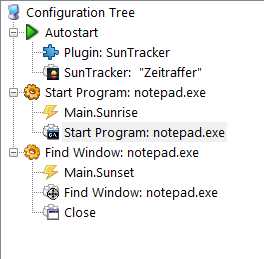
- Image3.jpg (11.77 KiB) Viewed 6224 times
At sunrise, notepad will be started and at sunset it will get closed. This example gives you an idea. You can add mouse and window controls, emulate keyboard etc to set it up as you need.
Best regards, Walter
PS I forgot one thing, disable the "Synchronization activated (Y/N)", then you will only get events at actual Sunrise/Sunset.
Re: SunTracker - with moving ghost
Posted: Thu Sep 06, 2012 4:07 am
by krambriw
Bug?
I run the latest version and fight the following problem. The events Main.sunset and Main.Sunrise appear 2 hours too early, while the announced times in the log are completely correct.
I will set this up myself a couple of days to check if I can reproduce, thanks
BR Walter
Re: SunTracker - with moving ghost
Posted: Thu Sep 06, 2012 4:17 pm
by cheater
Guten Abend,
ich habe heute Nacht eine Testkonfiguration laufen lassen.
00:00:02 Today is Thursday. Sunrise will be at 0641 and Sunset at 1951
04:41:00 Main.Sunrise
06:41:01 Main.Sonnenaufgang
17:51:00 Main.Sunset
Main.Sunrise erscheint meiner Meinung nach 2 Stunden zu fr├╝h, Main.Sonnenaufgang ist dagegen korrekt. Fraglich ist auch, weshalb um 17:51 Main.Sunset geloggt wird. Ich werde noch updaten was im Laufe des Abends passiert.
PS I forgot one thing, disable the "Synchronization activated (Y/N)", then you will only get events at actual Sunrise/Sunset.
Habe ich bereits selbst herausgefunden, trotzdem Danke!

Grüße, cheater.
Re: SunTracker - with moving ghost
Posted: Fri Sep 07, 2012 5:41 am
by krambriw
@cheater and Noelba,
It might very well be that there is a bug somewhere...but I have not found it yet
Can you try to change the time settings from 1159 to 1100 instead and see if it then runs ok for you?
In my test since yesterday, it looks ok (if I have the time set to 1100):
From the log file:
Code: Select all
>2012-09-07 00:00:01	Today is Friday. Sunrise will be at 0559 and Sunset at 1932<br
>2012-09-07 05:59:01	Sunrise, Weather Condition: Undefined, Total time compensation(negative is ON earlier and OFF later): 0<br
From EG log:

- Image2.jpg (1.62 KiB) Viewed 6217 times
Re: SunTracker - with moving ghost
Posted: Fri Sep 07, 2012 8:51 am
by DoXer
It might very well be that there is a bug somewhere...but I have not found it yet
Can you try to change the time settings from 1159 to 1100 instead and see if it then runs ok for you?
In my test since yesterday, it looks ok (if I have the time set to 1100):
Hi, I have the same problem, 2hours to early. Sorry, I use the plugin Twilight as workaround
. Walter in which timezone are you? I have "UTC+1" located in Germany.
Re: SunTracker - with moving ghost
Posted: Fri Sep 07, 2012 10:59 am
by krambriw
Walter in which timezone are you? I have "UTC+1" located in Germany.
I am in the same, in Stockholm, Sweden. Have you tried to set the time to 11.00? Or post a picture of your setting.
Best regards, Walter
Re: SunTracker - with moving ghost
Posted: Fri Sep 07, 2012 12:53 pm
by DoXer
I'll test this night, you'll get feedback tomorrow
Re: SunTracker - with moving ghost
Posted: Fri Sep 07, 2012 5:17 pm
by cheater
Set the time to 11:00.
Let's test
Re: SunTracker - with moving ghost
Posted: Sat Sep 08, 2012 9:26 am
by DoXer
Set the SunTracker to 11:00, same problem.
Code: Select all
2012-09-08 00:00:01  Today is Saturday. Sunrise will be at 0659 and Sunset at 2004
2012-09-08 04:59:00  EVENT: Main.Sunrise
Re: SunTracker - with moving ghost
Posted: Sat Sep 08, 2012 12:21 pm
by piert
Hi Walter,
Sorry to mess up the bug tracking thread, but I currently use an old version of suntracker in my TV watching macro and I wonder if I can use the new suntracker with my EG script.
As it is working now in my case, the IR signal from my TV remote is received by the computer when I switch on the television when I watch TV; if it is light outside, as determined in a Python script using suntracker's command "eg.plugins.Suntracker.IsSunDown(-50, 60)" -note the offset that is used to compensate for the brightness inside my house compared to outside conditions- , the computer will not activate the lights inside the house. However, at the same time, by including in the python script the statement "eg.plugins.Suntracker.IsSunDown(-50, 60)", suntracker causes an event "Main.IsSunDown.False" with payload to be sent to the EG log. I use this to schedule an event to switch on the lights at a later time when it gets dark. For this, I use a command that calculates the time between the moment of switching on the TV and the time when it will get dark. This command uses the payload from the previous suntracker event and multiplies by 60 to get the number of seconds between the receipt of the event and sunset. This command is eg.wacht = 60*float(eg.event.payload.split("|")[8]). Then, the script will schedule a command to switch on the lights for TV watching during the night: eg.scheduler.AddTask(eg.wacht, eg.TriggerEvent, 'ON').
The above is just an explanation of what I am using, but basically I would like to know from you if the new Suntracker plugin still uses the same commands eg.plugins.Suntracker.IsSunDown(-50, 60), i.e. with offset feature and that Suntracker still reports back with events with payload, of which the 8th section is the time remaining until sunset, so that I can migrate safely.
thanks
Perry
Re: SunTracker - with moving ghost
Posted: Sat Sep 08, 2012 1:20 pm
by krambriw
The commands are still there of course with the same format as before. Running your example eg.plugins.Suntracker.IsSunDown(-50, 60) in the latest version returns 'False' right now and creates the following event in the eg log:
Code: Select all
15:08:29 Main.IsSunDown.False u"-50|60|Fair|Real Sunset expected:|1929|Virtual Sunset expected:|1839|Minutes to Virtual Sunset:|211|Minutes adjusted:|0|IsSunDown:|False"
However, depending on how old version you are using, there could be a general problem with migration. I recommend that you build up your SunTracker actions again in a separate computer.. Then you could do xml editing and copy & paste from the new to the old xml file and in this way migrate. Just replacing the old SunTracker plugin with the latest might cause error messages that can not be solved easily.
Best regards, Walter
Re: SunTracker - with moving ghost
Posted: Sat Sep 08, 2012 4:41 pm
by cheater
DoXer wrote:Set the SunTracker to 11:00, same problem.
Code: Select all
2012-09-08 00:00:01  Today is Saturday. Sunrise will be at 0659 and Sunset at 2004
2012-09-08 04:59:00  EVENT: Main.Sunrise
Yup, same problem!