Page 3 of 3
Re: File Operations
Posted: Sat Mar 16, 2013 10:19 am
by Pako
eventspook wrote:It looks like ...
So I guess ...
It should ...
but maybe ...
That's not what I want "to hear".
I need to know how to your problem occurs in a real situation.
I have DropBox also available.
Pako
Re: File Operations
Posted: Wed May 01, 2013 7:19 am
by fred38
Hello,
I am really a new comer in EG and experience some difficulties.
I have an OWL 160 to monitor my electricity consumption.
I well receive the signal of the OWL in EG and would like to write the result in a text file.
I have create a macro and use file operations to write the eg.result but it doesn't not write me the result but this :
13-05-01 09:14:48 <eg.CorePluginModule.FileOperations.FileOperations object at 0x033701F0>
This is the xml file :
<?xml version="1.0" encoding="UTF-8" ?>
- <EventGhost Version="1610" Guid="{4AB4DFF4-7D1E-430F-BE6A-244B117DC2D2}" Time="1367392634.55">
- <Autostart Name="D├®marrage automatique" Expanded="True">
<Plugin Identifier="RFXtrx" Guid="{72DCE030-68FF-49B9-835D-295D4CF048ED}" File="RFXtrx">gAIoSwOJiYmJiYmJiYmIiYmJiYmJiYiITU0FiYl0cQAu</Plugin>
<Plugin Identifier="Keyboard" Guid="{59CBD10F-C1D8-4ADB-999B-9B76BA360F1F}" File="Keyboard">gAIpLg==</Plugin>
<Plugin Identifier="FileOperations" Guid="{50D933C5-F93B-4A8A-A6CE-95A40F906036}" File="FileOperations">gAIpLg==</Plugin>
</Autostart>
- <Folder Name="Conso elec" Expanded="True">
- <Macro Name="reception owl" Expanded="True">
<Event Name="RFXtrx.Type: CM119/160 id: 43874" />
<Action>FileOperations.Write(1, u'{eg.result}', u'C:\\UwAmp\\www\\test eg\\owl.txt', 2, 0, True, True, False, 'utf8')</Action>
</Macro>
</Folder>
</EventGhost>
Could you help me ?
Thanks a lot
Fred
Re: File Operations
Posted: Wed May 01, 2013 7:40 am
by fred38
Hi !
I have tested different "Input text". It works with : {eg.event.payload} and the result is :
13-05-01 09:37:48 Counter: 0 Instant power usage: 370.00 W Total energy usage: 58988.68 Wh signal: 5 battery: 9
Good !
BUT : how to get only a value, for example : Instant power usage ?
Thanks !
Fred
Re: File Operations
Posted: Wed May 01, 2013 1:45 pm
by piert
Hi Fred,
You are going to have to split up your result and pick out the stuff you need with a Python script.
There are many examples to be found in the forum. Here is one for instance:
viewtopic.php?f=9&t=2115&p=22456#p22456
Try to modify to your needs. If no luck, ask for help where you get stuck.
Re: File Operations
Posted: Wed May 01, 2013 8:09 pm
by fred38
Hi Piert,
Thanks for you answer.
I will try to understand your python script because I really beginning with Pythom language.
If I fail, I will ask for your help ! Thanks !
Best regards
Fred
Re: File Operations
Posted: Mon Nov 25, 2013 8:38 pm
by WinoOutWest
I have something that hopefully file operations plugin can help me with.
I have a EG macros that generates and export from a google spreadsheet to a csv file every 15 minutes. It works great but every once in a while the google spreadsheet logs out and the export doesn't complete successfully. Because of the the way I am doing it right now this means that when this situation occurs the csv is deleted at the end of the macro.
Is there a way with File Operations that I can determine if the file has dissappeared? I don't care what is in the file I only care that is not there (which means that is has failed and I need to trigger some other action in EG)
Can I do this with EG? I tested the situation with the current plugin and in errors out when the file is missing but unfortunately I can't use the error in EG as a trigger.
Any anyone help with this?
Thanks,
Darren
Re: File Operations
Posted: Mon Feb 10, 2014 3:13 pm
by juanalei
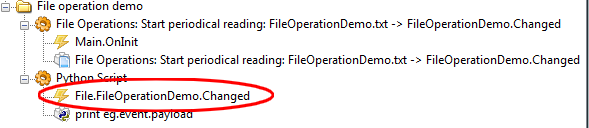
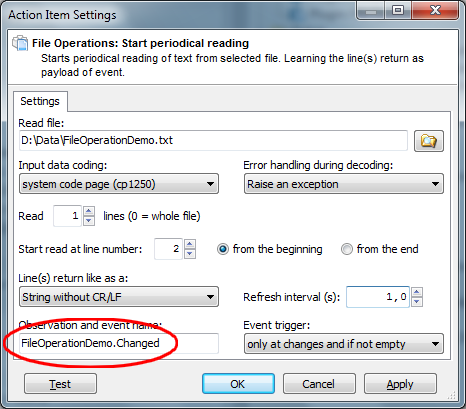
Pako wrote:When you use the action "Start periodical reading", so you can not print eg.result. This action does not result, this action only starts the periodic reading.
Content (or certain lines) of file you can only receive as eg.event.payload.
You certainly do not need to actually print the "result".
Perhaps it would be better to write exactly what you need.
Pako
Hello
I managed to read a txt, but I would like that value would generate an event, to run a program.
In the txt there is "0" or "1"
I used: File Operations: Start reading periodical
Can you help? I know nothing of Python
Thank you.
(Google translator)
Hola
He conseguido leer un txt, pero me gustaría que ese valor generase un evento, para poder ejecutar un programa.
En el txt solo hay "0" o "1"
He utilizado: File Operations: Start periodical reading
Pueden ayudarme? no se nada de Python
Gracias.
Re: File Operations
Posted: Tue Feb 11, 2014 2:16 am
by kkl
What is the problem you are having? The example posted above by Pako works fine. If you have a "1" in your file, you'll get an event like this: File.FileOperationDemo.Changed u"1"
Re: File Operations
Posted: Tue Feb 11, 2014 5:08 am
by juanalei
Thanks for responding.
Works part.
I get the same txt
File.FileOperationDemo.Changed or "1" or File.FileOperationDemo.Changed or "0"
But to copy the event, only recognized as File.FileOperationDemo.Changed then I can not run different programs by state.
(Google translator)
Gracias por responder.
Funciona una parte.
Obtengo del mismo txt
File.FileOperationDemo.Changed u "1" o File.FileOperationDemo.Changed u "0"
Pero al copiar el evento, solo lo reconoce como File.FileOperationDemo.Changed
entonces no puedo ejecutar diferentes programas seg├║n el estado.
Re: File Operations
Posted: Tue Feb 11, 2014 6:00 am
by kkl
Ahh. Okay, I understand your question. The result of the event is found in the variable
eg.event.payload, so if your file contains a "1", when your event "File.FileOperationDemo.Changed" is triggered, then eg.event.payload will equal "1". If you want to open a program when the value is "1", then you could add a python command like this in your macro after the event:
Code: Select all
if eg.event.payload == "1": eg.plugins.System.Execute(u'notepad.exe', u'', 0, False, 2, u'', False, False)
This example opens Notepad. You can get the syntax for opening the program by setting it up with the Start Application plug-in, right click on the entry, and select "Copy as Python". That's where I got "eg.plugins.System.Execute(u'notepad.exe', u'', 0, False, 2, u'', False, False)".
Re: File Operations
Posted: Tue Feb 11, 2014 2:30 pm
by juanalei
Perfect thank you very much.
Now I can run a program.
really thank you very much.
(Google translator)
Perfecto muchas gracias.
ahora puedo ejecutar un programa.
De verdad muchas gracias.
Re: File Operations
Posted: Thu Feb 09, 2017 11:40 pm
by Chipsgoumerde
Hello guys, first post here.
I'm trying to do something very simple, but I'm new to python (and EG obviously).
I want to read a different line from a file and then send it to TTS. So I did that:
Code: Select all
import random
RandomNumber = random.randrange(1, 10)
print RandomNumber
eg.plugins.FileOperations.Read(
    0, u'C:\\Users\\Edouard\\automation\\phrases.txt', 0, 0,
    'cp1252', RandomNumber, False, 1)
print eg.result
eg.plugins.Speech.TextToSpeech(
    u'Microsoft Hortense Desktop - French', 0, eg.result,
    u'', 100, u'Line Out (Scarlett 18i8 USB)')
The result is the fileOperation.read return the same line each time.