Page 3 of 9
Re: OSM (On Screen Menu)
Posted: Sun Jan 24, 2010 6:34 pm
by Bob
Hi Pako,
Thanks for having updated your plugin.
After trying to replace your plugin with an Harmony One with a tactil Screen, I come back to your plugin since this remote didn't gave me entire satisfaction.
I have download the last version, and all my configurations were not recognized by the plugin. But it doesn't matter, i'm going to reorganise all of them.
For the moment, I have just a question : Do you think that it is possible to add a confirmation dialog ?
I ask you this question because i'm using the OSM to do critical actions like restarting computer or starting an another application.
Those actions in a middle of a movie can be very dangerous !!

Thanks in advance,
Bob
Re: OSM (On Screen Menu)
Posted: Mon Jan 25, 2010 6:26 am
by Jostein
Hi Bob.
Maby not what you are looking for but there is a way to do what you want now.
Use the event to launch a second menu with only "Confirm" and "Cancel". Then have Cancel go back to the first menu and Confirm triger the event that restarts the computer.
If you have a lot of menues it can look weary bad but it atleast works in a way.
Best regards, Jostein.
Re: OSM (On Screen Menu)
Posted: Mon Jan 25, 2010 1:01 pm
by Bob
Your solution is quite interesting. But perhaps, I can manage a single maco to confirm the action.
It needs to save the event in a variable, and then call the action to confirm. If confirmed the event stored is trigger, else it is deleted.
Can somebody tell me if this is possible. I'm going to try out this at home this evening.
Bob
Re: OSM (On Screen Menu)
Posted: Mon Jan 25, 2010 7:09 pm
by Pako
I think Jostein's solution is the right way. I just made a very simple improvement. Download the new version and you can proceed as follows:
You just create only a macro, which will be assigned all the events that you need to confirm.
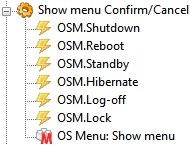
- MacroConfirm_Cancel.jpg (12.33 KiB) Viewed 8936 times
In the editing box "
Default event prefix:" you shall put the term "
{eg.event.string}".
Once the menu, then choose "Confirm", created a new event, accompanied by the suffix "Confirmed".
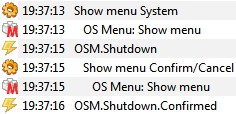
- Logger.jpg (14.94 KiB) Viewed 8936 times
Pako
Re: OSM (On Screen Menu)
Posted: Mon Jan 25, 2010 7:29 pm
by Bob
Hi,
I've just tried. It function as I want.
Thanks Pako and Jostein.
May be soon for an other request.
Bob
Re: OSM (On Screen Menu)
Posted: Fri Feb 12, 2010 9:27 am
by Pako
I made some improvements to plugin OSM.
What's new:
1) Events are now able to carry the payload
2) Added action "Show menu, created from python expression"
It was relatively difficult to solve so that it was easy enough for users
and enough variable. I wrote a (hopefully) a sufficiently detailed description and several examples.
I have two requests for you:
1) Please try the modified plugin
2) Please check all English text
Any comments please write here.
I still have plans to do some examples of the new possibilities of creating menus from python expression. But it will take time.
Pako
Re: OSM (On Screen Menu)
Posted: Sat Feb 13, 2010 5:58 pm
by Pako
Here is one example of the use of new capabilities OSM.
You can easily (using the OSM) select the album, which will be played in MediaMonkey.
I think that the pictures need no comment.
Python Script contains the following code:
Code: Select all
tmp = [item.split("\t") for item in eg.result]
tmp = [(item[2]+" - "+item[1],item[0]) for item in tmp]
tmp = [(item[0].upper(), item) for item in tmp]
tmp.sort()
eg.result = [item[1] for item in tmp]
whole script:
Code: Select all
<?xml version="1.0" encoding="UTF-8" ?>
<EventGhost Version="1436">
    <Folder Name="OS Menu example" Expanded="True">
        <Macro Name="OS Menu: Show menu, created from expression" Expanded="True">
            <Action>
                FileOperations.Read(1, u'D:\\Data\\M\\MediaMonkey\\AlbumJukebox.txt', 0, 1, 'utf8', 1, False, 0)
            </Action>
            <Action>
                EventGhost.PythonScript(u'tmp = [item.split("\\t") for item in eg.result]\ntmp = [(item[2]+" - "+item[1],item[0]) for item in tmp]\ntmp = [(item[0].upper(), item) for item in tmp]\ntmp.sort()\neg.result = [item[1] for item in tmp]\n')
            </Action>
            <Action>
                OSM.CreateMenuFromList(u'eg.result', (255, 255, 94), (64, 0, 64), u'0;-16;0;0;0;700;255;0;0;238;3;2;1;66;Monotype Corsiva', u'OSM.Album', 0, 1)
            </Action>
        </Macro>
        <Macro Name="Album jukebox" Expanded="True">
            <Event Name="OSM.Album" />
            <Action>
                MediaMonkey.Jukebox(2, 2, 2, True, u'D:\\Data\\M\\MediaMonkey\\AlbumJukebox.txt', True)
            </Action>
        </Macro>
    </Folder>
</EventGhost>
Pako
Re: OSM (On Screen Menu)
Posted: Sun Feb 28, 2010 6:13 pm
by Diabl0570
hi all,
i'm get this error if i try to execute a action of OSM plugin:
Code: Select all
Error in Action: "OS Menu: Show menu"
   Traceback (most recent call last) (1436):
     File "C:\Program Files\EventGhost\eg\Classes\ActionBase.py", line 168, in CallWrapper
   TypeError: __call__() takes at least 6 arguments (1 given)
OS: windows 7 32bit
eventghost version: 0.3.7.r1436
Diabl0
Re: OSM (On Screen Menu)
Posted: Mon Mar 01, 2010 7:04 am
by Pako
Diabl0, you first need to configure the action and then you can use.
Pako
Re: OSM (On Screen Menu)
Posted: Mon Mar 01, 2010 11:16 am
by Diabl0570
Pako wrote:Diabl0, you first need to configure the action and then you can use.
Pako
hahaha you are right Pako
thank you very much for all the plugins you have made!!
Greets from Holland
Re: OSM (On Screen Menu)
Posted: Tue Mar 02, 2010 7:16 pm
by Bob
Hi Pako,
I see that your are really active on your plugin.
So i ask you if is possible to improve the "graphical" configuration.
I mean modifying the selected color or the position of the menu.
I'm using it with mediaportal, and i would like to improve the integration with this software.
Thanks in advance,
Bob
Re: OSM (On Screen Menu)
Posted: Fri Mar 05, 2010 9:49 am
by Pako
1) Colors of the selected item - it is not yet possible to do.
Menu is based on the class wx.ListBox and there is not possible to set these attributes.
I would have to be used instead of wx.ListBox class more complex (and therefore much more difficult applicable)
wx.Grid class. However, I'll think about it.
2) Position of the menu setting - this is not a big problem technically, but it's a problem in terms of design and logic
of configuration dialog. When the user will have option to set the location of the menu, will also probably appropriate
to give him an opportunity to set the maximum size. I am by this time was convinced that the location of the middle
of the screen is satisfactory, because the menu is always displayed only a short time.
If multiple users will claim that it is important for them to implement this option, I'll do it.
Pako
Re: OSM (On Screen Menu)
Posted: Fri Mar 05, 2010 4:46 pm
by Bob
Ok Pako, thanks for your explanations. The most important for me was the selected color. But as you said it is not so easy as it seems to be.
Bob
Re: OSM (On Screen Menu)
Posted: Tue Mar 09, 2010 12:02 pm
by Pako
I have never used the class wx.Grid and tempted me to try it.
Therefore, I decided to do a new version of the plugin and it is in the world.
It is true that it gave me more work than I expected.
So what's new:
1) Added ability to choose colors of selected item.
2) Added ability to completely control the menu using the keypad (accepts Up, Down, PgUp, PgDown, Esc and Enter keys).
It is possible that I have tested poorly and you will find bug. If so, please report it here.
Of course I also welcome your positive response

.
Pako
Re: OSM (On Screen Menu)
Posted: Tue Mar 09, 2010 6:54 pm
by Bob
Great,
But you were not forced to do it

.
I'm gonna try it this Week End.
Now i can simulate a mediaportal menu and i'm going to use flashing color for confirm menus.
Thanks again.
Bob