Page 3 of 4
Re: Dynamic Webserver (variable processing)
Posted: Wed May 25, 2011 5:37 pm
by wollo
Hi guys, wondering if anyone can offer some help. I'm new to eventghost and I'm a bit stuck. I'm trying to toggle the power on my tv from the dynamic web server plugin and my usbuirt sending. I can then control my tv from homeseer. I'll never look at the webpage so its looks only need be functional.
I've installed EventGhost 0.4.1.r1509 to fully patched win7 ultimate x86 and configured dynamic web server (default config, no password) and usbuirt plugins firewall is open I have my webroot in users/xxxx/eventghost web. I can access my very basic web page on
http://localhost/control.html The web page, modified from an example of here shows my one shortcut Toggle TV Power, however when i click on my shortcut I get 404 error.
I know very little about html and I'm sure I'm missing something, nothing is logged in event ghost when I access the shortcut as I believe it should be. When I press an unmapped button on my remote control it is logged. Please help.
Contents of html in users/xxxx/eventghost web:
<html>
<head>
<title>EventGhost Webserver example</title>
</head>
<body>
<a href="example.html?TV">Toggle TV Power</a>
</body>
</html>
Sorry for the legth of my post, further details available.
Bill
Re: Dynamic Webserver (variable processing)
Posted: Thu May 26, 2011 11:53 am
by tohenrik
your file is named control.html right? the file example.html does not exist in your folder therefore you will get a http 404 error: "file not found"
try to change the following line:
from:
Code: Select all
<a href="example.html?TV">Toggle TV Power</a>
to:
Code: Select all
<a href="control.html?TV">Toggle TV Power</a>
Code: Select all
<html>
<head>
 <title>EventGhost Webserver example</title>
 </head>
 <body>
<a href="control.html?TV">Toggle TV Power</a>
 </body>
</html>
Re: Dynamic Webserver (variable processing)
Posted: Thu May 26, 2011 4:56 pm
by wollo
Many, Many thanks. that worked a treat.
Re: Dynamic Webserver (variable processing)
Posted: Fri Jun 10, 2011 9:24 pm
by eatmeimadanish
I am having an issue getting {{eg.globals.variable}} to display in my web pages with the Dynamic Webserver. For example if I use the sample listed in this forum:
Code: Select all
<html>
    <head></head>
    <body>
        <p>
            <a href="?LightOn">Turn Light On</a>
        </p>
        <p>
            <a href="?LightOff">Turn Light Off </a>
        </p>
        <p>
            <a href="?LightToggle">Toggle Light</a>
        </p>
        <p>
            Light is {{"on" if lightState else "off"}}
        </p>
    </body>
</html>
What I get in my browser is this:
Turn Light On
Turn Light Off
Toggle Light
Light is {{"on" if lightState else "off"}}
How do I get it to display my variables that are in Eventghost?
Re: Dynamic Webserver (variable processing)
Posted: Fri Jun 10, 2011 10:00 pm
by eatmeimadanish
Also if I just put in
<p>
Light is {{eg.globals.lightState}}
</p>
I get a series of errors in Eventghost.
Re: Dynamic Webserver (variable processing)
Posted: Sat Jun 11, 2011 5:40 am
by Pako
eatmeimadanish wrote:I am having an issue getting {{eg.globals.variable}} to display in my web pages with the Dynamic Webserver. For example if I use the sample listed in this forum:
Code: Select all
<html>
    <head></head>
    <body>
        <p>
            <a href="?LightOn">Turn Light On</a>
        </p>
        <p>
            <a href="?LightOff">Turn Light Off </a>
        </p>
        <p>
            <a href="?LightToggle">Toggle Light</a>
        </p>
        <p>
            Light is {{"on" if lightState else "off"}}
        </p>
    </body>
</html>
What I get in my browser is this:
Turn Light On
Turn Light Off
Toggle Light
Light is {{"on" if lightState else "off"}}
How do I get it to display my variables that are in Eventghost?
For the example mentioned to work, you must meet the following requirements:
1. The author of this example is Bitmonster. For this reason, it is necessary to use the plugin Webserver
(which is also the author Bitmonster) and not plugin Dynamic Webserver.
Plugin Dynamic Webserver is obsolete and will be removed from the installation file.
2. In your configuration, must be this
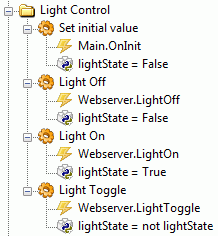
- LightControl.gif (6.87 KiB) Viewed 8356 times
3. The plugin webserver must be configured as follows:
Pako
Re: Dynamic Webserver (variable processing)
Posted: Mon Jun 13, 2011 4:46 pm
by eatmeimadanish
lol, well that makes a whole lot of sense now. I was assuming the Dynamic Webserver was the most current since it was not in earlier builds but in the newer ones. I know how to set it up, was just confused why it wasnt working. I will switch it over and see if it works. Also if anyone cares, I figured out how to do long key press and posted in the forum in case anyone is interested. It requires a down and up event on the web button, but can be done with Eventghost logic.
Anyway cheers.
P.S. watch for a free project called doggo July 5th. Then users will see how powerful Eventghost truly is, and hopefully bring more attention to this awesome tool.
Re: Dynamic Webserver (variable processing)
Posted: Wed Jun 15, 2011 3:27 am
by Livin
Looking forward to seeing what you have in store for us.
Re: Dynamic Webserver (variable processing)
Posted: Thu Jun 23, 2011 9:56 pm
by Livin
Pako wrote:
1. The author of this example is Bitmonster. For this reason, it is necessary to use the plugin Webserver
(which is also the author Bitmonster) and not plugin Dynamic Webserver.
Plugin Dynamic Webserver is obsolete and will be removed from the installation file.
Pako,
Where is the webserver plugin you are currently using?
Re: Dynamic Webserver (variable processing)
Posted: Fri Jun 24, 2011 4:29 am
by Pako
I in reality do not use the Webserver plugin. I have no use for it.
But the Webserver plugin, about which I wrote, is part of the installation file EventGhost.
Pako
Re: Dynamic Webserver (variable processing)
Posted: Fri Jun 24, 2011 5:29 am
by Livin
strange, my install (3.7.1494) does not have a default Webserver plugin
Re: Dynamic Webserver (variable processing)
Posted: Fri Jun 24, 2011 6:35 am
by Pako
Livin wrote:strange, my install (3.7.1494) does not have a default Webserver plugin
I was obviously referring to the actual installation file.
Based on the theme
New version 0.4.1 is out! (especially post by
kingtd, posted Sun May 29, 2011 9:07 am),
Webserver plugin is back in the installer file since version r1522.
Pako
Re: Dynamic Webserver (variable processing)
Posted: Fri Jun 24, 2011 3:22 pm
by Livin
I'll try installing .4 again... last time I tried to update it had problems - and I did not see anything .4 fixed or added that I needed anyway.
Re: Dynamic Webserver (variable processing)
Posted: Wed Jul 06, 2011 4:11 am
by Livin
eatmeimadanish ... where is doggo?
Re: Dynamic Webserver (variable processing)
Posted: Mon Aug 08, 2011 4:58 am
by eatmeimadanish
Very very soon my friend. I was punched in the face by my adopted son, who broke my eyesocket. So... needless to say I have had more pressing things to contend with. But the product is compeleted, I am waiting for the web designer to finish the
www.doggohouse.com redesign and the download will become available when we are ready to launch. My goal is in 2 weeks.