Page 3 of 12
Re: Spotify
Posted: Fri Jan 08, 2010 7:57 am
by Sheugel
Hi,
Really nice plugin!
Jostein, I saw in this post (
http://www.eventghost.org/forum/viewtop ... ify#p12417) that you have configured a nice interface with the webserver plugin, based on paseant's application.
It would be great if you could share your xml file and your index.html. Indeed, I'm not able to return the song title and artist information to my iPod Touch.
Thanks,
Sheugel
Re: Spotify
Posted: Fri Jan 08, 2010 1:47 pm
by Jostein
Hi.
I am not yet done with it. (Lots of stuff missing and half done.) And also lots of stuff in norwegian but if you want it i can post it as it is?
Also there is the catche problem still witch i dont now how to fix. I have to refresh the page to get the info. Hoping for a reply on how to avoid this.
To get the now playing status i use bitmonsters "new web plugin" not the one that comes with EG. Se this post in the midle by bitmonster:
http://www.eventghost.org/forum/viewtop ... 8742#p8742
Bitmonster wrote:You need 0.3.7.r1016 or greater to get it working. Then replace plugins\Webserver\__init__.py with the attached version.
In Eg i run this phyton script under these comands: Play, Next Track and Previous Track:
Code: Select all
nowplaying = eg.plugins.MySpotify.GetStatus()
nowplaying = nowplaying.split('!')
eg.globals.SpotifyStatus = nowplaying[1]
a = nowplaying[1]
b = a.strip("Now playing ")
c = b.split(" - ")
eg.globals.SpotifyArtist = c[0]
eg.globals.SpotifyTitle = c[1]
And under the stop command i use this phyton script:
Code: Select all
nowplaying = eg.plugins.MySpotify.GetStatus()
eg.globals.SpotifyStatus = nowplaying
eg.globals.SpotifyArtist = ""
eg.globals.SpotifyTitle = ""
To display the information in the web page i use the code posted before, here is just the info boxes:
Code: Select all
			<tr>
				<td egevent="Spotify:Artist-status" colspan="4" >Artist: {{SpotifyArtist}}</td>
			<tr>
				<td egevent="Spotify:Title-status" colspan="4" >Title: {{SpotifyTitle}}</td>
			<tr>
				<td egevent="Spotify:status" colspan="4" >{{SpotifyStatus}}</td>
			</tr>
I dont now how to master the sending of variables over the network event sender and am runing the webinterface on a diferent computer than the one i use spotify on. But i have a instance of spotify on that computer also that i use for the shower only. Here is the spotify EG layout from the computer runing the webinterface (just copy and paste in to EG tree.):
Code: Select all
<?xml version="1.0" encoding="UTF-8" ?>
<EventGhost Version="1194">
    <Folder Name="Lyd" Expanded="True">
        <Folder Name="Start" id="402" Enabled="False">
            <Macro Name="Start Program: spotify.exe">
                <Event Name="Main.VolDown" />
                <Action>
                    Speech.TextToSpeech(u'Microsoft Sam', 0, u'Spotify started', 0, 100)
                </Action>
                <Action>
                    System.Execute(u'C:\\Programfiler\\Spotify\\spotify.exe', u'', 2, False, 2, u'')
                </Action>
                <Action>
                    EventGhost.Wait(2.0)
                </Action>
                <Action>
                    MySpotify.GoToPlayList()
                </Action>
                <Action>
                    EventGhost.EnableExclusive(XmlIdLink(616))
                </Action>
                <Action>
                    EventGhost.EnableExclusive(XmlIdLink(624))
                </Action>
            </Macro>
            <Macro Name="Speech: Speak: Spotify not started. Press Volume down to start.">
                <Event Name="Main.Play" />
                <Event Name="Main.Previous Track" />
                <Event Name="Main.Next Track" />
                <Event Name="Main.VolUp" />
                <Action>
                    Speech.TextToSpeech(u'Microsoft Sam', 0, u'Spotify not started. Press Volume down to start.', 0, 100)
                </Action>
            </Macro>
        </Folder>
        <Folder Name="Spotify" id="616">
            <Folder Name="play" Expanded="True">
                <Macro Name="Spotify: Play" id="618">
                    <Event Name="Main.Play" />
                    <Action>
                        Speech.TextToSpeech(u'Microsoft Sam', 0, u'Spotify Play', 0, 100)
                    </Action>
                    <Action>
                        EventGhost.Wait(0.90000000000000002)
                    </Action>
                    <Action>
                        EventGhost.EnableExclusive(XmlIdLink(624))
                    </Action>
                    <Action>
                        MySpotify.Play()
                    </Action>
                    <Action Name="Status update spotify web">
                        EventGhost.PythonScript(u'nowplaying = eg.plugins.MySpotify.GetStatus()\nnowplaying = nowplaying.split(\'!\')\neg.globals.SpotifyStatus = nowplaying[1]\na = nowplaying[1]\nb = a.strip("Now playing ")\nc = b.split(" - ")\neg.globals.SpotifyArtist = c[0]\neg.globals.SpotifyTitle = c[1]\n')
                    </Action>
                </Macro>
                <Macro Name="Spotify: Stop" id="624" Enabled="False" Expanded="True">
                    <Event Name="Main.Play" />
                    <Action>
                        MySpotify.Stop()
                    </Action>
                    <Action Name="Status update spotify web">
                        EventGhost.PythonScript(u'nowplaying = eg.plugins.MySpotify.GetStatus()\neg.globals.SpotifyStatus = nowplaying\neg.globals.SpotifyArtist = ""\neg.globals.SpotifyTitle = ""\n\n\n\n\n')
                    </Action>
                    <Action>
                        Speech.TextToSpeech(u'Microsoft Sam', 0, u'Spotify Pause', 0, 100)
                    </Action>
                    <Action>
                        EventGhost.Wait(0.5)
                    </Action>
                    <Action>
                        EventGhost.EnableExclusive(XmlIdLink(618))
                    </Action>
                </Macro>
            </Folder>
            <Macro Name="Previous Track" Expanded="True">
                <Event Name="Main.Previous Track" />
                <Action>
                    MySpotify.PreviousTrack()
                </Action>
                <Action Name="Status update spotify web">
                    EventGhost.PythonScript(u'nowplaying = eg.plugins.MySpotify.GetStatus()\nnowplaying = nowplaying.split(\'!\')\neg.globals.SpotifyStatus = nowplaying[1]\na = nowplaying[1]\nb = a.strip("Now playing ")\nc = b.split(" - ")\neg.globals.SpotifyArtist = c[0]\neg.globals.SpotifyTitle = c[1]\n')
                </Action>
            </Macro>
            <Macro Name="Next Track" Expanded="True">
                <Event Name="Main.Next Track" />
                <Action>
                    MySpotify.NextTrack()
                </Action>
                <Action Name="Status update spotify web">
                    EventGhost.PythonScript(u'nowplaying = eg.plugins.MySpotify.GetStatus()\nnowplaying = nowplaying.split(\'!\')\neg.globals.SpotifyStatus = nowplaying[1]\na = nowplaying[1]\nb = a.strip("Now playing ")\nc = b.split(" - ")\neg.globals.SpotifyArtist = c[0]\neg.globals.SpotifyTitle = c[1]\n')
                </Action>
            </Macro>
            <Macro Name="Terminate Spotify">
                <Event Name="Main.VolUp" />
                <Action>
                    MySpotify.TerminateSpotify()
                </Action>
                <Action Name="Status update spotify web">
                    EventGhost.PythonScript(u'nowplaying = eg.plugins.MySpotify.GetStatus()\nnowplaying = nowplaying.split(\'!\')\neg.globals.SpotifyStatus = nowplaying[1]\na = nowplaying[1]\nb = a.strip("Now playing ")\nc = b.split(" - ")\neg.globals.SpotifyArtist = c[0]\neg.globals.SpotifyTitle = c[1]\n')
                </Action>
                <Action>
                    EventGhost.EnableExclusive(XmlIdLink(402))
                </Action>
                <Action>
                    Speech.TextToSpeech(u'Microsoft Sam', 0, u'Spotify Terminated', 0, 100)
                </Action>
            </Macro>
            <Macro Name="Speech: Speak: {TIME}">
                <Event Name="Main.VolDown" />
                <Action>
                    MySpotify.Stop()
                </Action>
                <Action>
                    EventGhost.Wait(1.0)
                </Action>
                <Action>
                    Speech.TextToSpeech(u'Microsoft Sam', 0, u'{TIME}', 0, 100)
                </Action>
                <Action>
                    EventGhost.Wait(4.0)
                </Action>
                <Action>
                    MySpotify.Play()
                </Action>
            </Macro>
            <Macro Name="Restart">
                <Event Name="MySpotify.Spotify Window was not found" />
                <Action>
                    System.Execute(u'C:\\Programfiler\\Spotify\\spotify.exe', u'', 2, False, 2, u'')
                </Action>
                <Action>
                    EventGhost.Wait(3.0)
                </Action>
                <Action>
                    MySpotify.GoToPlayList()
                </Action>
                <Action>
                    MySpotify.MinimizeSpotify()
                </Action>
            </Macro>
        </Folder>
    </Folder>
</EventGhost>
I am sure there is a way more neat/easy way to display it but this is the way that came to me. Happy if anybody else has a bether/smother way. Maby one that will update also when change is done from Spotify.
Best regards, Jostein.
Re: Spotify
Posted: Fri Jan 08, 2010 3:11 pm
by krambriw
Maybe this helps?
Code: Select all
<html>
  <head>
   <META HTTP-EQUIV="CACHE-CONTROL" CONTENT="NO-CACHE">
   <META HTTP-EQUIV="PRAGMA" CONTENT="NO-CACHE">
    <title>Lys</title>
  </head>
Re: Spotify
Posted: Fri Jan 08, 2010 6:52 pm
by Sheugel
@Jostein
Thanks so much, it's working fine!
I had no luck with krambriw's trick to update the data.
With an automatic refresh (here every 30''), even if it's not a perfect solution, it works:
Code: Select all
<html>
<head>
   	<meta http-equiv="refresh" content="30" />
</head>
Re: Spotify
Posted: Fri Jan 08, 2010 7:46 pm
by Jostein
Hi.
Yes this indeed work. But the catching of the whole page at the start gives it a lot qucker loading time when i switch from page to page inside the interface.
Sheugel wrote:With an automatic refresh (here every 30''), even if it's not a perfect solution, it works:
If i insert this it takes me straight back to the home screen every 30second. There must be some way to let the browser check only the one line without returning me to the home screen.
Best regards, Jostein
Re: Spotify
Posted: Mon Jan 18, 2010 7:45 pm
by Siernan
Hi, I've recently bought a RF MCE Remote Control Model OR22V and trying to control Spotify with it using EventGhost and the Spotify plugin but I can't seem to get it to work. If have configured EventGhost (EG) so that it will start Spotify and then "Enable exclusive" the Spotify folder in EG. This works fine but when I try to control spotify nothing happens (if I try to execute the commands from EG it works fine), do I need to do some more setup?
Regards,
Fredrik
Re: Spotify
Posted: Mon Jan 18, 2010 8:33 pm
by krambriw
Hi Fredrik,
Yes, have to map the remote button events to the corresponding macros
You can do it the following way: Press a button and you should see the event on the left side (in the EG log window). Drag that event to a macro on the right side for the corresponding function like volume up / volume down.
This picture shows a part of my configuration
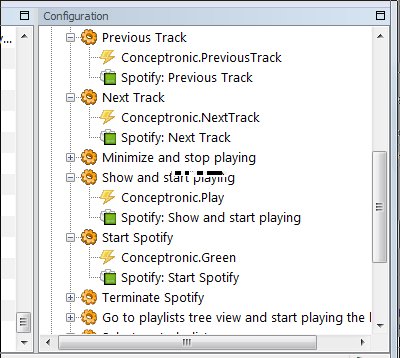
- Image2.jpg (42.17 KiB) Viewed 9055 times
Best regards, Walter
Re: Spotify
Posted: Mon Jan 18, 2010 10:22 pm
by Siernan
Thank you for the fast reply.
Thats what I thought and I tried to add a few events to the macros but i didn't work. But now I know I did right so I will keep on trying.
Thanks again!
/Fredrik
Re: Spotify
Posted: Wed Jan 20, 2010 11:31 am
by Siernan
Hi again, I can't get it to work.
If I press a key on the remote control nothing happens, but if I execute a command from EventGhost it works. So it seems as my remote controller can't communicate right. (If I press a key on the remote controller it shows up in the Log so that shuldn't bee the problem.)
This is my configuration:
Re: Spotify
Posted: Wed Jan 20, 2010 1:27 pm
by krambriw
I think it might be worth trying to enable the "Context Folder" that is disabled (the one with the red cross over it)
Otherwise it will block the execution of everything below on events
If you need to have it disabled, you will instead have to move the Spotify folder up in the tree hierarchy
Best regards, Walter
Re: Spotify
Posted: Wed Jan 20, 2010 8:18 pm
by Siernan
Thank you, it worked!

I added the "Tabulator" simulation events to the Spotify to so I can tab between the playlists and songs.
Thanks again for the help!
/Fredrik
Re: Spotify
Posted: Thu Jan 21, 2010 6:34 am
by Jostein
Hi krambriw.
Have you seen this web
interface it captures the images of the now playing. Is that possible to do with eventghost? Have it store a now playing image in the EG folder.
Also i have looked for a RF remote but cant find any i like. Where did you by the one from your later post in this thread?
Best regards, Jostein
Re: Spotify
Posted: Thu Jan 21, 2010 8:24 am
by krambriw
Hello,
Have you seen this web interface it captures the images of the now playing. Is that possible to do with eventghost? Have it store a now playing image in the EG folder.
I can check if this is possible
Also i have looked for a RF remote but cant find any i like. Where did you by the one from your later post in this thread?
At Kjell & Company: Datorer & kringutrustning / M├Âss & tangentbord / M├Âss / pekdon / Tr├Ñdl├Âst / Fj├ñrrkontroll / 66222
but it is more expensive it seems than this one that Siernan is using
http://xbmc.org/forum/showthread.php?t=42341
Best regards, Walter
Re: Spotify
Posted: Thu Jan 21, 2010 12:16 pm
by Jostein
krambriw wrote:At Kjell & Company: Datorer & kringutrustning / M├Âss & tangentbord / M├Âss / pekdon / Tr├Ñdl├Âst / Fj├ñrrkontroll / 66222
I can not find any RF remote at Kjell & Company can only find this IR one:
http://www.kjell.com/?item=66222
I want an IR remote as i have to go through a wall.
Yes this looks great. But i cant find it anywhere on ebay when searching for it. Can you tell me where you got it Siernan?
Best regards, Jostein
Re: Spotify
Posted: Thu Jan 21, 2010 12:24 pm
by Siernan
I bought mine at Inet:
http://www.inet.se/artikel/6101315/fjar ... -vista-mce.
I don't know if the can ship it outside Sweden but you can always ask them.
I can help you buy it and post it to you otherwise.