Page 3 of 6
Re: New Pioneer AVR Network Plugin
Posted: Sun Jul 29, 2012 11:23 pm
by piert
Sem;colon wrote:
What you maybe can do is:
-Shorten to DHCP scope of your router, or make an exclusion for one IP Address. (just to make sure that the router won't give the IP of the receiver to another device also)
-After that you turn of DHCP on your receiver and give the receiver one of these excluded IP addresses and the subnet mask (usually 255.255.255.0).
-also you have to give the receiver the IP address of your router as default gateway.
-and optionally the IP address of your router as DNS server.
Wow, Sem;colon, you really hit the nail on the head!
I had already done the first three of your recommendations, but would have never thought that the IP address of the DNS server should actually be the gateway's IP address (I had instead used my ISP's DNS server IP addresses).
I completed step number 4 and Voila, internet radio is back!
Thanks a lot!
Best regards,
Perry
Re: New Pioneer AVR Network Plugin
Posted: Sun Jun 09, 2013 6:33 pm
by Sem;colon
Hi everyone,
it's been a while since I gave you the last update, but as I promised, I won't quit developing this plugin until it works perfect for me.
Sadly this is still not the case, so I will release another new version in the future.
Major changes since last release:
-Better handing of connection problems (please let me know if get any more connection errors)
-Now you will get two events in EventGhost per events that the AVR creates; one with Payload and one without (please let me know if you find some events that are not split correctly)
-You now get every change to the Display of the AVR as an event with payload in EventGhost by default.
See the first post for the download!
Re: New Pioneer AVR Network Plugin
Posted: Mon Jun 10, 2013 7:42 am
by piert
Thanks for the continued improvement and sharing, Sem;colon!
I think I will not have time to test before next weekend, but I am interested in seeing the result of the display of the AVR as payload. I wonder if this will mean that the titles of internet radio stations will show up as a payload?
Re: New Pioneer AVR Network Plugin
Posted: Mon Jun 10, 2013 9:09 pm
by Sem;colon
Hi piert,
yes, you will see it

But you get a new event every time the display changes - which means you will get a lot of events when you have a scrolling title.
Re: New Pioneer AVR Network Plugin
Posted: Tue Jun 11, 2013 6:44 am
by piert
Is there any way you think the scrolling issue could be prevented, like maybe the option to have only the information of the display width?
Re: New Pioneer AVR Network Plugin
Posted: Thu Jun 13, 2013 7:07 pm
by Sem;colon
...sadly the receiver doesn't give me that information, but it would be possible to write a script that checks if its scrolling (with matching the prev. event with the new) and adds the new char to a string.
It would then take a little time to get the whole title, but at least you have it then completely in one string.
Re: New Pioneer AVR Network Plugin
Posted: Sat Sep 07, 2013 7:44 pm
by kkl
The plug-in is crashing after the receipt of most messages from the receiver. I'm getting:
error: uncaptured python exception, closing channel <eg.CorePluginModule.Pioneer AVR.PioneerEventer connected 10.10.2.73:8102 at 0x475c558> (<type 'exceptions.TypeError'>:Odd-length string [asyncore.pyc|read|76] [asyncore.pyc|handle_read_event|416] [asynchat.pyc|handle_read|158] [C:\Program Files (x86)\EventGhost\plugins\Pioneer AVR\__init__.py|found_terminator|239])
When starting up (re-enabling) the plug-in, I get all of the Pioneer.Received.Unknown 'XXXX' entries, then as soon as I do something, like press the AutoSurround button on the front panel, I get the error.
EG r1640
Win8 Pro x64
VSX-1123
Any thoughts?
Re: New Pioneer AVR Network Plugin
Posted: Sat Sep 07, 2013 9:30 pm
by Sem;colon
Hi kkl,
it seems like you are using the other Pioneer Ethernet Plugin (yes, there are two for the same thing

)
If you have trouble using the other plugin (what was the reason for me to create this second plugin) you could give mine a try (download at the first post) or go to the topic of the other plugin
viewtopic.php?f=9&t=3488&p=27349&hilit=+pioneer#p27349
Mine is not as comfortable as the other one, but it runs very stable.
Re: New Pioneer AVR Network Plugin
Posted: Sat Sep 07, 2013 10:00 pm
by kkl
Sem;colon wrote:
it seems like you are using the other Pioneer Ethernet Plugin
Doh!

Thank you for the quick reply, and for the plug-in!
Re: New Pioneer AVR Network Plugin
Posted: Sat Sep 07, 2013 11:04 pm
by kkl
Sem;colon, now that I've got your attention, I hope you won't mind another question. The event Pioneer_AV_NET.FL u" [)(]DIGITAL " doesn't seem to be associated with a payload event. Dragging it to the configuration pane just gives Pioneer_AV_NET.FL. What I'm trying to do is every time the receiver is in Dolby Digital mode, change it to DD EX (0022SR). The 0022SR command works, but I don't have the DD trigger. Is this possible?
Re: New Pioneer AVR Network Plugin
Posted: Sun Sep 08, 2013 10:04 am
by Sem;colon
kkl wrote:Sem;colon, now that I've got your attention, I hope you won't mind another question. The event Pioneer_AV_NET.FL u" [)(]DIGITAL " doesn't seem to be associated with a payload event. Dragging it to the configuration pane just gives Pioneer_AV_NET.FL. What I'm trying to do is every time the receiver is in Dolby Digital mode, change it to DD EX (0022SR). The 0022SR command works, but I don't have the DD trigger. Is this possible?
well, you never see the payload when you drag the event in your configuration; To trigger on a specific payload like " [)(]DIGITAL " you would have to write a little python script like this:
Code: Select all
if eg.event.payload=="  [)(]DIGITAL   ":
    eg.plugins.Pioneer_AV_NET.SendCommand(u'0022SR')
But I would recommend to use the Pioneer_AV_NET.SR**** event(s) to trigger your macro.
Re: New Pioneer AVR Network Plugin
Posted: Sun Sep 08, 2013 4:46 pm
by kkl
The problem seems to be that there are no SR**** or LM**** events that are specific for DD mode. If I use AutoSurround to get to DD, I see:
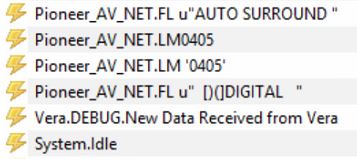
- eg_auto.JPG (22.09 KiB) Viewed 9666 times
If I use Direct, I see:
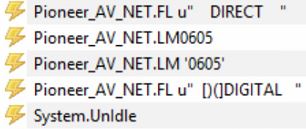
- eg_direct.JPG (17.77 KiB) Viewed 9666 times
So, there are numeric codes for the modes that get the receiver into DD mode, but not for Dolby Digital itself. This isn't the fault of the plug-in because Pioneer doesn't seem to provide a code for it, which is why it would be nice to be able to trigger on " [)(]DIGITAL ".
I will try your script example, if I can figure out when to test for that payload. Thanks again.
Re: New Pioneer AVR Network Plugin
Posted: Sun Sep 08, 2013 4:58 pm
by Sem;colon
I see...
well, the script should work for you
Re: New Pioneer AVR Network Plugin
Posted: Sun Dec 29, 2013 5:23 pm
by kkl
Sem;colon wrote:I see...
well, the script should work for you
To close this out, yes, it worked great. Thank you very much. It just took me a long time to realize that even though the full payload wasn't displayed, it was still there.
Re: New Pioneer AVR Network Plugin
Posted: Tue Dec 31, 2013 12:36 pm
by DarkCinema
Hi,
Is it possible to get the Audio input type (Request AUDIO information Parameter by ASCII code) ? I only can get the ASCII value with "?AST" and the output of that isn't an event.
Thanks.