Page 3 of 6
Re: VLC media player
Posted: Fri Jan 22, 2010 2:23 pm
by Pako
I added a new action - Seek.
Changed plugin can be downloaded from the
SVN repository.
Pako
Re: VLC media player
Posted: Sat Jan 30, 2010 4:39 pm
by Pako
Added several actions of type "Get Info". The results are not returned as an event, but as eg.result.
Get time - returns elapsed and remaining times.
Get length - returns the length of the current stream.
Get some info - returns information whose type is chosen by user.
Updated plugin can be downloaded from the
SVN repository.
Pako
Re: VLC media player
Posted: Sun Feb 21, 2010 8:53 am
by Pako
It's looks that nobody is interested, but I have again made another improvement of VLC plugin.
What actions were added this time:
1) Action, allowing cyclic switch of audio tracks. As "eg.result" returns the name of the currently selected track.
2) Action, allowing cyclic switch of subtitles. As "eg.result" returns the name of the currently selected subtitles.
3) Action named "
Simulate hotkey press". As the name suggests, through this action you can simulate the pressing any hotkey.
So you can now use a total of 101 commands! It is therefore clear that the majority is completely new.
4) Action named "
Get list of hotkeys". If bellow this action adding the action "OSM / Show menu, created from expression"
you get on screen menu with all 101 commands. For instance:
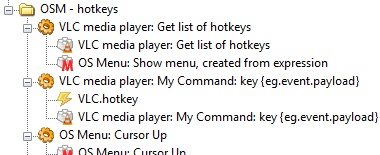
- GetListOfHotkeys.jpg (31.21 KiB) Viewed 13026 times
5)
The group of actions to control the DVD menu
Pako
Re: VLC media player
Posted: Fri Feb 26, 2010 4:41 pm
by AndiChrist
Thx for this useful improvements, especially the skipping features! The 'Fast Rewind' works properly, skipping back some seconds. But 'Fast Forward' seems to have the same behavier like 'Play Faster'.
AndiChrist
Re: VLC media player
Posted: Sat Feb 27, 2010 2:08 pm
by Pako
Thank you for responding. At least I know that my work was not entirely in vain.
Regarding actions "Fast Forward" and "Play Faster", I have nothing to add.
I do not use these actions and I'm not the author of the original version of the plugin, in which these actions have been included.
Pako
Re: VLC media player
Posted: Mon Jul 05, 2010 1:00 am
by maxim745
When I upgraded to VLC 1.10 I had to set things to work with Eventghost again and I noticed it won't save the telnet port number preference. I was able to get around it by modifying Eventghost to use VLC's (apparently immutable) default, 4212, but was curious if anyone else was encountering this. Tried Googling it, since it's a VLC issue, not an Eventghost one, but came up empty. FYI, I'm running Windows XP and was trying to set it to 1234, which is what it was set up for before the upgrade.
Re: VLC media player
Posted: Tue Jul 13, 2010 9:51 pm
by Diabl0570
Great plugin!, but i cant get the file name of the current playing video.
i use the "VLC media player: Current Playlist Status" action
if i run this action i get this back in my log:
Code: Select all
VLC.status change: ( new input: file:///W:/TV/History%20Of%20Sportscar%20Racing%202005%20DVDRip%20XviD%20FiCO/fico-hosr.avi )
VLC.status change: ( audio volume: 192 )
VLC.status change: ( play state: 3 )
VLC.status: returned 0 (no error)
my question: how can i get the filenmame into a variable?
gives me a bool "true"
Code: Select all
eg.globals.info0 = eg.result.split(":")
eg.globals.info1 = eg.globals.info[0]
eg.globals.info2 = eg.globals.info[1]
this gives errors:
Code: Select all
      Traceback (most recent call last):
        Python script "3", line 1, in <module>
          eg.globals.info0 = eg.result.split(":")
      AttributeError: 'bool' object has no attribute 'split'
Re: VLC media player
Posted: Wed Jul 14, 2010 6:49 am
by Pako
Please follow these steps:
1) Download the latest version of the plugin from the
SVN repository
2) Using notepad or another plain text editor to open the file
__init__.py
in directory
EventGhost\plugins\VLC and adjust the line number 38 as follows:
Code: Select all
version = "0.4." + "$LastChangedRevision: 1472 $".split()[1],
3) Start EventGhost and to obtain needed information, use the action
Get some info (in the configuration dialog box, select the type of information).
Pako
Re: VLC media player
Posted: Tue Jul 20, 2010 11:19 pm
by zeeke
I was actually looking forward to trying this tomorrow, nice to see that the vlc plugin is still developed!
Re: VLC media player
Posted: Sun Sep 12, 2010 7:03 pm
by Zageyiff
Hi all,
First following forum rules:
EventGhost 0.3.7.r1462
Windows 7 Ultimate x64
VLC media player 1.1.4
I have recently installed eventghost to control VLC media player through the MCE controller. I had some problems capturing events, but solved them looking at some posts in this forum.
Now that I can capture events, I relate them with vlc players macros.
When I started testing them, I get this error in the log an nothing happens.
I tried to find in the VLC media player, where is the port it's using to see if setting the same port will work. I set the same, and still causing problems. Any ideas?
1:58:41 PM MceRemote.BE9
1:58:41 PM Play
1:58:41 PM VLC.Connected
1:58:41 PM error: uncaptured python exception, closing channel <eg.PluginModule.VLC.VlcSession connected at 0x5fa0468> (<type 'exceptions.UnicodeDecodeError'>:'utf8' codec can't decode byte 0xff in position 45: unexpected code byte [asyncore.pyc|read|76] [asyncore.pyc|handle_read_event|416] [asynchat.pyc|handle_read|158] [C:\Program Files (x86)\EventGhost\plugins\VLC\__init__.py|found_terminator|155] [C:\Program Files (x86)\EventGhost\plugins\VLC\__init__.py|ValueUpdate|580] [encodings\utf_8.pyc|decode|16])
1:58:41 PM VLC.ConnectionLost
Re: VLC media player
Posted: Thu Oct 14, 2010 8:47 am
by Pako
I've made improvements to VLC plugin in order to use it for VLC version 1.1.0 and higher.
Pako
Re: VLC media player
Posted: Sat Oct 16, 2010 2:17 pm
by giantpopples
Hi !
I'm having issues with the original VLC plugin and VLC 1.1.4 so i downloaded your upgrade, paste it in the original VLC plugin folder but it doesn't seem to work.
I'm using Windows 7 x64, and eventghost doesn't see your plugin, it's not in the list of available ones.
I also tried to put your __init__.py in another folder (VLC Pako) but still the plugin does not show in the list of plugins..
What should i do or what should i modified in __init__.py ??
Thank you very much !
PS: i also wanted to thank you for all the development you do in eventghost, it would be great if you can help with the new fork since eventghost won't be maintained anymore, or create your own fork

Re: VLC media player
Posted: Sat Oct 16, 2010 4:29 pm
by Pako
Unfortunately, I have no idea why you can not see the plugin.
I do not think this is due to the fact that your Windows are x64.
But I do not have the opportunity to try it.
Plugin should be in the folder ...\EventGhost\plugins\VLC.
Pako
Re: VLC media player
Posted: Mon Oct 18, 2010 6:11 pm
by giantpopples
Nevermind, it works fine now.. Probably an issue with the name of the files i had, a space was in there i guess, sorry to had bothered you

Re: VLC media player
Posted: Fri Nov 19, 2010 6:26 pm
by AndreasMergner
