Page 23 of 38
Re: SunTracker - with moving ghost
Posted: Fri Jan 04, 2013 3:07 pm
by Saxtus
I get an error when I try "GetSunStatusWeatherCompensated(0)".
Everything between 1 and 60 doesn't display an error so far.
Maybe I haven't understood exactly what that value means, except that it is counted in minutes.
Can you please clarify?
Re: SunTracker - with moving ghost
Posted: Fri Jan 04, 2013 3:32 pm
by krambriw
The main idea behind the various possible actions is to check if the sun is up or down and to use this variable in a script to execute something based on the condition.
The "normal" one to use is the 'GetSunState'. It will return the sun state based only on the actual sunrise and sunset in your location.
If you intend to control something based on the sun state, it might be that you also would like to consider the current weather in your location. Like when you are turning on lamps, in bad weather conditions, lamps need to be turned on earlier and left on longer. For this purpose you could use the 'GetSunStatusWeatherCompensated' and add the number of minutes that shall be used in the calculation.
As in your example, if you set 'GetSunStatusWeatherCompensated(60)', the calculation will use 60 minutes in total for calculation, depending on the programmed rules (you can see and actually change this in the separate python file 'weather_condition.py' where the various sections hold their specific sets of weather conditions).
So if the weather condition is one of those in section 'weather_conditions_dark' the full time (in your example 60 minutes) will be applied and the lights will be turned on 60 minutes before the actual sunset (and consequently turned off 60 minutes after actual sunrise). If the weather is fair, clear, sunny or something else in the section 'weather_conditions_bright' no time will be added or subtracted...and then there is a section for weather conditions in between where the time will be divided into half.
When you use this you shall not use the value = 0 because it makes no sense, it is the same as using 'GetSunState' instead. The error you see now will not be there when the print statements are removed in the final version
Best regards, Walter
Re: SunTracker - with moving ghost
Posted: Fri Jan 04, 2013 10:44 pm
by Saxtus
Thank you, now it makes sense.
After passing the 00:30 mark without any problem, I believe that you've fixed the problem completely.
Some requests/ideas:
Is there a way to get the next sunrise's timestamp from SunTracker into a variable, kinda like GetSunStateWithTimeStamp does for (next?) sunset?
Also is there a way to use "GetSunStatusWeatherCompensated()" with "Check if time now is inside calculated virtual range" action? (i.e. I don't see an option to select "Weather Compensated Sunrise/Sunset" at it's dropdown boxes).
krambriw wrote:When you use this you shall not use the value = 0 because it makes no sense, it is the same as using 'GetSunState' instead.
The dialog shows and allows zero values, maybe needs a fix and also add some of the description you gave above to it just to spice it up for those not reading the fora?
Re: SunTracker - with moving ghost
Posted: Sat Jan 05, 2013 11:16 am
by krambriw
The dialog shows and allows zero values
Thanks, will change to allow 1-60, thats easy!
For the rest of your ideas, I think all is possible (with software), just more or less work for each of them.
What are the use cases you have in mind?
get the next sunrise's timestamp from SunTracker into a variable
Do you want actions to pick the time for upcoming sunrise (and sunset) into a variable?
Also is there a way to use "GetSunStatusWeatherCompensated()" with "Check if time now is inside calculated virtual range" action?
This one is a bit more heavy to implement, I need to look at the impact and how much effort it will take, maybe I can find an easy solution.
Best regards, Walter
Re: SunTracker - with moving ghost
Posted: Sat Jan 05, 2013 2:29 pm
by Saxtus
I am just trying an easy way to combine the power of "Compensated Weather" with adding a preset offset, as offered by the other functions.
If you have a better idea in mind to do this, please guide me!
Re: SunTracker - with moving ghost
Posted: Sun Jan 06, 2013 1:07 pm
by krambriw
@saxtus
Attached is a new test version. It includes new features as discussed and understood.
- Added a getter action 'Check if time now is inside calculated virtual range with weather compensated offset' to check dawn/dusk calculations for various twilight options and +/- X minutes offset setting with weather condition compensation.
This action is based on the one where you can check if within time range for the various twilight options and +/- X minutes offset setting and now in addition, with weather condition compensation. This action will return True or False depending on if all conditions are met or not.
- Added a getter action 'GetTimeFor_SunSet_SunRise' to retrieve current time stamps for todays Sunset and Sunrise"
This action will return a list with two strings, one for sunrise time and one for sunset time in the following format:
I hope I understood it correctly,
Best regards, Walter
Re: SunTracker - with moving ghost
Posted: Sun Jan 06, 2013 5:07 pm
by flopp
If i want to power on when sunset is and turn off when sunrise is, power on during whole night, how do I set it up then.
I have tried with ---- on everything but nothing happens.
I have to add at least OFF time, then it works.
Any ideas?
Re: SunTracker - with moving ghost
Posted: Sun Jan 06, 2013 5:23 pm
by flopp
I get "URL Error" every 2 minutes.
I got this error as soon as I added Suntracker plugin.
I have Tellstick DUO, Broadcast and scheduler plugins installed.
Re: SunTracker - with moving ghost
Posted: Sun Jan 06, 2013 7:27 pm
by krambriw
I get "URL Error" every 2 minutes.
It might be that your location settings are incorrect...
If i want to power on when sunset is and turn off when sunrise is, power on during whole night, how do I set it up then.
Try to set '1100' on all days like below
Re: SunTracker - with moving ghost
Posted: Sun Jan 06, 2013 10:50 pm
by Saxtus
krambriw wrote:- Added a getter action 'Check if time now is inside calculated virtual range with weather compensated offset' to check dawn/dusk calculations for various twilight options and +/- X minutes offset setting with weather condition compensation.
This action is based on the one where you can check if within time range for the various twilight options and +/- X minutes offset setting and now in addition, with weather condition compensation. This action will return True or False depending on if all conditions are met or not.
Thank you very much but I can't understand where do I set the weather compensated offset.
I only see the standard offset... (either I didn't understood it correctly)

Re: SunTracker - with moving ghost
Posted: Mon Jan 07, 2013 6:32 am
by krambriw
Oh, yes, good point, it is the normal offset setting that is used. Like if you set 60 minutes, when weather compensated it might be changed before it is used in the calculation (same rules applies as for all weather condition based stuff), all depending on the weather condition...
Re: SunTracker - with moving ghost
Posted: Mon Jan 07, 2013 10:53 am
by Saxtus
I am still confused...
Maybe if you can give me an example with numbers, so I will understand how the offset is used in conjunction with good and with bad weather conditions?
Re: SunTracker - with moving ghost
Posted: Mon Jan 07, 2013 12:00 pm
by krambriw
The action will return true
- if you are within the time range (with the weather compensated offset applied) between the selected twilight options (e.g sunrise/sunset or something else)
The rules for recalculating the offset are the same as described earlier above:
So if the weather condition is one of those in section 'weather_conditions_dark' the full time (in your example 60 minutes) will be applied and the lights will be turned on 60 minutes before the actual sunset (and consequently turned off 60 minutes after actual sunrise). If the weather is fair, clear, sunny or something else in the section 'weather_conditions_bright' no time will be added or subtracted...and then there is a section for weather conditions in between where the time will be divided into half.
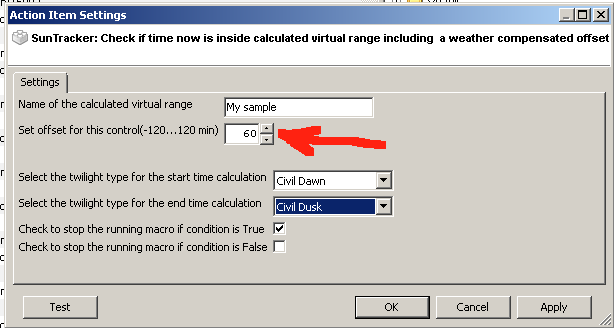
As example, assume you define an action and you would like this to return TRUE as long as you are inside the range.
- you select 'Civil Dawn' and 'Civil Dusk'
- you set the offset to 60 minutes
What will happen is that depending on the weather condition, a certain time will be added or subtracted to the actual time for 'Civil Dawn' and 'Civil Dusk' when checking if you are inside or not. If outside the return is of course FALSE. Note that this time adjustment might change many times during the day, in the early morning, time may be added, in the evening, time may be subtracted, all depending on the current weather condition when the check is performed.
BestR Walter
Re: SunTracker - with moving ghost
Posted: Mon Jan 07, 2013 2:46 pm
by Saxtus
What I fail to understand, is where do I set the weather compensation minutes offset.
Thank you for your patience with me!

Re: SunTracker - with moving ghost
Posted: Mon Jan 07, 2013 3:05 pm
by krambriw
The offset you set will not be fixed, it will be weather compensated...you set the maximum or minimum value it is allowed to have.
- Image2.png (9.21 KiB) Viewed 7796 times