Notice: This forum has been recovered from an old backup, so some content, links, and dates may be outdated. The forum is currently read-only while we restore sign-in and registration functionality. Details

If you find this forum valuable and would like to help keep it online, donations to help cover hosting and domain costs are greatly appreciated, but never expected. You can support the forum through Buy Me a Coffee or Ko-fi. Thank you for helping preserve the EventGhost community.

SunTracker - with moving ghost

Questions and comments specific to a particular plugin should go here.
krambriw
Plugin Developer
Posts: 2570
Joined: Sat Jun 30, 2007 2:51 pm
Location: Stockholm, Sweden
Contact:

Re: SunTracker - with moving ghost

Post by krambriw »

Hello Ryan, yes, you are right, we need to check for several conditions to determine when it might be required to close the shades.

Actually, in the SunTracker plugin folder, there is a file with defined conditions.

I suggest you try the following conditions (those are the ones I use for *good* weather) and replace part of the script code with this code:

Code: Select all

def CheckWeather(pload):
    cond = False
    if(
        pload == 'Fair'
        or
        pload == 'Fair/Windy'
        or
        pload == 'Clear'
        or
        pload == 'Sunny'
        or
        pload == 'Mostly Sunny'
        or
        pload == 'Partly Sunny'
    ):
        cond = True
    return cond
You can add more conditions if you like. Eventually 'Partly Cloudy' would be a candidate. If you Google for 'Yahoo weather conditions' you can find some more info but I have seen that what Yahoo actually publishes is not 100% according to published list. If you look into the file mentioned above (weather_conditions.py in the SunTracker plugin folder) you can see those I use.

BR
rdgerken
Experienced User
Posts: 89
Joined: Fri Sep 21, 2012 7:41 pm

Re: SunTracker - with moving ghost

Post by rdgerken »

Walter,

Everything is working great! Thanks so much for the help with that.

Instead of using the else statement to raise the shade, I commented that out, and then after python script action runs, I run an action to disable itself, and then raise the shade on sunrise the next morning - and then re-enable the script action. This is pretty close to what I want, but I think I will try to find a way to get it to raise the shade back up like maybe 60 minutes before sunset or something like that (could I use a suntracker schedule with an offset or something to accomplish this?). I guess the only downside to the approach you worked out here, is that the event log is flooded with this script, since it runs every minute while enabled - as opposed to the approach where you would have a timer running that generates the event when you want it - but given my requirement of monitoring that weather condition continuously during the late afternoon/evening hours - this does seem to be a good way to do that.

While I'm bugging you with all of this stuff, I have two other questions that are unrelated.

1. Is it possible to retrieve the temperature with the weather condition stuff?
2. I tried, rather unsuccessfully, to configure 3 different moving ghosts to simulate movement about the house when I'm out on vacation. I struggle to understand how to make that work. I know you tried helping me with that in the past, but was wondering if you would mind giving a quick primer on how to do that? The lighting system I have has all the devices assigned to an index number. What I'd like to do is group different light indexes and assign them to be called to activate via moving ghost. For example, if I have a moving ghost 1, which is the first floor of the home, and it's device indexes were ( 3, 8, 12, 15, 20) - is there a way to randomize turning on this group of lights when the mode is activated? I would then do the same thing for floor 2 with a different moving ghost. Just some thoughts... did you have a different thing in mind when designing this function?

Both of these are low priority, so please, don't take too much out of your time to field these questions. I appreciate the help. Also, please PM me if you accept donations.

Ryan
krambriw
Plugin Developer
Posts: 2570
Joined: Sat Jun 30, 2007 2:51 pm
Location: Stockholm, Sweden
Contact:

Re: SunTracker - with moving ghost

Post by krambriw »

This is pretty close to what I want, but I think I will try to find a way to get it to raise the shade back up like maybe 60 minutes before sunset or something like that (could I use a suntracker schedule with an offset or something to accomplish this?)
Yes, just configure a new SunTracker action and set the offset to -60. (Maybe the noise from the engines will wake you up too early, you have to try it)
the event log is flooded
True, only way to keep everything hidden would be to create a small plugin instead. Benefit is also that some parameters could be made configurable
Is it possible to retrieve the temperature with the weather condition stuff?
Sure, try this code in a python script

Code: Select all

cc = eg.plugins.Suntracker.GetCurrentCondition()
c_temp = cc['temp']
print 'Current temperature: ' + c_temp
#if you would like to convert the string into a value for comparison with a threshold
i_temp = int(c_temp)
print i_temp
f_temp = float(c_temp)
print f_temp
I tried, rather unsuccessfully, to configure 3 different moving ghosts
I think you are on the right track, configure them individually and check the box 'Enable Local Moving Ghost' in each. Also make the event names in each unique like 'MG_FirstFloor_ON' and 'MG_FirstFloor_OFF' etc.

You could also try to check the 'Exclusive usage' box. This will de-activate some basic functions but keep the moving ghost things as indicated in the picture in the link below.

download/file.php?id=2371&mode=view

BestR Walter
NateEaton
Posts: 4
Joined: Thu May 23, 2013 3:32 am

Re: SunTracker - with moving ghost

Post by NateEaton »

I'm still a bit new to EventGhost and just discovered SunTracker so please pardon the noob questions...

My goal is to control the brightness on secondary monitor on wall above TV (the secondary monitor is a 21" that runs slideshow software and serves as a digital photo frame). The issue is that at night (or when really cloudy and dark outside) the secondary monitor can become a distraction when watching TV. My wife still likes to have it on even when we're watching TV but it's a pain to have to lean up high to manually change the brightness. I have a command line interface to control its brightness and can do that using remote but preference would be to just have it bright during the day and dim whenever its dark.

For now, I am not worried about controlling changes due to weather, just want to dim it at sunset and return to bright at sunrise. What I haven't figured out yet is how to trigger those events. I did add the plugin to Autostart and configured it for my locale. I also added a Suntracker in Autostart and named the On and Off events. What I don't get is how to use those events to control actions. I went a day or two watching the log for the named events but didn't see anything show up at sunrise or sunset. I tried entering times for Morning On and Evening Off and did start seeing events but they were every 30 minutes and didn't seem to align to sunrise or sunset.

Again, I'm sure I'm missing something obvious but I'd appreciate any assistance.

Regards,
Nathan
vuego
Experienced User
Posts: 69
Joined: Wed Jan 17, 2007 9:22 pm
Location: Sweden

Re: SunTracker - with moving ghost

Post by vuego »

You do need times for Morning On and Evening Off for events to trigger. You are seeing it every 30 minutes because Syncronization is activated. The idea with Synchronization is that SunTracker should keep, for example, your lights on even if it is manually turned off during the evening. If you only want one event on sunrise and one on sunset, you may disable Syncronization (using the SunTracker action item you added to Autostart).
Pastis
Posts: 19
Joined: Mon May 16, 2011 3:03 pm

Re: SunTracker - with moving ghost

Post by Pastis »

hello
I am using SunTracker: GetForecasts
but where can I get the "chance of rain" % ? .. to know when I wake up if I need my umbrela or not ^^
krambriw
Plugin Developer
Posts: 2570
Joined: Sat Jun 30, 2007 2:51 pm
Location: Stockholm, Sweden
Contact:

Re: SunTracker - with moving ghost

Post by krambriw »

Chance of rain is not provided by the Yahoo! Weather api. Check this link as example
http://weather.yahooapis.com/forecastrss?w=615702

Always bring umbrella with you or have one in the car this time of the year...

BestR Walter
flopp
Posts: 17
Joined: Mon Dec 24, 2012 8:00 am

Re: SunTracker - with moving ghost

Post by flopp »

Problem when EG is restarted.

latest version of EG
latest version of SunTracker
I am Administrator
UAC is turned off
Windows 7 home premium 64 bit

I close EG manually with the X in top right corner

I start EG from StartMenu

i open suntracker plugin from EG configuration menu "Autostart"

Currently Active Suntrackers-list is empty

If I press "Restart all", all my SunTracker items will be visibe in the Currently Active Suntrackers-list

This i have to do everytime i restart EG

I had same problem in XP embedded SP2

Any ideas?
krambriw
Plugin Developer
Posts: 2570
Joined: Sat Jun 30, 2007 2:51 pm
Location: Stockholm, Sweden
Contact:

Re: SunTracker - with moving ghost

Post by krambriw »

Show a picture/screen shot of your config tree so that we can verify where you put your suntracker actions
flopp
Posts: 17
Joined: Mon Dec 24, 2012 8:00 am

Re: SunTracker - with moving ghost

Post by flopp »

krambriw wrote:Show a picture/screen shot of your config tree so that we can verify where you put your suntracker actions
Thanks for quick reply.

See added pictures
Attachments
image.jpg
image.jpg
image.jpg
krambriw
Plugin Developer
Posts: 2570
Joined: Sat Jun 30, 2007 2:51 pm
Location: Stockholm, Sweden
Contact:

Re: SunTracker - with moving ghost

Post by krambriw »

Hello, I see the problem now and it is easy to resolve.

The SunTracker actions you have created are fine but they will not automatically start when placed in the config tree like this. You can do it in two ways:

a) You drag and drop them under the "Autostart" and below the actual SunTracker plugin itself

b) You add the event 'Main.OnInit' to each of the macros, 'nattbelysning', 'Sovrum' etc

I would use the b) alternative

Best regards, Walter

PS you need to set the longitude and latitude correctly to get actions working according to sunset/sunrise. To get correct weather information, you need to set your location
flopp
Posts: 17
Joined: Mon Dec 24, 2012 8:00 am

Re: SunTracker - with moving ghost

Post by flopp »

I do use Long/Lat, but i erased them when I added the pictures to the forum.

Thanks for the help.

:)
flopp
Posts: 17
Joined: Mon Dec 24, 2012 8:00 am

Re: SunTracker - with moving ghost

Post by flopp »

krambriw wrote:Hello, I see the problem now and it is easy to resolve.

The SunTracker actions you have created are fine but they will not automatically start when placed in the config tree like this. You can do it in two ways:

a) You drag and drop them under the "Autostart" and below the actual SunTracker plugin itself

b) You add the event 'Main.OnInit' to each of the macros, 'nattbelysning', 'Sovrum' etc

I would use the b) alternative

Best regards, Walter

PS you need to set the longitude and latitude correctly to get actions working according to sunset/sunrise. To get correct weather information, you need to set your location
I worked. Thanks again.
creon
Posts: 3
Joined: Thu Nov 18, 2010 7:27 am

Re: SunTracker - with moving ghost

Post by creon »

i have found suntracker
and want to use it on my rolling shutters

suntracker say's Main.Weather Condition: 'Mostly Cloudy' in the log
i was thinking that i can just use that tag to start a event
so i drag the event to a macro, but that didn't work
it only dislay's Main.Weather Condition:
and every time suntracker shecks for weather my macro strarts

how can i use 'Mostly Cloudy' to start a macro?
krambriw
Plugin Developer
Posts: 2570
Joined: Sat Jun 30, 2007 2:51 pm
Location: Stockholm, Sweden
Contact:

Re: SunTracker - with moving ghost

Post by krambriw »

Hello,
Provided you automate your shutters at your own risk, you may do as follows:

The data you need to use, the actual weather condition, is in the so-called payload of the event. That is why it doesn't work the way you tried.

You need to use a python script to extract the payload content and then analyze the condition to decide if the macro shall continue or not. Like in this example:

Code: Select all

def eventHandler(base, pload):
    try:
        if(
            str(pload).find('Mostly Cloudy') > -1 or
            str(pload).find('Cloudy') > -1 or
            str(pload).find('Mostly Cloudy/Windy') > -1
        ):
            pass
        else:        
            eg.StopMacro()
            eg.plugins.EventGhost.ShowOSD(u'Stopped macro', u'0;-24;0;0;0;700;0;0;0;1;0;0;2;32;Arial', (255, 255, 255), (0, 0, 0), 0, (0, 0), 0, 3.0, False)
    except:
        eg.StopMacro()
        pass


eg.event.suffix_copy = eg.event.suffix
eg.event.payload_copy = eg.event.payload

eventHandler(eg.event.suffix_copy, eg.event.payload_copy)
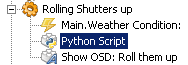
Image2.png
Image2.png (3.57 KiB) Viewed 6883 times
It works so that only if a valid weather condition is found, the macro will continue an roll your shutters up. Please be aware that Yahoo! Weather has a number of weather condition that you may consider. Check the file 'weather_conditions.py' in the suntracker plugin folder (The sample in the script above you can easily extend).

If you need a macro also to roll shutters down, you can create such with a script based on the same principle but opposite conditions. But be sure that you consider carefully all conditions that eventually could damage the shutters or anything in the way BEFORE rolling them down (including adults & kids, bad weather conditions, windows closed, no other obstacles in the way etc etc).

BR
Post Reply