Page 29 of 36
Re: RFXtrx
Posted: Tue Feb 10, 2015 8:13 pm
by krambriw
It is interesting to see, at least it breaks at the same line as in my case so that is good. But I cannot understand why you don't get the event.
This is a desperate question, I assume you have this checkbox unticked? If so, I will build in some more debugging info tomorrow, we will find this!
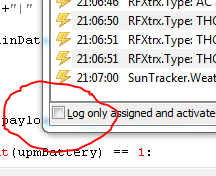
- Skärmklipp.PNG (10.38 KiB) Viewed 5304 times
I have also started with the NetHome plugin. There it works partly, I have two types of devices and one is monitored correctly so I receive an event in EG if I disconnect it. But with the Duo, this does not work, I have reported this to the OpenNetHomeServer forum. I think they have bug, hopefully it gets corrected.
Re: RFXtrx
Posted: Tue Feb 10, 2015 8:25 pm
by Mastiff
Desperation often works with morons like me, but no.

It's not that. So we'll see tomorrow, then.
Oh, and great! I'm glad you're doing this on the NHS plugin!

Re: RFXtrx
Posted: Tue Feb 10, 2015 8:33 pm
by krambriw
Thanks, this type of errors are irritating...you have new version uploaded
Thanks for testing!
Two lines will be printed when the connection is checked
Re: RFXtrx
Posted: Tue Feb 10, 2015 8:44 pm
by Mastiff
Your Swedish version of tomorrow and my version of tomorrow differs a bit...
But nope, nothing happening.The connection is not checked, it seems.
Code: Select all
21:41:21   Exception in thread RFXtrxThread:
21:41:21   Traceback (most recent call last):
21:41:21     File "threading.pyc", line 532, in __bootstrap_inner
21:41:21     File "threading.pyc", line 484, in run
21:41:21     File "C:\Program Files (x86)\EventGhost\plugins\RFXtrx\__init__.py", line 763, in ReceiveThread
21:41:21       while self.serial.inWaiting() > 0 and not self.hold:
21:41:21     File "C:\Program Files (x86)\EventGhost\eg\WinApi\serial\serialwin32.py", line 202, in inWaiting
21:41:21       flags, comstat = win32file.ClearCommError(self.hComPort)
21:41:21   error: (5, 'ClearCommError', 'Ingen tilgang.')
21:41:21
21:41:28   System.DeviceRemoved [u'\\\\?\\USB#Vid_0403&Pid_6001#AEVD61QP#{a5dcbf10-6530-11d2-901f-00c04fb951ed}']
21:42:10   System.ClipboardChanged
21:44:00   System.ClipboardChanged
Re: RFXtrx
Posted: Wed Feb 11, 2015 6:26 am
by krambriw
Good Morning Mastiff,
Continuing from y-day, I wonder how your start up of the RFXtrx plugin works. In my case the following lines are printed, how does it look like for you?
Re: RFXtrx
Posted: Wed Feb 11, 2015 6:35 am
by krambriw

I suddenly know what is the problem...I did put the monitoring code in a thread that might not run depending on user settings..it is depending on that you have select support for websockets in the plugin
I will quickly move the function to another thread that is always running
Re: RFXtrx
Posted: Wed Feb 11, 2015 6:47 am
by krambriw
So, new version uploaded
Re: RFXtrx
Posted: Wed Feb 11, 2015 7:20 am
by Mastiff
Good morning! I'm impressed, you manage to get three postings and one new version before I get out of bed! Working from home has it's perks for me... And you're right, I don't use the websockets. But unfortunately that doesn't seem to help. More than five minutes without an event, and I gave up:
Code: Select all
08:13:18   Exception in thread RFXtrxThread:
08:13:18   Traceback (most recent call last):
08:13:18     File "threading.pyc", line 532, in __bootstrap_inner
08:13:18     File "threading.pyc", line 484, in run
08:13:18     File "C:\Program Files (x86)\EventGhost\plugins\RFXtrx\__init__.py", line 763, in ReceiveThread
08:13:18       while self.serial.inWaiting() > 0 and not self.hold:
08:13:18     File "C:\Program Files (x86)\EventGhost\eg\WinApi\serial\serialwin32.py", line 202, in inWaiting
08:13:18       flags, comstat = win32file.ClearCommError(self.hComPort)
08:13:18   error: (5, 'ClearCommError', 'Ingen tilgang.')
08:13:18
08:13:25   System.DeviceRemoved [u'\\\\?\\USB#Vid_0403&Pid_6001#AEVD61QP#{a5dcbf10-6530-11d2-901f-00c04fb951ed}']
08:15:09   System.Idle
08:15:14   System.UnIdle
08:16:56   System.ClipboardChanged
08:18:56   System.DeviceAttached [u'\\\\?\\USB#Vid_0403&Pid_6001#AEVD61QP#{a5dcbf10-6530-11d2-901f-00c04fb951ed}']
As for the startup I'm almost like that, but I see that you have the E version, while I have this:
Code: Select all
08:19:51      Enable: Plugin: RFXtrx
08:19:54   Interface mode:  ['0d', '01', '00', '01', '02', '53', '53', '04', '00', '06', '00', '00', '00', '00']
08:19:54   RFXtrx Firmware Version: 83
08:19:54   RFXtrx receiver/transceiver type: 433.92MHz transceiver
08:19:54   You have a RFXtrx Type 1
08:19:54   Copyright RFXCOM. A genuine RFXtrx is detected and started
So different type. Can that be the problem?
Re: RFXtrx
Posted: Wed Feb 11, 2015 7:58 am
by krambriw
I have added some debugging printouts. I am worried all threads are maybe not started correctly. You should see the following lines in the log every minute
Code: Select all
2015-02-11 08:56:00  counter 60
2015-02-11 08:56:00  Checking connection...
Re: RFXtrx
Posted: Wed Feb 11, 2015 8:07 am
by Mastiff
Yep, I see that. As soon as I saw it I disconnected the RFX, and this time:
Code: Select all
09:03:21   Exception in thread RFXtrxThread:
09:03:21   Traceback (most recent call last):
09:03:21     File "threading.pyc", line 532, in __bootstrap_inner
09:03:21     File "threading.pyc", line 484, in run
09:03:21     File "C:\Program Files (x86)\EventGhost\plugins\RFXtrx\__init__.py", line 763, in ReceiveThread
09:03:21       while self.serial.inWaiting() > 0 and not self.hold:
09:03:21     File "C:\Program Files (x86)\EventGhost\eg\WinApi\serial\serialwin32.py", line 202, in inWaiting
09:03:21       flags, comstat = win32file.ClearCommError(self.hComPort)
09:03:21   error: (5, 'ClearCommError', 'Ingen tilgang.')
09:03:21
09:03:28   System.DeviceRemoved [u'\\\\?\\USB#Vid_0403&Pid_6001#AEVD61QP#{a5dcbf10-6530-11d2-901f-00c04fb951ed}']
09:04:00   counter 60
09:04:00   Checking connection...
09:04:00   RFXtrx.Lost connection with the RFXtrx
So finally working! Great work!

Any idea why it didn't work before? Also, I pulled this to the reset plugin action, and while still disconnected it did reset the plugin. So this time I tried to pull the "Error starting plugin" message to another action, which would reboot the VM, but that wasn't possible. Maybe I should create an action that reboots after two lost connection events?
Re: RFXtrx
Posted: Wed Feb 11, 2015 1:10 pm
by krambriw
Finally back from a meeting
Any idea why it didn't work before?
No idea but happy it works now!
While still disconnected it did reset the plugin
Yep, it tries every minute, it doesn't know when the device is connected again so just re-trying until it works
So this time I tried to pull the "Error starting plugin" message to another action, which would reboot the VM, but that wasn't possible. Maybe I should create an action that reboots after two lost connection events?
The error message is not an event, just a printed message so it cannot be used as a trigger. It is as you think possible to count the number of events and once it has reached the level, you can do a reset or reboot
I will remove the print statements from the code and upload the final version
Re: RFXtrx
Posted: Wed Feb 11, 2015 1:13 pm
by Mastiff
Great, thanks! So this means that my other request about "if no events received for x minutes, fire event" is out?

Re: RFXtrx
Posted: Wed Feb 11, 2015 1:28 pm
by krambriw
Final version is uploaded and available
Re: RFXtrx
Posted: Wed Feb 11, 2015 1:34 pm
by krambriw
"if no events received for x minutes, fire event"
Help me to see a use case for that? Since the connection with the device is checked once a minute, you will know when it is not connected any longer?
If you want other functions like a counter no events for x minutes, it is better to put such into a script. Make an eg.global variable for the counter, increment for each connection loss event, reset counter at x and reboot if really needed
Re: RFXtrx
Posted: Wed Feb 11, 2015 1:40 pm
by Mastiff
Well, it was just for those times (like I told you) where the RFX still sends, but don't receive any events. Like I said I think that's only happened once, but of course with my wife in the house that's five to many!
Oh, and I tested the new version now, and it worked.

So great work! Let it stay without connedtion for two minutes and then reconnected it, and on the next check it detected it.