Page 4 of 6
Re: Multitap
Posted: Thu Jan 15, 2009 9:07 pm
by Bitmonster
The driver should be right. It simply also installs the required drivers for the other X10 stuff. And it worked for every X10 receiver I have seen.
You should get a "X10 USB Wireless Transceiver V2.36" in the device manager. Not the "ACPI" one. Try to install the driver when the device is plugged in. Your 'USB Human Interface Device' is most likely another device like a keyboard, mouse, joystick or similar. Try to remove every other peripheral to make sure.
But we are getting off topic. If it doesn't work, open another thread.
Re: Multitap
Posted: Fri Jan 16, 2009 6:22 pm
by michelch
I uninstalled and reinstalled the driver, and now I see the correct driver installed.
Now I have a "X10 USB Wireless Transceiver V2.36" in the device manager. Not the "ACPI" one.
But still no events are coming in anymore with this driver.
I know it is off-topic. I wanted to start another thread, but I didn't see a way to do that easily.
Re: Multitap & Extraction of Suffixes
Posted: Wed Mar 11, 2009 1:21 am
by Loll
Hi
I have installed the Multitap plugin for writing some text in itunes.
I have set the Multitap mode to "SMS like String" and the eventname to "SMSEvent"
So after pressing "2 - 2 2 - 2 2 - 2 - OK" (abba) I get a new event called Multitap.SMS.Event.abba.
Is there a method to extract the text from the event-key in order to do enter the text in some search field in itunes?
I have already tried with "{eg.Multitap.SMSEvent.suffix.split('.')[1]}" in the "emulate keystrokes"-command, but this does not work:
Code: Select all
      Multitap: Enter
      Emulate Keystrokes: {eg.Multitap.SMSEvent.suffix.split('.')[1]}
      Error in Action: "Emulate Keystrokes: {eg.Multitap.SMSEvent.suffix.split('.')[1]}"
      Traceback (most recent call last) (851):
      File "C:\Programme\system\EventGhost\eg\Classes\ActionBase.py", line 166, in CallWrapper
      File "C:\Programme\system\EventGhost\plugins\Window\SendKeys.py", line 129, in __call__
      File "C:\Programme\system\EventGhost\eg\WinApi\SendKeys.py", line 436, in __call__
      File "C:\Programme\system\EventGhost\eg\WinApi\SendKeys.py", line 373, in ParseText
      File "<string>", line 1, in <module>
      File "C:\Programme\system\EventGhost\eg\__init__.py", line 50, in __getattr__
      ImportError: No module named Multitap
      Multitap.SMSEvent.abba
I think this error is due to the fact that "Multitap.SMSEvent.abba" event is created after the "emulate keystrokes" although this is not the case in my script.
Is there a possibility to extract the text or is there another trick to do this?
Thanks for any suggestions
Loll
EventGhost Version: 0.3.7r851
SendKeys.py replaced with the new one found on the site.
System: Win XP SP3
Re: Multitap
Posted: Wed Mar 11, 2009 7:43 am
by Pako
You can not use the expression {eg.Multitap.SMSEvent.suffix.split('.')[1]}.
You must use only {eg.event.suffix.split('.')[1]}.
You do not need to change the file SendKeys.py.
Version 0.3.7.r851 has already fixed the bug.
Pako
Re: Multitap
Posted: Wed Mar 11, 2009 11:30 am
by Loll
Thanks for your quick answer.
I have correct the "emulate keystrokes"-command to {eg.event.suffix.split('.')[1]} but now always the Everghost emulate keystrokes command windows pop up when I press "Ok" on my remote.
To simplyfy and illustrate the problem, I post a picture of the error as well as the corresponding script-file.
It seems strange to me that the keystroke command is applied before the Multitap-Event is created althouugh the order of this two commands is correct in the script.
I have no idea at all where the fault could be.
Re: Multitap
Posted: Wed Mar 11, 2009 12:36 pm
by jinxdone
If you examine your config the event that tiggers the "Multitap Enter" macro is 'X10.Ok', that is not the right place to put that {eg.event.suffix.split('.')[1]} bit.
So, move the emulate keystroke action in a separate macro, which you trigger with the Multitap.SMSEvent.* event. Like this.. (copy&paste into EG)
Code: Select all
<?xml version="1.0" encoding="UTF-8" ?>
<EventGhost Version="851">
    <Macro Name="Emulate Keystrokes" Expanded="True">
        <Event Name="Multitap.SMSEvent.*" />
        <Action>
            Window.SendKeys(u"{eg.event.suffix.split('.')[1]}", False)
        </Action>
    </Macro>
</EventGhost>
Re: Multitap
Posted: Wed Mar 11, 2009 10:18 pm
by Loll
Thanks a lot for the answer. This works very fine.
Now only an iTunes plugin, which do not generate any errors and with some additional functions would be nice.
Re: Multitap
Posted: Wed Apr 01, 2009 7:28 am
by Pako
I finished the first part of the instructions for use plugin Multitap. You can read the
Wiki. Because my English is very weak,
all corrections of spelling errors and poorly formulated phrases are very welcome!
Pako
Re: Multitap
Posted: Mon May 18, 2009 1:50 pm
by Jostein
Hi.
First of i just want to say that i love this plugin.
I am using this plugin with remote to enter text in to msn winamp and so on.
Why is it not possible to have the charakter "space" in the begining or the end? Would it be possible to have a comand just for space(So i could link 0 just to space)?
When typing into the OSD, would it be possible to go back in to the midle of the text to change something? like you can do on a cell phone or the computer with left and right?
Regards Jostein
Re: Multitap
Posted: Wed May 20, 2009 8:10 am
by Pako
Jostein wrote:Why is it not possible to have the charakter "space" in the begining or the end? Would it be possible to have a comand just for space(So i could link 0 just to space)?
No word does not start or does not end with the character "space". The problem is that if the character "space" is located at the beginning or end of the string, is not visible. Thus, as is done now, the user has a better overview of what he wrote.
If someone needs to insert a separate character "space", can easily use the Action "Emulate Keystrokes".
I will be waiting, whether it will be more requirements to eliminate this restriction. If so, I will make an innovation of plugin.
Jostein wrote:When typing into the OSD, would it be possible to go back in to the midle of the text to change something? like you can do on a cell phone or the computer with left and right?
Yes, on this possibility I have also previously considered. I will add it to the list of "ToDo".
Pako
Re: Multitap
Posted: Sun Jul 05, 2009 9:26 am
by Pako
New version (0.1.10) released.
The new version is the abolition of restrictions on the use of the character "Space" and added two actions: Left and Right (this is an option to edit your text or number).
I tested it quite a long time, but it is difficult to test all possible conditions. Therefore I please for leniency in the case of finding bugs. If you find any, report it here.
Pako
Re: Multitap
Posted: Sun Oct 18, 2009 9:08 pm
by Jostein
Hi.
Thanks Pako for these new features.
I have been testing the new version of the plugin for quite a while now and cant find anything wrong with it. It works perfect:D
Re: Multitap
Posted: Mon Oct 19, 2009 6:00 am
by Pako
Thank you for the good message!
Pako
Re: Multitap
Posted: Thu Nov 05, 2009 10:57 pm
by Reboot
Okay this is my first mess. and i am using only my remote to write.
Only one question. I always get an error if I try to program any tilded char.
/me gets the keyboard again:
Like ├í├®├¡├│├║... EventGhost says:
Code: Select all
23:53:50            SendKeys: Can't translate character '├│' to key sequence!
23:53:50            Error en la accion: Emular pulsaciones de teclado: {eg.event.payload}"
23:53:50            Traceback (most recent call last) (1194):
23:53:50              File "C:\Archivos de programa\EventGhost\eg\Classes\ActionBase.py", line 168, in CallWrapper
23:53:50              File "C:\Archivos de programa\EventGhost\plugins\Window\SendKeys.py", line 128, in __call__
23:53:50              File "C:\Archivos de programa\EventGhost\eg\WinApi\SendKeys.py", line 438, in __call__
23:53:50              File "C:\Archivos de programa\EventGhost\eg\WinApi\SendKeys.py", line 472, in SendRawCodes1
23:53:50            TypeError: 'NoneType' object is not iterable

More. Is there any way to automatically submit the word/phrase with a timeout?
And last. A smaller OSD?
BTW, spaces can be attached to a number, but editing the .py file manually.
Thanks for this plugin, it's f****g great!
Re: Multitap
Posted: Sat Nov 07, 2009 7:25 pm
by Pako
Reboot wrote:Only one question. I always get an error if I try to program any tilded char.
/me gets the keyboard again:
Like ├í├®├¡├│├║... EventGhost says:
Code: Select all
23:53:50            SendKeys: Can't translate character '├│' to key sequence!
23:53:50            Error en la accion: Emular pulsaciones de teclado: {eg.event.payload}"
23:53:50            Traceback (most recent call last) (1194):
23:53:50              File "C:\Archivos de programa\EventGhost\eg\Classes\ActionBase.py", line 168, in CallWrapper
23:53:50              File "C:\Archivos de programa\EventGhost\plugins\Window\SendKeys.py", line 128, in __call__
23:53:50              File "C:\Archivos de programa\EventGhost\eg\WinApi\SendKeys.py", line 438, in __call__
23:53:50              File "C:\Archivos de programa\EventGhost\eg\WinApi\SendKeys.py", line 472, in SendRawCodes1
23:53:50            TypeError: 'NoneType' object is not iterable
Yes it is a problem. But it is not bug in plugin Multitap. It's the lack features of eg.SendKeys. Also in Czech windows to receive the same error message,
if the characters do not have their own key. Interim fix not it difficult, fortunately.
Action "Emulate keystrokes" should be replaced by actions "Python script":
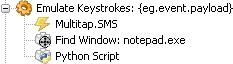
- EGtree.jpg (5.54 KiB) Viewed 7177 times
Dictionary "Conversion" course, you must adapt to your needs.
Reboot wrote:More. Is there any way to automatically submit the word/phrase with a timeout?
This issue I probably not understand. Timeout is not used to stop inserting the words/phrases.
Timeout is used in the event, that the consecutive characters are assigned to the same key.
Otherwise, the timeout is not used. You want to have a some additional timeout for the automatic termination input of words/phrases?
Reboot wrote:And last. A smaller OSD?
There are not thinking about giving to choose the size of OSD. No one else has had an interest. You can turn off the OSD.
Reboot wrote:BTW, spaces can be attached to a number, but editing the .py file manually.
Also I do not understand what you mean. What is the problem with spaces?
Pako