Page 4 of 8
Re: Plugin for USB PC Remote Controller
Posted: Mon Nov 09, 2009 7:01 am
by Pako
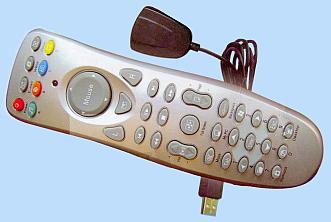
phvrc2nt wrote:This is exactly my remote.
Will this work on Windows 7 x64?
I don't know. I have got Windows XP.
phvrc2nt wrote:
I cant seem to find the link for the dx_usb_remote.zip
See my post of Jul 05 2009 in this topic.
Pako
Re: Plugin for USB PC Remote Controller
Posted: Mon Nov 09, 2009 9:37 am
by phvrc2nt
Thanks so much for the replies.
I presume these drivers are for Windows XP 32bit only.
Will have to wait for a Seven 64 driver.
Thanks!
Pako wrote:phvrc2nt wrote:This is exactly my remote.
Will this work on Windows 7 x64?
I don't know. I have got Windows XP.
phvrc2nt wrote:
I cant seem to find the link for the dx_usb_remote.zip
See my post of Jul 05 2009 in this topic.
Pako
Re: Plugin for USB PC Remote Controller
Posted: Wed Dec 02, 2009 6:26 am
by schindi77
Hi!
Somebody still listening here?
I┬┤ve got the same remote like pouz, but with a different hardware-id.
I simply changed the hardware-id in the driver.inf, installed the driver and changed the hardware-id in the eventghost plugin.
And, what shall I say: It works fine.
I changed the eventghost plugin (I┬┤m reading only 3 bytes from the buttons) and added some code for the mouse up/down/left/right function.
To use it I had to cut off the numlock-button because I didn┬┤t find a way to handle the changing button-codes when using the numlock...
It works fine for me, but I┬┤ve got NO IDEA of python-programming, so it was just trial and error writing the code

Could someone try this, have a look at my code and put it into some "good" form?
Thanks a lot!
Re: Plugin for USB PC Remote Controller
Posted: Thu Dec 17, 2009 2:17 pm
by krambriw
My new remote from K├Ânig is 100% compatible with the Conceptronic
http://www.topseed.com.tw/gptype.htm
It works great!!!
All buttons are captured and sent to eg
Best regards, Walter
Re: Plugin for USB PC Remote Controller
Posted: Thu Dec 17, 2009 7:46 pm
by Pako
I did update plugin "Deal Extreme USB PC Remote" for this remote:
- DXusbPCR.jpg (12.93 KiB) Viewed 10174 times
There is now used a new driver eg.WinUSB and is also added new "guid" parameter.
Plugin is ready for work with new versions EventGhost.
Pako
EDIT:
ATTENTION !! This version of the plugin (1.1.0) is designed exclusively for experimental version of EventGhost (0.4.0). For version 0.3.7 you must use a previous version of the plugin!
Re: Plugin for USB PC Remote Controller
Posted: Thu Dec 17, 2009 8:16 pm
by Bitmonster
@Pako
eg.WinUsb only works in EG 0.4.0 beta and this version is highly experimental currently.
Check out the "PC Remote Controller" plugin in 0.4.0. I think its implementation is a bit easier and it should work with 0.3.7 also (it has some fallback code). Also the new ASUS PSR-2000 plugin might be worth a look. This remote is very similiar and the plugin directly integrates the mousepad (this is the main difference between these two remotes. The ASUS generates much more directions and therefore an event for every direction change is not very practical.)
Re: Plugin for USB PC Remote Controller
Posted: Sun Dec 27, 2009 11:40 pm
by johndoe
I have IR receiver
similar to TechniSatUsb.
So I edit
driver.inf to match my device (
USB\VID_147A&PID_E019) and try to install.
After driver installed the device appears with exclamation mark on icon:

- devicemanager.png (1.59 KiB) Viewed 10143 times
"
This device is not working properly because Windows cannot load the drivers required for this device. (Code 31)"
I've tried install on 2 different PCs, both failed
Re: Plugin for USB PC Remote Controller
Posted: Mon Dec 28, 2009 4:56 pm
by Pako
Bitmonster wrote:@Pako
eg.WinUsb only works in EG 0.4.0 beta and this version is highly experimental currently.
Yes, I know that the new USB driver is only for version 0.4.0. It seems that I have in my post not sufficiently emphasized. I will add an additional note about this in my original post.
Bitmonster wrote:Check out the "PC Remote Controller" plugin in 0.4.0. I think its implementation is a bit easier and it should work with 0.3.7 also (it has some fallback code).
Yes, "PC Remote Controller" is the same with my remote control. I tried the plugin and it works well. Your method evaluation pressing mousepad is very interesting. I would but more suited if mousepad generated only four types of events (up, down, left and right). I will try to adjust also my plugin to work this way. Your plugin but still have one shortage (at least for me). There is no option to ignore nonsensical Numlock key (because it has no indication of status), while in my plugin this is possible.
I know that it is possible assign to each macro always both variants events, but I think that my way of solution is preferable.
Pako
Re: Plugin for USB PC Remote Controller
Posted: Sun Jan 10, 2010 10:48 pm
by jarq
Hi
I've got the same problem with this drivers:
Error code 31
Win XP SP3
Please help
Greetings From Poland
Re: Plugin for USB PC Remote Controller
Posted: Sat Jan 23, 2010 8:32 pm
by molitar
Yes the deal extreme worked for me in Windows 7 32bit. I had to manually install the driver into the USB Input Devices with VID of 073. So yes it works perfect with Windows 7. You saved me a real headache with this plugin! BTW I am using EG 3.7.
One problem with this plugin though is the mouse remote pad stops functioning. Is their a fix for this?
Secondly the version for EG 0.4.0 does not work for me.. But the 0.3.7 version works well.. but why can't we get the fullscreen button to work? I would love to be able to use that button for my fullscreen toggle. Seems EG 0.4.0 is aweful for the USB PC Remote for USB\VID_073A&PID_2230&REV_0200. Because it does not work at all.
Re: Plugin for USB PC Remote Controller
Posted: Sun Jan 24, 2010 6:14 pm
by ViceIce
Hello.
I have a "TechniSat USB IR Receiver" with id "VID_04B4&PID_0100". I have changed the Technisat plugin and it is working.

Aditionally i had changed the inf of the driver.
can anybody add this device to the package?
Regards
ViceIce
Re: Plugin for USB PC Remote Controller
Posted: Fri Feb 05, 2010 6:28 pm
by Luca Brasi
Hi there,
I discovered this great feature in the latest beta release. I installed it to get rid of some anoying hid problems but then on install eg recognized my remote and installed the driver and the plugin. So now everything is working nearly perfectly.
Only problem is that not all buttons create an action in eg. For example the color buttons. I tried to change the code but I have no experience in that. So didn't understand the code when i opened the ini.pyc.
I have a auvisio VRC-1100 remote. I added a screenshot of the incoming data in eg. The first one is recognized and triggers auvisio.play. The following 4 don't trigger any actions. Those are the color buttons.
Can someone please tell me what wo do?
Thanks in advance!
Luca
Re: Plugin for USB PC Remote Controller
Posted: Sat Feb 06, 2010 6:49 pm
by molitar
Well using the DAnschis Ebay Fernbedienung version driver with the Eventghost DX USB Remote plugin I am only missing two button controls. Desktop and Full Screen. Anyone figured out a method to get them to work at all?
Ok for those that have the DAnschis Ebay Fernbedienung here is a modified plugin for it. I had to do some merging of the various versions to get all 4 directions working with mousepad as well as the left and right buttons working. Also in the default version the desktop button was not working. So basically all works on this version from my testing with ignore numlock except for Full screen button.. sure wish someone could figure out how to fix that button to make it work.
Re: Plugin for USB PC Remote Controller
Posted: Mon Feb 08, 2010 11:09 pm
by cichmen
Hi all,
I've bought this remote
http://www.dealextreme.com/details.dx/sku.14380
It seems similar to what Pako mentioned in this thread before, but it has different ID: USB\VID_073A&PID_2230.
So I added it to the USB driver inf file, it is in attached zip. Works well under Win7 64bit!
I've also did some little tweaks to Pako's plugin:
- GUID change
- changed code for Full screen button - maybe apply to other remotes?
Result is in attached zip.
Mouse keypad does not work well. It seems it somehow change also first byte of code for other buttons and then they don't work. I haven't spent much time with this. Maybe someone else could help?
Cichmen
Re: Plugin for USB PC Remote Controller
Posted: Tue Feb 09, 2010 3:05 am
by molitar
cichmen wrote:Hi all,
I've bought this remote
http://www.dealextreme.com/details.dx/sku.14380
It seems similar to what Pako mentioned in this thread before, but it has different ID: USB\VID_073A&PID_2230.
So I added it to the USB driver inf file, it is in attached zip. Works well under Win7 64bit!
I've also did some little tweaks to Pako's plugin:
- GUID change
- changed code for Full screen button - maybe apply to other remotes?
Result is in attached zip.
Mouse keypad does not work well. It seems it somehow change also first byte of code for other buttons and then they don't work. I haven't spent much time with this. Maybe someone else could help?
Cichmen
Same remote I have.. ok I will grab it... the only thing needed in mine was fullscreen.. the mouse works good with the above modifications.. so if fullscreen is working I just need to add it to my modified one. Ok Fullscreen is now working! Yeah now all the buttons work now as well as the 4 mouse directions! Grab the modified plugin I attached to this post. The only thing that nobody has solved now so far is the 4 diagonal directions for the mouse pad.