I was asked to create detailed instructions on how to set EventGhost, for the following tasks:
It is required that an application will automatically turn off when I'm leaving home and turned on again when I return.
We'll need just this plugin - Nmap.
The prerequisite, of course, is that you have installed the program EventGhost.
If not, you can always find the latest release
HERE. Download the installation file and run it.
Note: Another prerequisite for the functioning is an Android smartphone.
It was found that the iPhone not work well in this case.
I will do the instruction using the numbered steps, so there will be the opportunity to refer to the individual steps:
1) Installing Nmap program. Nmap plugin can only work if Nmap program is installed on your computer.
The program can be downloaded
here. Currently it is:
nmap-6.47-setup.exe.
Run the downloaded program and follow the instructions. Installing and running WinPcap confirm.
2) Install the plugin Nmap. Download the latest
__init__.py file, which can be found in the initial post in this topic.
In the folder
...\EventGhost\plugins create a new folder
Nmap and downloaded file
__init__.py move into it.
3) Restart (close and reopen) EventGhost and add a new plugin into configuration (
Configuration->Add plugin..., Other->Nmap).
This opens the main configuration dialog of plugin.
Please read the information that is on the Description tab !
4) Check path (and correct it, if necessary) to the installed Nmap program and set the IP address of your home network:
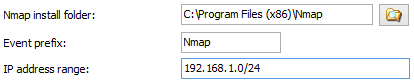
- Nmap_01.png (4.37 KiB) Viewed 8670 times
5) Press "Apply".
After a few seconds you should be able to press "
Add new" button under "
Named devices". Do it. A small window opens for adding a device:
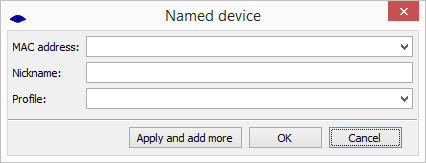
- Nmap_02.png (4.99 KiB) Viewed 8670 times
6) From the drop-down menu to select your smartphone, assign a nickname, and select a profile (so far there is only
Default). Click OK to confirm.
7) Confirm the setting of the entire dialog with OK.
At this moment plugin should already trigger events based on connect/disconnect your smartphone to your home network. It is possible that it will be necessary
adjust the settings of the respective profile (
Default if you have not changed it).
If it works reliably, we can continue.
Pako


 thought it was really good until I scrolled down,
  Again it has to be "jailbroken" to use the app.

