Page 34 of 38
Re: SunTracker - with moving ghost
Posted: Fri Nov 27, 2015 5:09 am
by krambriw
Any idea where I'm going wrong?
You are not, I guess it is me to blame...need to check those additional actions and see what can be done
Re: SunTracker - with moving ghost
Posted: Fri Nov 27, 2015 7:52 am
by krambriw
A new version is now available.
Due to the change of weather service, the format of resulting responses from some actions have changed (due to the pywapi.py). You may have to check how you use the results in scripts etc.
Best regards, Walter
Re: SunTracker - with moving ghost
Posted: Fri Nov 27, 2015 9:18 am
by Old Bear
krambriw wrote:A new version is now available.
Due to the change of weather service, the format of resulting responses from some actions have changed (due to the pywapi.py). You may have to check how you use the results in scripts etc.
Best regards, Walter
Perfect, sir; it now works a treat.

Many thanks for this brilliantly useful plugin.
Re: SunTracker - with moving ghost
Posted: Thu Dec 10, 2015 10:50 am
by curtdwar
Having an issue with weather.com. My weather condition keeps coming back as "N/A". If I understand your code, at nighttime on current day the [t] element of the [cc] tag should be blank. However mine is "N/A". Couldn't really follow what happened in the code from there, maybe that will be enough to suggest a fix. Anyway, some relevent info.
locationid is ASXX8202:1:AS
url is
http://wxdata.weather.com/wxdata/weathe ... dayf=5&cc=*
Re: SunTracker - with moving ghost
Posted: Thu Dec 10, 2015 12:38 pm
by krambriw
With this I assume that the weather condition (most of the time) is reported correctly?
If so, yes, sometimes the reported weather condition could be just like that, N/A (Not available), seen that myself. To handle it to avoid error messages, open and edit the weather_conditions.py file (in the plugins own folder) and add a line to the section as below
Code: Select all
def weather_conditions_except():
    list = [
        "Unavailable",
        "Undefined",
        "Unknown",
        "N/A"
    ]
    return list
Re: SunTracker - with moving ghost
Posted: Fri Dec 11, 2015 8:31 am
by curtdwar
Where in the XML is the weather condition stored?
weather.com is displaying a weather condition, but sun tracker keeps returning N/A. I can see N/A in <gust> element, and also in
<cc>
<t>N/A</>
</cc>
I can see the weather condition in
<dayf>
<day>
<part p=n>
<t>Partly Cloudy</t>
Where does sun tracker expect the weather condition to be?
Re: SunTracker - with moving ghost
Posted: Fri Dec 11, 2015 9:58 am
by krambriw
I am expecting it in the <cc> section
Like in my case
http://wxdata.weather.com/wxdata/weathe ... ayf=5&cc=*
where it reports
Code: Select all
<cc>
<lsup>12/11/15 10:20 AM CET</lsup>
<obst>Stockholm, AB, SW</obst>
<tmp>5</tmp>
<flik>1</flik>
<t>Partly Cloudy</t>
<icon>30</icon>
Maybe the dayf section is more reliable...
Re: SunTracker - with moving ghost
Posted: Fri Dec 11, 2015 10:44 am
by krambriw
After testing a bit further altering between various locations, it suddenly seems to work also with your location ( at least for the moment). You can try yourself with the attached script (please do copy the pywapi.py to C:\Program Files (x86)\EventGhost\lib26\site-packages folder to allow scripts to import the module)
1) In my case I do get the current weather condition in my expected position as well as day/night forecasts
11:33:20 Mostly Cloudy
11:33:20 Partly Cloudy
11:33:20 Clouds Early / Clearing Late
2) In your case, it also works right now but I only get day OR night forecasts (this would make it difficult to change method)
11:34:02 Partly Cloudy
11:34:02
11:34:02 Partly Cloudy / Wind
Here is the python script that can be used for testing
Code: Select all
import  pywapi
import string

#weather_com_result = pywapi.get_weather_from_weather_com('UKXX0085:1:UK') #London UK
#weather_com_result = pywapi.get_weather_from_weather_com('USNY0996:1:US') #New York
#weather_com_result = pywapi.get_weather_from_weather_com('ASXX0075:1:AS') #Melbourne
#weather_com_result = pywapi.get_weather_from_weather_com('SWXX0027:1:SW') #Sollentuna, Stockholm Sweden
weather_com_result = pywapi.get_weather_from_weather_com('ASXX8202:1:AS')  #Edithvale, Australia

print weather_com_result
print weather_com_result['current_conditions']['text']
print weather_com_result['forecasts'][0]['day']['text']
print weather_com_result['forecasts'][0]['night']['text']
Re: SunTracker - with moving ghost
Posted: Sat Dec 12, 2015 10:19 am
by curtdwar
thanks mate, A few cogs fell into place, understanding that a little better. It could be because the weather station location is a small cargo airport. I see that Melbourne has the conditions in the CC section. I'll just use Melbourne for now, it's close enough.
How do I get the events?
Posted: Thu Mar 10, 2016 9:25 am
by Henrik4223
Seems like a great plugin - but I cant get it to work. I need an event by sundown and sunrise and if possible also an action that checks the status of sunrise/sunset.
I have installed the sun tracker plugin and inserted my coordinates and then inserted the action "Sun Tracker: Start new or control running SunTracker". The event name on is "nn ON" and the event name OFF i "nn OFF".
I have also set the "Set offset for this control" to -120 because I would like the event two hourers before.
But I am no getting any events when the sun sets or rises - I think I should get the events "nn ON" and "nn OFF" but I get none.
What am I doing wrong?
Re: SunTracker - with moving ghost
Posted: Thu Mar 10, 2016 6:54 pm
by krambriw
Is your action running? Open the plugin and check in the list
Provide some screenshots of your configuration
Re: SunTracker - with moving ghost
Posted: Sun Mar 13, 2016 9:57 am
by Henrik4223
The plugin is running - I have copied in some screenshots.
Also, the only event I get is "Main.nn OFF" every 30 minutes.
Re: SunTracker - with moving ghost
Posted: Mon Mar 14, 2016 4:08 pm
by heggholmen
How to...
I want the following setup - and I think this plug-in could do it, but I'm not sure if it's working like I was expected or if it's anything that I do:)
What I want to accomplish;
1: Sunrise: Lights turns of --> Using the "Sunrise" event
2: Sunset: Lights turns on - 100% --> Using the "Sunset" event
3: 22:30: Lights dims to 25% --> Using "Evening off" - event
4: 05:30: Lights dims to 100% --> Using "Event on" -event
My issue is that when having the "Synchronization" activated - "Evening off" event is pushed even after "Sunset" event has been triggered. I would have expected the last event to be the one that was synchronized. Between timestam 1 and 2 "Sunrise" should be send al the time. Between 2 and 3 "Sunset" should be sent and between 3 and 4 "Evening off" should be sent ...
Anyone got some idea on how i could resolve this?
//Jan-Erik
Re: SunTracker - with moving ghost
Posted: Wed Mar 16, 2016 6:42 am
by krambriw
@Henrik4223
You have to insert at least one time on each day type to make it work. Like the example below. At 11.00 the sun will be up so the lights will not turn on anyway but the whole routine will then start correctly (this is how it is implemented...)
Re: SunTracker - with moving ghost
Posted: Wed Mar 16, 2016 7:30 am
by krambriw
@ Heggholmen
I think it is possible in many ways, I would split the tasks using two plugins and do it as follows
1) Use only the SunTracker plugin and the sunrise/sunset events (DO NOT define any action with synchronization for those lights you wan't to control this way)
2) Use my Scheduler plugin and an action for the fixed time settings (see example below)
3) Create macros with actions with dim levels for the actual control of your lights depending on what type of device you have (RFXtrx, TellStick Duo, Z-Wave, whatever...). With your example I would create 3 separate macros; Turn Off, Turn On, Dim 25% ( I see no difference between Turn On and Dim 100%...)
4) Drag the events from the SunTracker and Scheduler plugin to the respective macros the usual way
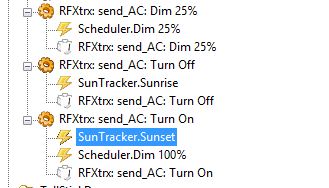
- Skärmklipp1.JPG (23.82 KiB) Viewed 5830 times