Page 5 of 23
Re: Webserver
Posted: Sat Jan 11, 2014 1:04 am
by radenblazed
ok so i found a plug in to be able to control musicbee, it gives me basic control over the player... I use this music player to stream some of my music to teamspeak3 (a chat program) for when i play games with my guild mates... what i want to do is use the webserver to allow other guild leaders to have control over the music stream. I am using apachi along with a no-ip dns to make the website public, but the website does nothing when i visit (the website shows but the buttons do nothing)... it only works when i visit localhost from my web browser (it works perfectly fine when i do this)
Why does the website only work in localhost and why it does not work when i visit
If i could get this working it would be awesome since i could just I-frame the page on our guild website midnightmafia.net and give using rights accordingly
Re: Webserver
Posted: Sat Jan 11, 2014 2:06 am
by Dragon470
If you are using apache, you need it to redirect to the eventghost webserver plugin. I have not done this but maybe you can use
http://httpd.apache.org/docs/current/re ... pping.html This would be making apache more or less an intermediary only.
Re: Webserver
Posted: Sat Jan 11, 2014 2:34 am
by radenblazed
I dont quite undestand... Im faily new to all this

so i would need to make apachi somehow complatible with the webserver plug in? im so confused
Re: Webserver
Posted: Sat Jan 11, 2014 10:36 am
by Sem;colon
Do you use Apache for anything else or just for this particular reason, that you would like to share the music player controls with your friends?
I never used a no-ip service to be honest but a guess it should be possible to use this service without Apache (maybe you even get it running with your router directly)
I, for example, can remote control my EventGhost hosted site from anywhere by simply open port 80 on the router firewall and redirect it to the pc where EG is running on.(note that this is not recommended from a security perspective!)
But I always use the external ip directly to connect (which is changing once every day), but a no-ip service should work the same way as all it does is dynamic dns.
Re: Webserver
Posted: Sat Jan 11, 2014 8:07 pm
by radenblazed
I did dirent my router to open port 80 and redirent it to my pc
Re: Webserver
Posted: Sat Jan 11, 2014 10:13 pm
by Sem;colon
...if
http://localhost/index.html works for you, there is defiantly not a problem with the plugin.
Re: Webserver
Posted: Thu Jan 16, 2014 5:10 am
by radenblazed
http://localhost/index.html works perfect the priblem is when i go to the no-ip
Re: Webserver
Posted: Thu Jan 16, 2014 6:18 am
by radenblazed
when using
http://localhost/index.html it works perfect as shown bellow

When i use http://**************.no-ip.org it does not work. I have also tried entering my IP and it does the same thing as when i enter the no-ip address.

I have the plugin correctly directed to the apache folder wich contains the webpage

idk what the problem is it works perfect with localhost but when i use my ip or http://************.no-ip.org/ it does not work.
Re: Webserver
Posted: Thu Jan 16, 2014 8:07 am
by Pako
radenblazed wrote:... the problem is it works perfect with localhost but when i use my ip or http://**************.no-ip.org/ it does not work.
What does "it does not work"?
I connected to the address http://**************.no-ip.org, and it looks like this:
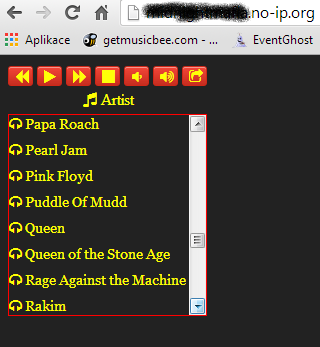
- apache.png (17.72 KiB) Viewed 8094 times
Although I do not hear the song, but I am convinced that it works.
Pako
Re: Webserver
Posted: Thu Jan 16, 2014 10:24 am
by Sem;colon
I could imagine, that if you open the webpage via localhost the EG webserver is providing the site and when you go from external the apache does and therefore the events can't be triggered in eventghost.
You can try this by disableling apatche.
Re: Webserver
Posted: Thu Jan 16, 2014 12:45 pm
by Pako
Sem;colon wrote:I could imagine, that if you open the webpage via localhost the EG webserver is providing the site and when you go from external the apache does and therefore the events can't be triggered in eventghost.
You can try this by disableling apatche.
You're right, it not occurred to me.
I looked at what I get header from http://**************.no-ip.org:
Code: Select all
HTTP/1.1 200 OK
Date: Thu, 16 Jan 2014 12:31:20 GMT
Server: Apache/2.0.65 (Win32)
Last-Modified: Fri, 10 Jan 2014 14:00:29 GMT
ETag: "1b96e-3f21-260cf134"
Accept-Ranges: bytes
Content-Length: 16161
Content-Type: text/html
It is obvious that it is not (EventGhost) Webserver.
This gives another header:
Code: Select all
HTTP/1.0 200 OK
Server: EventGhost/0.4.1.r1640
Date: Thu, 16 Jan 2014 12:38:45 GMT
Content-type: text/html
Content-Length: 3161
Last-Modified: Fri, 27 Jul 2012 16:59:14 GMT
I think it should be solved by using a different port.
Pako
Re: Webserver
Posted: Fri Jan 17, 2014 9:08 am
by radenblazed
ok so i got the server up and running XD
anyone know how i would go about showing the artist and title of songs in the webpage? im using the musicbee plug in... i tried using the webserver set value but it just keeps showing the path of the mp3 playing... musicbee has actions to show the tags for the mp3s but i dont know how i would go about using this
this is the action to show the artist
Code: Select all
<?xml version="1.0" encoding="UTF-8" ?>
<EventGhost Version="1640">
    <Action>
        MusicBee.NowPlayingCommand(43, 2, None, None)
    </Action>
</EventGhost>
how can i incorporate that with this
Code: Select all
<?xml version="1.0" encoding="UTF-8" ?>
<EventGhost Version="1640">
    <Action>
        Webserver.SetValue(u'', u'{eg.event.payload}')
    </Action>
</EventGhost>
ps ty piko for removing the no-ip address

Re: Webserver
Posted: Fri Jan 17, 2014 11:30 am
by Pako
radenblazed wrote:anyone know how i would go about showing the artist and title of songs in the webpage?
See how it's done in the example, which I published
here.
But just recently, I published a new
Tornado plugin that replaces the Webserver plugin and also allows you to use WebSocket.
Example of use (and even just to control MusicBee) there is attached.
Pako
Re: Webserver
Posted: Fri Feb 14, 2014 10:23 am
by Pako
Like for Tornado plugin, I added the option to serve with a secure protocol (https://).
Any feedback is welcome.
Pako
Re: Webserver
Posted: Thu May 01, 2014 3:33 pm
by Sem;colon
Hello Pako,
the webserver seems to have a maximum of 6 requests that can be processed at a time.
Is it possible to increase that?
I attached a small example.
Thank you in advance!