Page 5 of 28
Re: Plugin: TellStick Duo
Posted: Fri Sep 07, 2012 10:17 am
by tsleon
Mossberg wrote:I am experiencing some problems with the plugin, or at least i expect it's the plugin.
The problem accurs when i've pushed my wall transmitter (wst-512) a feew times, then eventghost just stops reciving events. It's like the plugin is no more

Works like two or three times.
I don't know if it's anyting i'm doing wrong or if it's a bug.
Thanks for a nice plugin otherwise!
I have same kind of problem, eventghost stops receiving incomind tellstick commands after some time, restarting evenghost fixes problem. When evenghost doesn't receive commands, Tellduscenter does.
Re: Plugin: TellStick Duo
Posted: Fri Sep 07, 2012 10:21 am
by krambriw
Are there any possibilities this will be expanded to Tellstick.Net?
Currently, it is not possible but I hope it will be some day and then I will of course try to make a change. There are ongoing work with a new firmware that is already partially working for local access but it is too early to start making a plugin for it.
Best regards, Walter
Re: Plugin: TellStick Duo
Posted: Fri Sep 07, 2012 10:55 am
by krambriw
To all of you having problems with the Duo:
- people running Switch King also experience similar problems (Telldus shows event but SK stops)
- new Telldus dll drivers are under test
- EG and SK are both depending on a stable service, if not also EG and SK will suffer
I have made some tests here with a LMST-606 (magnetic contact) and a LWST-605 (dual button device) and I have no problems, it works all the time and with a delay of 3 seconds I only get one event per status change (I have also added them as devices in Telldus Center).
Best regards
Code: Select all
12:54:55   TellStickDuo.Tryckknapp A.ON 'selflearning-switch:nexa.33'
12:54:57   TellStickDuo.Tryckknapp A.OFF 'selflearning-switch:nexa.33'
12:54:58   TellStickDuo.Tryckknapp A.ON 'selflearning-switch:nexa.33'
12:55:00   Main.Weather Condition: 'Partly Cloudy'
12:55:01   TellStickDuo.Tryckknapp A.ON 'selflearning-switch:nexa.33'
12:55:02   TellStickDuo.mandolyn.temperaturehumidity.81.Temperature: '13.3|2012-09-07 12:55:02'
12:55:02   TellStickDuo.mandolyn.temperaturehumidity.81.Humidity: '70|2012-09-07 12:55:02'
12:55:03   TellStickDuo.mandolyn.temperaturehumidity.81.Temperature: '13.3|2012-09-07 12:55:03'
12:55:03   TellStickDuo.mandolyn.temperaturehumidity.81.Humidity: '70|2012-09-07 12:55:03'
12:55:03   TellStickDuo.mandolyn.temperaturehumidity.81.Temperature: '13.3|2012-09-07 12:55:03'
12:55:03   TellStickDuo.mandolyn.temperaturehumidity.81.Humidity: '70|2012-09-07 12:55:03'
12:55:04   TellStickDuo.Tryckknapp A.OFF 'selflearning-switch:nexa.33'
12:55:04   TellStickDuo.mandolyn.temperaturehumidity.11.Temperature: '13.3|2012-09-07 12:55:04'
12:55:04   TellStickDuo.mandolyn.temperaturehumidity.11.Humidity: '69|2012-09-07 12:55:04'
12:55:04   TellStickDuo.mandolyn.temperaturehumidity.11.Temperature: '13.3|2012-09-07 12:55:04'
12:55:04   TellStickDuo.mandolyn.temperaturehumidity.11.Humidity: '69|2012-09-07 12:55:04'
12:55:04   TellStickDuo.Tryckknapp A.ON 'selflearning-switch:nexa.33'
12:55:05   TellStickDuo.Tryckknapp A.OFF 'selflearning-switch:nexa.33'
12:55:05   TellStickDuo.Tryckknapp A.ON 'selflearning-switch:nexa.33'
12:55:06   TellStickDuo.Tryckknapp A.OFF 'selflearning-switch:nexa.33'
12:55:07   TellStickDuo.Tryckknapp A.ON 'selflearning-switch:nexa.33'
12:55:07   TellStickDuo.Tryckknapp A.OFF 'selflearning-switch:nexa.33'
12:55:08   TellStickDuo.oregon.1A2D.58.Temperature: '21.9|2012-09-07 12:55:08'
12:55:08   TellStickDuo.Tryckknapp B.ON 'selflearning-switch:nexa.34'
12:55:08   TellStickDuo.Tryckknapp B.OFF 'selflearning-switch:nexa.34'
12:55:09   TellStickDuo.Tryckknapp B.ON 'selflearning-switch:nexa.34'
12:55:09   TellStickDuo.Tryckknapp B.OFF 'selflearning-switch:nexa.34'
12:55:10   TellStickDuo.Tryckknapp B.ON 'selflearning-switch:nexa.34'
12:55:10   TellStickDuo.Tryckknapp B.OFF 'selflearning-switch:nexa.34'
12:55:11   TellStickDuo.Tryckknapp B.ON 'selflearning-switch:nexa.34'
12:55:11   TellStickDuo.Tryckknapp B.OFF 'selflearning-switch:nexa.34'
12:55:12   TellStickDuo.Tryckknapp B.ON 'selflearning-switch:nexa.34'
12:55:12   TellStickDuo.Tryckknapp B.OFF 'selflearning-switch:nexa.34'
12:55:13   TellStickDuo.Tryckknapp B.ON 'selflearning-switch:nexa.34'
12:55:14   TellStickDuo.Tryckknapp B.OFF 'selflearning-switch:nexa.34'
12:55:14   TellStickDuo.Tryckknapp B.ON 'selflearning-switch:nexa.34'
12:55:15   TellStickDuo.Tryckknapp B.OFF 'selflearning-switch:nexa.34'
12:55:15   TellStickDuo.Tryckknapp B.ON 'selflearning-switch:nexa.34'
12:55:16   TellStickDuo.Tryckknapp B.OFF 'selflearning-switch:nexa.34'
12:55:17   TellStickDuo.Tryckknapp B.ON 'selflearning-switch:nexa.34'
12:55:17   TellStickDuo.mandolyn.temperaturehumidity.51.Temperature: '19.5|2012-09-07 12:55:17'
12:55:17   TellStickDuo.mandolyn.temperaturehumidity.51.Humidity: '77|2012-09-07 12:55:17'
12:55:17   TellStickDuo.Tryckknapp B.OFF 'selflearning-switch:nexa.34'
12:55:18   TellStickDuo.Tryckknapp B.ON 'selflearning-switch:nexa.34'
12:55:18   TellStickDuo.Tryckknapp B.OFF 'selflearning-switch:nexa.34'
12:55:19   TellStickDuo.oregon.1A2D.7.Temperature: '13.7|2012-09-07 12:55:19'
12:55:19   TellStickDuo.oregon.1A2D.32.Temperature: '15.2|2012-09-07 12:55:19'
12:55:21   TellStickDuo.mandolyn.temperaturehumidity.151.Temperature: '-21.2|2012-09-07 12:55:21'
12:55:21   TellStickDuo.mandolyn.temperaturehumidity.151.Humidity: '45|2012-09-07 12:55:21'
12:55:21   TellStickDuo.mandolyn.temperaturehumidity.151.Temperature: '-21.2|2012-09-07 12:55:21'
12:55:21   TellStickDuo.mandolyn.temperaturehumidity.151.Humidity: '45|2012-09-07 12:55:21'
12:55:21   TellStickDuo.mandolyn.temperaturehumidity.151.Temperature: '-21.1|2012-09-07 12:55:21'
12:55:21   TellStickDuo.mandolyn.temperaturehumidity.151.Humidity: '45|2012-09-07 12:55:21'
Re: Plugin: TellStick Duo
Posted: Fri Sep 07, 2012 1:24 pm
by cozmo
krambriw:
If you create a macro with an event "TellStickDuo.Tryckknapp A.ON" , then you add an action to this macro > "TellstickDuo turn off device", and set it to turn off/on some _other_ device you have inn TelldusCentre (for example som virtual device which isn't listening to any real code). When you physically then open your "tryckknapp" so you get the event TellStickDuo.Tryckknapp A.ON - you still only get _one_ event and _one_ execution of the macro?
Re: Plugin: TellStick Duo
Posted: Fri Sep 07, 2012 3:54 pm
by krambriw
Cosmo, I think there is something in what you are saying. I have managed to recreate the problem if I press the A button multiple time after each other. Most of the time it works just fine as seen below. I will debug a little, I already suspect what could be the problem; I think the Duo is listening to itself and not blocking the receiving part while transmitting. If you look at another device like the RXFtrx, it is blocking receiving during the transmission.
EDIT: I changed to the magnetic contact and now I see the problem clearly, I will try to fix it (even if I think it is really a Duo issue)
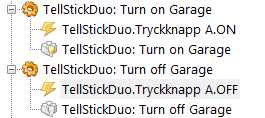
This configuration
- Image2.jpg (8.58 KiB) Viewed 9602 times
gives the following in my EG log
Code: Select all
16:43:41   TellStickDuo.Tryckknapp A.ON 'selflearning-switch:nexa.33'
16:43:41   TellStickDuo.Garage.ON 'codeswitch:nexa.5'
16:43:43   TellStickDuo.Tryckknapp A.OFF 'selflearning-switch:nexa.33'
16:43:44   TellStickDuo.Garage.OFF 'codeswitch:nexa.5'
16:43:45   TellStickDuo.Tryckknapp A.ON 'selflearning-switch:nexa.33'
16:43:45   TellStickDuo.Garage.ON 'codeswitch:nexa.5'
16:43:46   TellStickDuo.Tryckknapp A.OFF 'selflearning-switch:nexa.33'
16:43:46   TellStickDuo.Garage.OFF 'codeswitch:nexa.5'
16:43:48   TellStickDuo.Tryckknapp A.ON 'selflearning-switch:nexa.33'
16:43:48   TellStickDuo.Garage.ON 'codeswitch:nexa.5'
16:43:49   TellStickDuo.Tryckknapp A.OFF 'selflearning-switch:nexa.33'
16:43:49   TellStickDuo.Garage.OFF 'codeswitch:nexa.5'
16:43:50   TellStickDuo.Tryckknapp A.ON 'selflearning-switch:nexa.33'
16:43:50   TellStickDuo.Garage.ON 'codeswitch:nexa.5'
16:43:51   TellStickDuo.Tryckknapp A.OFF 'selflearning-switch:nexa.33'
16:43:51   TellStickDuo.Garage.OFF 'codeswitch:nexa.5'
16:43:53   TellStickDuo.Tryckknapp A.ON 'selflearning-switch:nexa.33'
16:43:53   TellStickDuo.Garage.ON 'codeswitch:nexa.5'
16:43:54   TellStickDuo.Tryckknapp A.OFF 'selflearning-switch:nexa.33'
16:43:54   TellStickDuo.Garage.OFF 'codeswitch:nexa.5'
16:43:55   TellStickDuo.Tryckknapp A.ON 'selflearning-switch:nexa.33'
16:43:55   TellStickDuo.Garage.ON 'codeswitch:nexa.5'
16:43:57   TellStickDuo.Tryckknapp A.OFF 'selflearning-switch:nexa.33'
16:43:57   TellStickDuo.Garage.OFF 'codeswitch:nexa.5'
BestR Walter
Re: Plugin: TellStick Duo
Posted: Fri Sep 07, 2012 4:02 pm
by cozmo
Thanks for looking into it, good that you managed to reproduce it.
Would be great if you managed to fix it - would make my life much easier

Re: Plugin: TellStick Duo
Posted: Sat Sep 08, 2012 6:10 am
by krambriw
Cozmo (and other interested), can you try this version? Now it works as I would expect:
- only one event of the same type (ON or OFF) from the device within the delay time you configured
- only one sensor event of the same type (temp & hum) from the sensor device within the delay time you configured
- try with 3.0 seconds if you have magnetic contacts
- you can now also set delay to 0.0 seconds (maybe not so useful but to allow disabling of filtering to see all events from the Duo)
You can just replace the old with the new one below, it is backward compatible.
Best regards, Walter
Re: Plugin: TellStick Duo
Posted: Sat Sep 08, 2012 10:54 am
by cozmo
Thanks krambriw!! Tested it quickly with one of my magnetswitches, and now it seems to work perfectly!!!
Thanks a lot!!
cozmo
Re: Plugin: TellStick Duo
Posted: Thu Sep 13, 2012 4:06 pm
by Mossberg
tsleon wrote:Mossberg wrote:I am experiencing some problems with the plugin, or at least i expect it's the plugin.
The problem accurs when i've pushed my wall transmitter (wst-512) a feew times, then eventghost just stops reciving events. It's like the plugin is no more
Works like two or three times.
I don't know if it's anyting i'm doing wrong or if it's a bug.
Thanks for a nice plugin otherwise!
I have same kind of problem, eventghost stops receiving incoming tellstick commands after some time, restarting evenghost fixes problem. When evenghost doesn't receive commands, Tellduscenter does.
Is there anybody who has an idea of what could cause this to happen?

Re: Plugin: TellStick Duo
Posted: Thu Sep 13, 2012 5:39 pm
by krambriw
If you are toggling the status on/off it should not stop. If you repeat on or off, there might be a configured delay that blocks the event. In general, you should not experience any blocking at all, events should continue to come in in EG except for the delay of repeats if configured.
To verify you could also install SK in the same PC and see if events are blocked there as well. If so, you know it is something wrong with the Telldus software.
Best regards, Walter
Re: Plugin: TellStick Duo
Posted: Thu Sep 13, 2012 10:51 pm
by Mossberg
krambriw wrote:If you are toggling the status on/off it should not stop. If you repeat on or off, there might be a configured delay that blocks the event. In general, you should not experience any blocking at all, events should continue to come in in EG except for the delay of repeats if configured.
To verify you could also install SK in the same PC and see if events are blocked there as well. If so, you know it is something wrong with the Telldus software.
Best regards, Walter
Unfortunately, both SwithKing and my Telldus Center application behave as expected when I press the button(s) On or Off.
If there's a; "configured delay that blocks the event..", where could I find such a setting or value?
Either way for me it still seems kind of strange that such a "configured delay" could block all future events, even from other units.

If there's anything i can do to help you debug, just say when
Re: Plugin: TellStick Duo
Posted: Fri Sep 14, 2012 4:28 am
by krambriw
Check the configuration settings.
Enable also raw events and check if they are showing up
It is really hard to find the problem if nobody else is reporting similar problems. In my setup all 3 (SK, EG, TC) works as expected in parallel.
Best reg
Re: Plugin: TellStick Duo
Posted: Fri Oct 26, 2012 7:02 pm
by vuego
Here is a problem with the logging file. The plugin doesn't start if it isn't possible to write to the file and also stalls EventGhost. Shutdown by Task Manager is needed.
20:55:39 Error starting plugin: TellStickDuo
20:55:39 Traceback (most recent call last) (1582):
20:55:39 File "C:\Program Files (x86)\EventGhost\eg\Classes\PluginInstanceInfo.py", line 177, in Start
20:55:39 self.instance.__start__(*self.args)
20:55:39 File "C:\Program Files (x86)\EventGhost\plugins\TellStickDuo\__init__.py", line 229, in __start__
20:55:39 fileHandle = open(self.pathToLogfile, 'a')
20:55:39 IOError: [Errno 13] Permission denied: u'c:/programdata/eventghost/logging_tellstick_duo.txt'
I just need to make sure that the TellStickDuo plugin can write to the file to fix this issue but it's kinda annoying if the log file is written to my user's temp folder and I move the configuration to another computer. Also I think that the plugin could handle this case a bit more elegant and continue to run without logging
Re: Plugin: TellStick Duo
Posted: Fri Oct 26, 2012 7:24 pm
by krambriw
Sure, the log was introduced in the beginning most for debug usage. Today I wonder if we really need it. Give me your opinion, I can easily remove it or make it selectable via another checkbox.
If you would like to have the log in the EventGhost directory, you can as workaround create a new subfolder "Log" or similar there and just enter the path in the plugin settings (/Program Files/EventGhost/Log/logging_tellstick_duo.txt). This works here.
BR Walter
Re: Plugin: TellStick Duo
Posted: Sat Oct 27, 2012 3:27 am
by vuego
I don't have any use for it so you might as well remove it all together. However other users might still need it so in that case i propose:
1. Allow the user to keep the path blank. Currently the plugin gives an error if that's the case.
2. Allow the use of a normal Windows path with backslash instead of forward slash. Currently the plugin crash and hangs EventGhost if you enter something like C:\ProgramData\EventGhost\tellstickduo.log.
3. If the user enters a log path which doesn't exist or where there's no write permissions (like in your example /Program Files/EventGhost/Log/logging_tellstick_duo.txt) try to catch the error and disable the logging. Currently the plugin crash and hangs EventGhost.
My tests above was made on EventGhost 0.4.1.r1582 on Windows 8 x64.
Thanks for your support