Page 5 of 10
Re: SONOS Plugin Official (download here)
Posted: Sun Sep 07, 2014 3:03 am
by techoguy
...
Re: SONOS Plugin Official (download here)
Posted: Sun Sep 07, 2014 10:20 am
by Telorast
techoguy wrote:
Hi Telorast,
based on your response, does that mean the plugin isn't seeing the zone player leave and rejoin the network as expected? I had made a few changes and tested on my system and it was working but i don't normally add and remove ZPs. When I have my system has come back up without me doing anything to EG.
I don't know what's expected but I never get join/leave events. If I turn the speaker on I get these events:
11:57:55 SONOS.RINCON_B8E937572BBE01400.Stopped u"Bathroom"
11:57:55 SONOS.RINCON_B8E937572BBE01400.Playing u"Bathroom"
When I turn it off, I get nothing.
All my commands use the ID of the always on speaker in the pair.
Re: SONOS Plugin Official (download here)
Posted: Sun Sep 07, 2014 3:09 pm
by techoguy
Hi wkumeling,
I forgot to mention that you can disable and enable a plugin or action you have.
When adding the new action, look at the Event Ghost actions and you'll see an Enable and Disable item that allows you to select the action or plugin that will be enabled or disabled just like pressing the red x. Note if you do this with the SONOS plugin you must make sure the plugin has fully shut down before re-enabling it. If the action disables and instantly re-enables the plugin it will cause an error.
Re: SONOS Plugin Official (download here)
Posted: Sun Sep 07, 2014 7:20 pm
by techoguy
Hi Telorast,
Telorast wrote:
I don't know what's expected but I never get join/leave events. If I turn the speaker on I get these events:
11:57:55 SONOS.RINCON_B8E937572BBE01400.Stopped u"Bathroom"
11:57:55 SONOS.RINCON_B8E937572BBE01400.Playing u"Bathroom"
See the images below to get an idea of what you should see when the Zone player is removed or added. I believe this is described with in the first post.

- events seen when the plugin realizes a ZP has been removed from the network.
Please note that it can take as long as 30 minutes for the plugin to realize the zone player has been disconnected or removed from the network. this is due to the fact that i'm subscribing to the players for updates (receive instant updates when they occur) instead of polling periodically. The SONOS app realizes the players are gone much sooner but can take a while sometimes as well for the same reason.
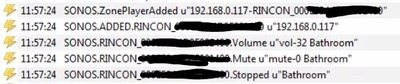
- events seen when the plugin sees a new ZP added to the network.
This should happen as soon as the player is back online.
Also, you'll only see the events when the SONOS player is added if it has actually been removed. If you power cycle the player and it comes back up before the plugin realizes it was gone, there will be no add events. This actually might be what causes an issue, I'm not sure how the plugin will handle the subscription task when this occurs. further testing will be needed.
Hope this helps.
Re: SONOS Plugin Official (download here)
Posted: Mon Sep 08, 2014 7:53 pm
by wkumeling
Dear techoguy,
Did some tests and the Sonos plugin does not reconnect:
Switching power off:
19:14:44 HTTP.MS10
19:14:44 Python Script
19:14:44 Python Script logHTTP
19:14:44 Sonos Mono Off
19:14:44 Python Script
19:14:44 Wait: 5.0 sec
19:14:49 File Operations: Read text from file: status.txt
19:14:49 Python Script
19:14:49 Sonos Mono OFF
After some time this message appears:
19:25:25 Service Unsubscribe Response Error: Service instance has no attribute 'unsubrequest'
19:25:25 EXCEPTION AT LINE: 486 = Service instance has no attribute 'unsubrequest'
19:25:25 Service Subscribe Response Error: 'TIMEOUT'
19:25:25 EXCEPTION AT LINE: 532 = 'TIMEOUT'
19:25:25 SONOS.ERROR "Service Unsubscribe Response Error: Service instance has no attribute 'unsubrequest'"
19:25:25 SONOS.ERROR "EXCEPTION AT LINE: 486 = Service instance has no attribute 'unsubrequest'"
19:25:25 SONOS.DELETED.RINCON_B8E93730435E01400 u"192.168.100.194"
19:25:25 Python Script
19:25:25 Python Script logHTTP
19:25:25 SONOS.ZonePlayerDeleted u"192.168.100.194-RINCON_B8E93730435E01400"
19:25:25 SONOS.ERROR "Service Subscribe Response Error: 'TIMEOUT'"
19:25:25 SONOS.ERROR "EXCEPTION AT LINE: 532 = 'TIMEOUT'"
19:25:27 Service Subscribe Response Error: 'RINCON_B8E93730435E01400'
19:25:27 EXCEPTION AT LINE: 527 = 'RINCON_B8E93730435E01400'
19:25:27 Service Subscribe Response Error: 'RINCON_B8E93730435E01400'
19:25:27 EXCEPTION AT LINE: 527 = 'RINCON_B8E93730435E01400'
19:25:27 SONOS.ERROR "Service Subscribe Response Error: 'RINCON_B8E93730435E01400'"
19:25:27 SONOS.ERROR "EXCEPTION AT LINE: 527 = 'RINCON_B8E93730435E01400'"
19:25:27 SONOS.ERROR "Service Subscribe Response Error: 'RINCON_B8E93730435E01400'"
19:25:27 SONOS.ERROR "EXCEPTION AT LINE: 527 = 'RINCON_B8E93730435E01400'"
Switching power on:
19:39:45 HTTP.MS11
19:39:45 Python Script
19:39:45 Python Script logHTTP
19:39:45 Sonos Mono On
19:39:45 Python Script
19:39:45 Wait: 5.0 sec
19:39:50 File Operations: Read text from file: status.txt
19:39:50 Python Script
19:39:50 Sonos Mono ON
Waites some time without any action through EG or Sonos app:
20:36:24 HTTP.M31
20:36:24 Python Script
20:36:24 Python Script logHTTP
20:36:24 StartPlayList - MNM
20:36:24 Sonos: StartPlayList: RINCON_B8E93730435E01400
20:36:24 !!! zone player no longer in globalZPList (not found on network) !!!
No reaction even after starting Play on Sonos app:
21:37:25 HTTP.M11
21:37:25 Python Script
21:37:25 Python Script logHTTP
21:37:25 VolumeAdjust +
21:37:25 Sonos: VolumeAdjust: RINCON_B8E93730435E01400
21:37:25 !!! zone player no longer in globalZPList (not found on network) !!!
Disabling an enabling the plugin cures the problem:
21:38:29 SONOS plugin stopping...
21:38:29 21:38:29 SONOS Plugin SHUTTING DOWN...
21:38:29 SONOS Event Server has been Shut down, the end.
21:38:40 SONOS plugin starting...
21:38:40 Searching for SONOS ZonePlayers on network...
21:38:42 MSEARCH socket closed
21:38:42 SONOS Event Server listening on port 3141
21:38:42 SONOS.ZonePlayerAdded '192.168.100.194-RINCON_B8E93730435E01400'
21:38:42 SONOS.ADDED.RINCON_B8E93730435E01400 '192.168.100.194'
||||||||
21:38:43 SONOS.RINCON_B8E93730435E01400.Playing u"Mono"
21:38:52 HTTP.M11
21:38:52 Python Script
21:38:52 Python Script logHTTP
21:38:52 VolumeAdjust +
21:38:52 Sonos: VolumeAdjust: RINCON_B8E93730435E01400
21:38:52 SONOS.RINCON_B8E93730435E01400.Volume u"vol-13 Mono"
Hope this will help to find the problem.
Re: SONOS Plugin Official (download here)
Posted: Mon Sep 08, 2014 8:11 pm
by techoguy
Hi wkumeling,
Thanks for the log output. Unfortunately I don't see anything in the log that helps. From my pervious post you can see what you should be seeing when the ZP is added (turned back on). You can also see this when the plugin is restarted.
Can you verify for me that the debug level in the sonos plugin is set to the highest value and run the test again? I just need to know at what time the SONOS player is back online (through the sonos app) and then the log output around that time.
To speed up the test, instead of powering down the ZP and waiting for it to be deleted you can follow this procedure assuming you still have another ZP that is left on:
First make sure the debug level is set to highest value.
1) turn ZP off
2) restart plugin (with delay between disable and enabling plugin)
3) after plugin has started, turn the SONOS player back on.
4) from the time it comes on to the time it shows up in the SONOS app, copy the log output.
Off hand, I can only think of possibly a firewall or network issue that isn't allowing the plugin to see the broadcast the ZP sends out when it first turns on. UPNP between networks can act very differently.
Re: SONOS Plugin Official (download here)
Posted: Tue Sep 09, 2014 10:28 pm
by Telorast
techoguy wrote:Hi Telorast,
Telorast wrote:
I don't know what's expected but I never get join/leave events. If I turn the speaker on I get these events:
11:57:55 SONOS.RINCON_B8E937572BBE01400.Stopped u"Bathroom"
11:57:55 SONOS.RINCON_B8E937572BBE01400.Playing u"Bathroom"
See the images below to get an idea of what you should see when the Zone player is removed or added. I believe this is described with in the first post.
SONOS_removed.JPG
Please note that it can take as long as 30 minutes for the plugin to realize the zone player has been disconnected or removed from the network. this is due to the fact that i'm subscribing to the players for updates (receive instant updates when they occur) instead of polling periodically. The SONOS app realizes the players are gone much sooner but can take a while sometimes as well for the same reason.
SONOS_added.JPG
This should happen as soon as the player is back online.
Also, you'll only see the events when the SONOS player is added if it has actually been removed. If you power cycle the player and it comes back up before the plugin realizes it was gone, there will be no add events. This actually might be what causes an issue, I'm not sure how the plugin will handle the subscription task when this occurs. further testing will be needed.
Hope this helps.
I can keep an eye on the log to see if it works. As you say even if it works it's not good enough to trigger group or play commands. That's why I have sidestepped the problem and let Sonos handle it instead.
I wonder if my Play:1 are drawing too much power? They always draw 18 W, even when idle. My Playbars only draws 6 W. Feels wrong to wake up and feel the speaker only to notice it's warm across the back despite being idle for hours. It's like it never goes into powersave mode. Anyone else have that problem?
Re: SONOS Plugin Official (download here)
Posted: Thu Sep 25, 2014 5:49 pm
by purp
Hi, I am planning on buying a Sonos connect and is wondering if you can power it on/off with this plugin?
Re: SONOS Plugin Official (download here)
Posted: Wed Oct 29, 2014 7:03 pm
by techoguy
purp wrote:Hi, I am planning on buying a Sonos connect and is wondering if you can power it on/off with this plugin?
Hi,
Sorry i just saw this question.
The SONOS equipment is designed to always be on due to the network connectivity and mesh network design (if a SONOS player was turned off and other players used it as a relay for the stream, those players wouldn't work any more). In the case of SONOS "off" that really just means "paused" or "stopped". In this case the plugin does control those features. When the player is not streaming music for a certain time the player goes into a standby sleep mode (designed by SONOS not this plugin).
I hope that helps.
Re: SONOS Plugin Official (download here)
Posted: Mon Dec 22, 2014 1:15 am
by jarvisautomation1
Sorry if this is posted some where else, I am trying to play a wav file to my sonos play 1 speaker based on an event that was sent from voxcommando. Does anyone have additional information on how to do this?
thanks in advance.
Re: SONOS Plugin Official (download here)
Posted: Mon Dec 22, 2014 6:23 am
by techoguy
jarvisautomation1 wrote:Sorry if this is posted some where else, I am trying to play a wav file to my sonos play 1 speaker based on an event that was sent from voxcommando. Does anyone have additional information on how to do this?
thanks in advance.
Hi jarvisautomation1,
refer to the first post under "How to use notifications:". Then you'll want to use the TrackURL option. The TrackURL will be the WAV file location. This location has to be network shared location and accessible by the SONOS system which can be tricky sometimes. Also, WAV files can present their own problems on the SONOS system. Refer to the links below for reference. If you need more information, let me know.
https://ask.sonos.com/sonos/topics/why_ ... es_library
https://sonos.custhelp.com/app/answers/ ... mats#var_i
http://forums.sonos.com/showthread.php?t=27818
Re: SONOS Plugin Official (download here)
Posted: Mon Dec 22, 2014 1:38 pm
by jarvisautomation1
awesome! thanks for your prompt reply, Ill give it a try.
thanks again
Re: SONOS Plugin Official (download here)
Posted: Wed Dec 24, 2014 10:01 pm
by luma
techoguy you are stud and I wanted to say thanks. I recently added a Sonos Connect to my home and I was concerned about being able to power on the attached AVR when music was sent to the Connect. A quick search here gave me your plugin and in about 5 minutes I had my network-connected Onkyo AVR powering on and selecting the Sonos input whenever my Connect was used. Everything works like it should and man was it easy. Thanks dude, you're work here has resolved what would otherwise have been a troublesome problem for me.
Re: SONOS Plugin Official (download here)
Posted: Fri Jan 16, 2015 3:35 pm
by techoguy
Hey Luma,
Thanks! glad it worked for you.
Re: SONOS Plugin Official (download here)
Posted: Sun Feb 22, 2015 4:33 pm
by techoguy
Hi all,
Is anyone receiving an async error within Eventghost? This error comes up for me when i'm using any plugin that uses IP (in my case, the SONOS plugin and Insteon plugin primarily). When ever async calls are made close together i seem to receive this error:
Code: Select all
08:22:47   Exception in thread AsyncoreThread:
08:22:47   Traceback (most recent call last):
08:22:47     File "threading.pyc", line 532, in __bootstrap_inner
08:22:47     File "threading.pyc", line 484, in run
08:22:47     File "asyncore.pyc", line 202, in loop
08:22:47     File "asyncore.pyc", line 132, in poll
08:22:47   error: (10038, 'An operation was attempted on something that is not a socket')
08:22:47
This basically stops EG for me and it has to be restarted. I can't seem to find why this is happening.
Anyone experiencing this?
Thanks!