Page 5 of 8
Re: Nmap
Posted: Mon Apr 20, 2015 3:47 pm
by OklahomaGreyBeard
Sorry Pako, I know I'm asking questions all over the place but I'm on a roll and the more I figure out, the more I can do with it.
I'm using the nmap plugin to turn lights on or off upon leaving and arriving home and also setting variables to check if anyone else is home. ie. don't turn off the lights when I leave if the wife is still home. It all works great with one exception that happened this morning. The pc updated and rebooted. Upon the start of EG, it does not trigger the device connecting event which I use to set the variable. I set an action in autorun to get the status of one of the devices, but it does not trigger an event and I don't know how to access the current status of the device.
The device I'm testing with is MikesS5Active and I have it setting a status of 0/1.
How do I check if the status is 0 or 1 in my python script so I can set or increase my variable of someoneshome?
I used to program in PHP and C++ years ago but this old brain is trying to get back in the swing of things after a few years of shunning technology.(long story) Learning python is a bit challenging but I'm getting there.
-GB
Re: Nmap
Posted: Mon Apr 20, 2015 4:49 pm
by Pako
OklahomaGreyBeard wrote:How do I check if the status is 0 or 1 in my python script so I can set or increase my variable of someoneshome?
It is very easy.
It might look like this:

- Nmap_05.png (45.62 KiB) Viewed 7793 times
Code: Select all
if eg.result:
    print "Present"
else:
    print "Absent"
Pako
Re: Nmap
Posted: Tue Apr 21, 2015 3:10 am
by OklahomaGreyBeard
Exactly what I needed, works like a charm. Thanks.
Re: Nmap
Posted: Fri Oct 23, 2015 9:13 pm
by eirik226
Hello Pako,
I'm a bit confused, I've installed Nmap program and then I installed the plugin (The path in configuration is also correct) I use IPrange: **.*.*.0/24 and I find all my clients that are connected - but when I press WIfI OFF on my phone I do not get any event on eventghost that the phone has gone away.
Know what might cause this?
EDIT: I think it's working now, did a complete reinstall. Only thing is that it's very slow to update, like 5-10 mins or so I think.
Re: Nmap
Posted: Sat Oct 24, 2015 6:36 am
by Pako
eirik226 wrote:Only thing is that it's very slow to update, like 5-10 mins or so I think.
In my experience it happens only for devices connected via WiFi, and especially for smartphones. This is probably due to some (battery) sparing mechanisms.
Pako
Re: Nmap
Posted: Tue Dec 29, 2015 9:14 am
by tameion
Hi team,
I'm having a little trouble here getting this plugin to work.
I have Windows 10 and the latest EventGhost install.
This plugin successfully loads in Eg.
Unfortunately no devices appear in the Devices list even though I have successfully scanned them in NMap itself.
What would cause my devices to appear in the NMap front end but not in the python plugin Named Devices List?
Is there a block being put in place by Win10 perhaps?
- Wayne (@Tameion)
Re: Nmap
Posted: Tue Dec 29, 2015 10:19 am
by Pako
I do not know, how I can help.
Now I've tried it and it works normally.
Note:
List of named devices is always empty when you first start.
You must manually add the device there.
Pako
Re: Nmap
Posted: Wed Dec 30, 2015 4:13 am
by tameion
It suddenly becomes clear.
I was expecting it to be filled automatically but once I read the word MANUAL in your reply it suddenly became obvious.
I commend you on your excellent work with plugins and commitment to ongoing support and development.
Thanks again Pako
- Wayne
Re: Nmap
Posted: Wed Dec 30, 2015 6:06 am
by tameion
Okay further to our earlier conversation Pako I now have the boxes populated and that end of the plugin seems to work just fine but I am not getting any results displayed and returned to me
I am using the following short python prog to display results immediately after executing a Npap:Get MAC Address request on a permanently connected device (10.1.1.2)
print "Result = " + eg.result
print "String = " + eg.event.string
print "Prefix = " + eg.event.prefix
When I use the commands I get this result in the log:
18:55:38 Nmap: Get MAC address: 10.1.1.2
18:55:38 Nmap: Get MAC address: 10.1.1.2
18:55:38 Python Script
18:55:38 Device is Present
18:55:38 Result = IP address "10.1.1.2" not present
Similarly if I execute any other Nmap command I get the same results
Can someone explain how this works.
My Eventghost .XML section is follows:
<?xml version="1.0" encoding="UTF-8" ?>
<EventGhost Version="1710">
<Macro Name="Nmap: Get MAC address: 10.1.1.2" Expanded="True">
<Action>
Nmap.GetMacAddress(u'10.1.1.2')
</Action>
<Action>
EventGhost.PythonScript(u'\nif eg.result:\n print "Device is Present"\nelse:\n print "Device is Absent"\n\nprint "Result = " + eg.result\nprint "String = " + eg.event.string\nprint "Prefix = " + eg.event.prefix\nprint eg.event.time\nprint "Suffix = " + eg.event.suffix\nprint "Souece = " + eg.event.source\nprint "isEnded = " + eg.event.isEnded\nprint "Payload = " + eg.event.payload')
</Action>
</Macro>
</EventGhost>
Re: Nmap
Posted: Wed Dec 30, 2015 8:26 am
by Pako
There may be several reasons, and it is difficult to find the cause from afar.
I have a few questions:
1) What is the IP address of a PC running EventGhost?
2) The command ping 10.1.1.2 is successful?
3) If you run nmap (Zenmap) directly, then the device with the address 10.1.1.2 is there to see?
Pako
Re: Nmap
Posted: Wed Dec 30, 2015 10:28 pm
by tameion
PAKO - PLEASE SEE NEXT POST
1) What is the IP address of a PC running EventGhost?
10.1.1.10 it is on the same subnet mask as the target.
2) The command ping 10.1.1.2 is successful?
YES....
C:\Users\Wayne>ping 10.1.1.2
Pinging 10.1.1.2 with 32 bytes of data:
Reply from 10.1.1.2: bytes=32 time=1ms TTL=64
Reply from 10.1.1.2: bytes=32 time=1ms TTL=64
Reply from 10.1.1.2: bytes=32 time=1ms TTL=64
Reply from 10.1.1.2: bytes=32 time=1ms TTL=64
Ping statistics for 10.1.1.2:
Packets: Sent = 4, Received = 4, Lost = 0 (0% loss),
Approximate round trip times in milli-seconds:
Minimum = 1ms, Maximum = 1ms, Average = 1ms
3) If you run nmap (Zenmap) directly, then the device with the address 10.1.1.2 is there to see?
Yes... nmap gives all extensive details for the device
Everything runs at both ends but it seems that the communication between Nmap and EventGhost is not happening
When I execute a command in EG it shows up in the log but nothing else happens
When I query the eg.result variable in EG immediately after execution of a plugin command it returns only information I have entered in the plugin setup and no other status results are collected from NMap
EG Nmap plugin commands asking to open dialogue boxes etc execute in the log but no other results appear.
This is what an EventGhost variable dump gives me
15:12:16 Nmap: Get MAC address: 10.1.1.2
15:12:16 Nmap: Get MAC address: 10.1.1.2
15:12:16 Event Ghost Variables
15:12:16 eg.result = IP address "10.1.1.2" not present
15:12:16 eg.string = Main.OnCmdExecute
15:12:16 eg.prefix = Main
15:12:16 eg.time = 395.734811221
15:12:16 eg.suffix = OnCmdExecute
15:12:16 eg.source = <dynamic-module 'eg'>
15:12:16 eg.isEnded = False
15:12:16 eg.payload = None
Any suggestions?
Re: Nmap
Posted: Thu Dec 31, 2015 2:29 am
by tameion
Pako I rebooted my system and then reinstalled NMap
It now works ....
I suspect it is because Windows needs a reboot for the system PATH variable to be actioned after installation adds the NMap location details.
As others seem to have experienced this issue I suggest you may like to add a note to your first post that a system reboot is required and possibly reinstalling could solve any additional problems.
I am excited about the opportunities your plugin provides me for my home automation projects.
Again many thanks.
- Wayne
Re: Nmap
Posted: Sat Mar 05, 2016 9:41 pm
by Henrik4223
Dear Pako
This plugin is without a doubt the best plugin I have - thank you very much for making it!!!
I only have one small issue with it. If I restart EG og my computer Nmap does not start by sending the EVENT corresponding to my group (empty or incomplete). I am sure this is possible, but I have no experience with python.
I looked at this script, but it does not send any events:
if eg.result:
print "Present"
else:
print "Absent"
How do I make Nmap send the event Empty or Incomplete?
Re: Nmap
Posted: Sun Mar 06, 2016 6:35 am
by krambriw
I know this question was to Pako but allow me to suggest a solution

To get information about a group status Pako has provided a getter action called "Get group status". You can use this in a python script typically like this:
Code: Select all
gState = eg.plugins.Nmap.GetGroupState(u'name of your group', 0)

eg.TriggerEvent(
    'GroupState',
    payload = gState,
    prefix = 'Nmap'
)
This will give you the group state result in the payload. If you would rather like to have it in the event suffix, the following code can be used:
Code: Select all
gState = eg.plugins.Nmap.GetGroupState(u'name of your group', 0)

eg.TriggerEvent(
    gState,
    payload = None,
    prefix = 'Nmap'
)
Next step is to run this script at startup. You can put it in the Autostart tree directly (but not above the Nmap plugin!) or what maybe looks cleaner, in a separate macro where you add the event 'Main.OnInit'

- Skärmklipp.JPG (11.93 KiB) Viewed 6870 times
Re: Nmap
Posted: Sun Mar 06, 2016 6:42 am
by Pako
Henrik4223 wrote:How do I make Nmap send the event Empty or Incomplete?
1) I'm glad you used the plugin. I expected more interested users, but it did not.
2) Maybe you do not have a corresponding option unticked.
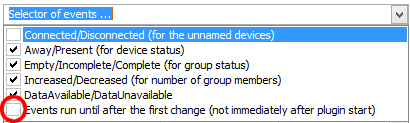
- Nmap_06.png (5.06 KiB) Viewed 6869 times
3) Note that even if you will have this option unticked, events Empty and Incomplete does not appear immediately, but only after a preset time ( Security factor * Scanning period).
Pako