Page 1 of 2
Virtual Numpad
Posted: Wed Oct 01, 2008 11:20 am
by Pako
Edit:
Virtual Numpad is obsolete and no longer being developed. Instead, use the plugin Multitap: http://www.eventghost.org/forum/viewtop ... f=9&t=1024
Based on the theme of GBWebmaster I created a plugin, which can generate events with a numeric string.
The number may be either as a suffix or as a payload event. In the second case, the user can define the suffix event itself.
Example of configuration:
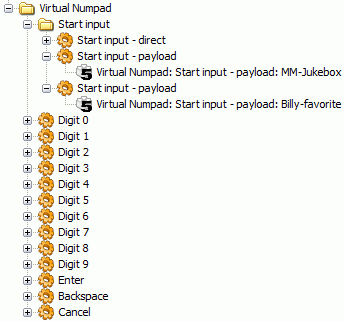
- VNP.gif (8.98 KiB) Viewed 9243 times
Result in Log:
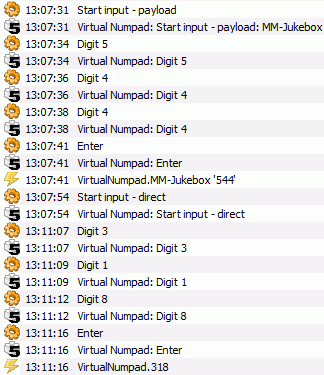
- VNP2.gif (14.93 KiB) Viewed 9237 times
You can approve committal of this plugin to SVN ?
Pako
Re: Virtual Numpad
Posted: Wed Oct 01, 2008 2:38 pm
by Bitmonster
Well, I think this functionality could be unified with a kind of "Multitap Plugin". What I have in my mind is a plugin that has one main action, where the user can configure a list of events (["a", "b", "c"] for example) and a timeout value. If this action is fired once and the timeout has reached, the plugin will fire the first value ('a') as an event or payload. If this action is run more times within the timeout, it will advance to the next value ('b' and then 'c'). So this is the normal SMS tripple-pad behaviour.
Now you only need another option, that prevents the firing of the event before the timeout is reached, even if an action of another key-group is used. So normally you would get a Multitap.A event immediately, if you press the 'abc' key once and then the 'def' key for example. If this option is set, the plugin should accumulate the keys. So if the user presses 'abc' once and then 'def' twice and waits for the timeout (or presses an 'Enter' action), you will get a Multitap.AE event.
So the user now can make ten actions for the digits and build a number of desired size.
You get the idea?
This could then be used for many other purposes, like switching between different states like "TV", "Video", "Music" and so on with a single key.
The current state of the key buffer can then also be delivered through eg.result, so you can put an OSD action behind it to see what you would get.
Re: Virtual Numpad
Posted: Wed Oct 01, 2008 5:43 pm
by topix
Not long ago i thought about a way to generate different events with one key. Based on the TripleTapKey-Macro i made (
look here) i did two versions. They are only macros because i did not yet look at making plugins.
The first version is like writing with mobile telephone, the second switches between given choices. I put a desktopremote in the example for easy testing.
Re: Virtual Numpad
Posted: Wed Oct 01, 2008 6:17 pm
by Pako
Bitmonster wrote:You get the idea?
I see perhaps a possible solution:
If it starts using the action "Start input" (direct or payload), plugin will be able to work as now (without a timeout, only digits). Conversely, if it starts direct through press of digit keys, can operate in the "Timeout" mode (SMS tripple-pad). Settings for this mode would be done in the main configuration dialog of plug-in.
It is a appropriate way? There's a catch in it ?
Pako
Re: Virtual Numpad
Posted: Wed Oct 01, 2008 9:54 pm
by Bitmonster
Pako wrote:Settings for this mode would be done in the main configuration dialog of plug-in.
It is a appropriate way? There's a catch in it ?
Pako
The setting of the mode should be done in the action, not in the plugin. So the user can create actions with only one item in the list (the digit) and set them to accumulate. He can also set the timeout setting, so he can directly press 1+2+3+Enter und will get Multitap.123, or he can press 1+2+3 and wait and will also get Multitap.123.
In another place (for another context), he can create actions for "abc", "def", etc., disable accumulation and gets the normal SMS behaviour and will get every key as a separate event.
Or he can set the accumulate option with the SMS setup and can create events like Multitap.hello by tapping the keys and pressing enter or wait for the timeout.
And on another place he can use the same action to create a "video", "music", "tv" choice.
So the plugin gets no options but nearly everything is handled by the same action with different settings.
Re: Virtual Numpad
Posted: Thu Oct 02, 2008 11:58 am
by Pako
Well, I try to describe it in another way.
A) Instead of the current actions "Start input - direct" and "Start input - payload" there will be only one action. It will bear a name for instance a "Start". This action will be run from other events than the events type "Digit". There will be possible to choose the mode in which the receive of digits will work and whether the resulting string will be sent as a suffix or payload.
B) In addition, there is one more "hidden" action that will work always in the Timeout mode. This action is put into operation just by the events of the key type "Digit", when will not be precede action "Start". Settings for this action would have to be only in the main dialog of plugin.
C) With events generated in accordance with section B) can start the action by type A)!
Please excuse my poor English !
Pako
Re: Virtual Numpad
Posted: Thu Oct 02, 2008 12:34 pm
by Bitmonster
Well, I'm not sure, if I understand point B.
This is a quick prototype screenshot of the way I think it could work:
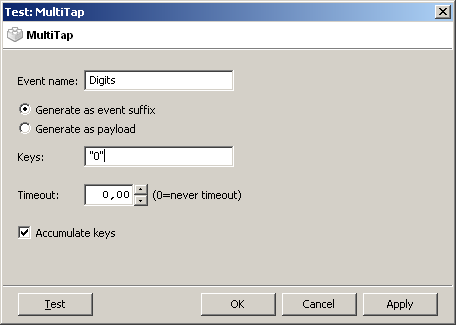
- multitap1.PNG (8.36 KiB) Viewed 9108 times
Here you see the setup for the numpad as you have it now. Since there is only one item in the keylist, the key will immediately be added to the buffer. So if the user triggers actions of this kind for the digits 1, 2 and 3, he will get a Multitap.Digits.123 event.
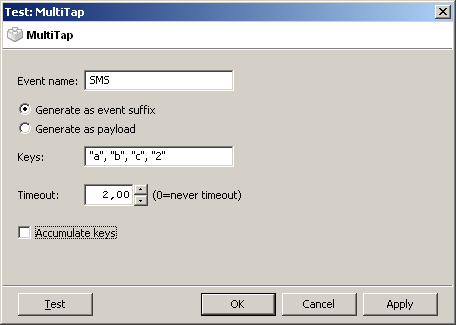
- multitap2.PNG (8.53 KiB) Viewed 9105 times
And this is the setup for SMS. If the same action is triggered before the timeout is reached, it will advance to the next key in the list. So two executions will give a Multitap.SMS.b event. If another action for the same event is triggered, the event will come even before the timeout.
Re: Virtual Numpad
Posted: Thu Oct 02, 2008 1:37 pm
by Pako
Bitmonster wrote:Well, I'm not sure, if I understand point B.
I probably understand why we still do not understand.
Once again, please carefully sight pictures that I gave as an attachment at the beginning.
According to my concept of events must be assigned to macros/actions type "Digit" in only one place for the whole plugin. This action has no option to configure. There is no need to use the "Exlusive enable" and the like. To me it is advantageous.
According to your concept probably is not any need for action Type "Start input - direct" and "Start input - payload" (or now only "Start"). I understand this right?
It seems to me that it will be for the user a highly complex.
Did you now understand my point B)?
Pako
Re: Virtual Numpad
Posted: Thu Oct 02, 2008 2:19 pm
by Bitmonster
Yes, the idea is to combine the functionality of a number merger, a triple-pad input and some more in a generic way. Even with your current Virtual Numpad the user will most likely need to use context folders, as nearly everybody needs the digit keys in other programs for other purposes. A TV program might need the keys directly for example, as it will most likely do the number merging of its own. For a filemanager it might be desirable to get letters to jump to the right file. And somewhere else it might be desirable to easily switch between different modes with a single key.
Re: Virtual Numpad
Posted: Thu Oct 02, 2008 6:29 pm
by Pako
Finally, I have to agree.

But I regret that I must abandon the concept of where to set the properties for the whole group at once. In many cases, it may be convenient, but overall it not joint in philosophy EventGhost.
I now then start almost from the beginning and do it according to your design.
Plugin thus will bear a new name Multitap.
Pako
Re: Virtual Numpad
Posted: Fri Oct 03, 2008 2:02 pm
by GBWebmaster
Hello Pako,
with the first version of
your PlugIn I type the number and the makro with the eventname "123" starts. The same happens, when I use the new PlugIn with the command "Virtual Numpad: Start input - direct".
Why does my makro "Load Playlist by Filter." not start with the eventname "123", when I use the command "Virtual Numpad: Start input - payload: MM-Jukebox". It also didn't start with the eventname "MM-Jukebox.123". What's wrong?
GBWebmaster
Re: Virtual Numpad
Posted: Fri Oct 03, 2008 3:02 pm
by Pako
Hi GBWebmaster!
Actions in the plugin MM is meantime unable to work with payload. Therefore you have to do a separate macro for each album.
Look at the attached file.
This is how it should work.
Pako
Re: Virtual Numpad
Posted: Sat Oct 04, 2008 7:06 pm
by GBWebmaster
Hello Pako,
exact this eventname (MM-Jukebox.544) doesn't work.
GBWebmaster wrote:Why does my makro "Load Playlist by Filter." not start with the eventname "123", when I use the command "Virtual Numpad: Start input - payload: MM-Jukebox". It also didn't start with the eventname "MM-Jukebox.123". What's wrong?
But it's no problem, because your first version do all I need. Thanks a million!
GBWebmaster
Re: Virtual Numpad
Posted: Tue Jan 06, 2009 11:49 am
by Spoony
How do I get this thing to work?
I put the __init__.py into the folder "VirtualNumpad" in the plugins dir (apparently it doesn't matter in which folder in the plugins dir...the messages stay the same), opened the example file and this shows up
VirtualNumpad not found
Main.OnInit
Can't read __init__.py for plugin "VirtualNumpad"
Can't read __init__.py for plugin "VirtualNumpad"
Error loading plugin: VirtualNumpad
Can't find action: VirtualNumpad.Digit0()
...
I'm using 0.3.5c.908...perhaps this is the problem? no idea...
thanks for help.
greetings,
Spoony
Re: Virtual Numpad
Posted: Tue Jan 06, 2009 1:16 pm
by Pako
Spoony wrote:I'm using 0.3.5c.908...perhaps this is the problem?
Yes, this is the problem.
You must use the latest beta version from here:
http://www.eventghost.org/downloads/
Virtual Numpad is obsolete and no longer being developed. Instead, use the plugin Multitap: http://www.eventghost.org/forum/viewtop ... f=9&t=1024
Pako