Page 1 of 1
Application Observer
Posted: Thu Sep 23, 2010 4:59 pm
by Pako
I do not like to use Task plugin, because it generates too many events.
That's why I create greatly simplified replacement - Application Observer plugin.
He generates events only when you start and end application. And that's only for those applications that you choose.
I do not know if someone is interested, but maybe yes.
Pako
Re: Application Observer
Posted: Mon Oct 11, 2010 9:41 pm
by Livin
Can you give an examples of usage?
I'd like to understand how this differs vs triggering Macros based on the following...
Task.Created
Task.NewWindow
Task.ClosedWindow
Task.Activated
Task.Deactivated
thx
Re: Application Observer
Posted: Tue Oct 12, 2010 7:01 am
by Pako
Here is an example of the contents of the log,
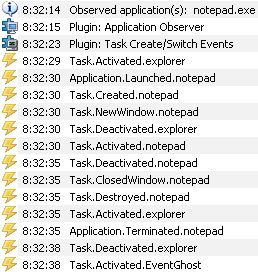
- EGlog.jpg (29.55 KiB) Viewed 9541 times
if I added plugins
Task Create/Switch Events and
Application observer to the configuration.
Then I opened a text file in notepad and again I closed it.
I think it is clear that correlations:
Application.Launched.XXX corresponds
Task.Created.XXX and
Application.Terminated.XXX corresponds
Task.Destroyed.XXX
BTW: what about the testing function
Window: Move Absolute?
I see that you're doing a very thorough test.
Pako
Re: Application Observer
Posted: Wed Oct 13, 2010 4:39 am
by Livin
work and my 1 yr old have been keeping me too busy to really test too much. I have added move absolute but not enabled it yet... maybe tomorrow or this weekend.
I still don't understand how Application Observer provides anything beyond using native triggers?
how is Application.Launched more useful than Task.Created?
Re: Application Observer
Posted: Wed Oct 13, 2010 5:37 am
by Pako
Livin wrote:how is Application.Launched more useful than Task.Created?
Here's something else entirely. I
never claimed that it was more useful.
Pako wrote:I do not like to use Task plugin, because it generates too many events.
Note: Because I am constantly experimenting with EventGhost, I do not use the option
Log only activated and assigned events.
I do not need events like Task.NewWindow, Task.ClosedWindow, Task.Activated, Task.Deactivated.
Pako
Re: Application Observer
Posted: Wed Oct 13, 2010 5:48 am
by Livin
gotcha... I also keep that option unchecked but I use the Task Plugin since it is useful to see what state an app is in and base Macros on them.
Re: Application Observer
Posted: Sun Dec 05, 2010 10:09 am
by schindi77
Hi Pako!
I┬┤m want to use your plugin to control a program called DSynchronize.exe.
It┬┤s proper configured, but I don┬┤t get any event after starting/closing the program.
Do you have any idea what the problem could be?
The "task create/switch events" plugin also doesn┬┤t recognize the program at all....
If I add "c:\windows\notepad.exe" it┬┤s also NOT recognized by your plugin, but recognized by the "task create/switch events" plugin.
Strange thing....
btw: I┬┤m using Win7 HP 32bit....
Re: Application Observer
Posted: Sun Dec 05, 2010 2:19 pm
by Pako
schindi77 wrote:If I add "c:\windows\notepad.exe" it┬┤s also NOT recognized by your plugin, but recognized by the "task create/switch events" plugin.
Strange thing....
I thought the only one reason for this behavior:
Applications you want to observe, you must insert without a path. Thus, only "notepad.exe".
Look at the picture in the introductory article of this topic.
Pako