Page 1 of 1
How do I reload plugin
Posted: Thu Oct 06, 2011 1:58 am
by TheOgre
Hi Guys,
It's my first day trying to write a plugin, so go easy on me..
After I have made changes to the plugins .py file, what's the best way to get it to reload?
Looks like I either have to delete the plugin (along with any actions) from the tree. Or close EG and restart it.
Is there an easier way to just do a reload/refresh?
Re: How do I reload plugin
Posted: Thu Oct 06, 2011 12:54 pm
by Pako
TheOgre wrote:Is there an easier way to just do a reload/refresh?
I do not know if it's the easiest way, but I use restart EventGhost from the menu.
It's simple. Just run the program with a command line argument
-debug:
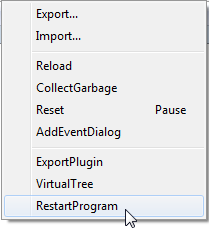
- EG-Debug_2.png (144.44 KiB) Viewed 3745 times
Pako
Re: How do I reload plugin
Posted: Fri Oct 07, 2011 9:08 pm
by bruinlax
thanks. I was having the same problem.
Re: How do I reload plugin
Posted: Wed Oct 12, 2011 1:29 pm
by cfull1
When I try to start it with -debug it just freezes.
Any ideas?
Also I noticed the restartprogram from the debug menu. Is there a way to call that from a python script?
Re: How do I reload plugin
Posted: Wed Oct 12, 2011 5:18 pm
by krambriw
When I try to start it with -debug it just freezes
For me as well, I thought I had a local problem
Best regards, Walter
Re: How do I reload plugin
Posted: Wed Oct 12, 2011 7:27 pm
by cfull1
Figured mine out.
I traced it back to a crappy plugin I threw together.
C:\Users\Carson\AppData\Roaming\EventGhost\Log.txt
Removed the plugin and it worked fine
Also Figured out how to do the restart: