Page 1 of 1
access procedures / variables of loaded plugin
Posted: Sun Feb 12, 2012 12:37 am
by bruinlax
what's the syntax to have a python script access a variable / procedure of a loaded plugin base?
for instance to run from a script something like:
print eg.
plugins("MyPlugin").strVariable or
eg
.plugins("MyPlugin").myProcedure()
where sample plugin base is:
Code: Select all
class MyPlugin(eg.PluginBase):
    strVariable
    def myProcedure(self):
        print "hello world -2"

    def __init__(self):
        pass

    def __start__(. . .
        strVariable = "Hello World"

    def __stop__(self):
        pass

    def __close__(self):
. . .
Thanks. . .
Re: access procedures / variables of loaded plugin
Posted: Sun Feb 12, 2012 11:02 am
by krambriw
The way I learned is to use a getter action like the following:
Here is you plugin slightly modified where I have added an action that will return you the content of "strVariable".
Code: Select all
import eg

eg.RegisterPlugin()


class MyPlugin(eg.PluginBase):

    def __init__(self):
        self.strVariable = ''
        self.AddAction(HelloWorld)

    def __start__(self):
        self.strVariable = "Hello World"
        print "Started"

    def myProcedure(self):
        print "hello world -2"

    def __stop__(self):
        print "Stopped"
        pass

    def __close__(self):
        print "Closed"
        pass


class HelloWorld(eg.ActionBase):

    def __call__(self):
        return self.plugin.strVariable
To use this from a python script, you could typically do like this:
Code: Select all
myMessage = eg.plugins.MyPlugin.HelloWorld()
print myMessage
So in summary, use an action to access a variable in the plugin.
Best regards, Walter
Re: access procedures / variables of loaded plugin
Posted: Sun Feb 12, 2012 6:48 pm
by bruinlax
cool. i can make that work. thanks.
Re: access procedures / variables of loaded plugin
Posted: Tue Feb 14, 2012 11:29 am
by Pako
The way that Krambriw said, is not the only one.
There is also another way to get or set the plugin variables.
You can see it in the following example:
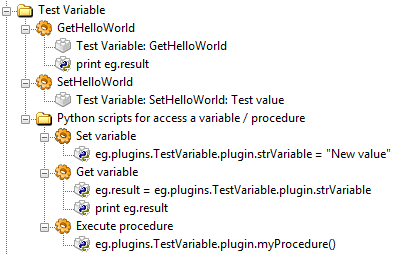
- Test_variable_access.png (18.59 KiB) Viewed 4611 times
Code: Select all
<?xml version="1.0" encoding="UTF-8" ?>
<EventGhost Version="1544">
    <Folder Name="Test Variable" Expanded="True">
        <Macro Name="GetHelloWorld" Expanded="True">
            <Action>
                TestVariable.GetHelloWorld()
            </Action>
            <Action>
                EventGhost.PythonCommand(u'print eg.result')
            </Action>
        </Macro>
        <Macro Name="SetHelloWorld" Expanded="True">
            <Action>
                TestVariable.SetHelloWorld(u'Test value')
            </Action>
        </Macro>
        <Folder Name="Python scripts for access a variable / procedure" Expanded="True">
            <Macro Name="Set variable" Expanded="True">
                <Action>
                    EventGhost.PythonCommand(u'eg.plugins.TestVariable.plugin.strVariable = "New value"')
                </Action>
            </Macro>
            <Macro Name="Get variable" Expanded="True">
                <Action>
                    EventGhost.PythonCommand(u'eg.result = eg.plugins.TestVariable.plugin.strVariable')
                </Action>
                <Action>
                    EventGhost.PythonCommand(u'print eg.result')
                </Action>
            </Macro>
            <Macro Name="Execute procedure" Expanded="True">
                <Action>
                    EventGhost.PythonCommand(u'eg.plugins.TestVariable.plugin.myProcedure()')
                </Action>
            </Macro>
        </Folder>
    </Folder>
</EventGhost>
(Help menu in EventGhost).
Pako
Attached is a modified testing plugin:
Re: access procedures / variables of loaded plugin
Posted: Tue Feb 14, 2012 4:01 pm
by krambriw
Dear Pako,
This is of course a nicer and very visible way since it is shown in the tree structure. If you prefer to have it more "hidden", and using a more advanced script with additional logic inside, built in calls to actions the way I showed could be the choice. Both ways will of course work.
Best regards, Walter
Re: access procedures / variables of loaded plugin
Posted: Tue Feb 14, 2012 6:44 pm
by Pako
krambriw wrote:If you prefer to have it more "hidden", and using a more advanced script with additional logic inside, built in calls to actions the way I showed could be the choice.
Dear Walter !
I do not understand your post. Or you misunderstood my post.
I mainly wanted to point out that
access to plugin variables is possible even without getter action.
This can be useful especially in case of an existing plugin, which is inappropriate to intervene.
Best regards, Pako
Re: access procedures / variables of loaded plugin
Posted: Tue Feb 14, 2012 7:47 pm
by krambriw
Dear Pako,
You are absolutely correct, no misunderstanding, your way is the best.
Best regards, Walter
Re: access procedures / variables of loaded plugin
Posted: Wed Feb 15, 2012 6:43 am
by Pako
krambriw wrote:You are absolutely correct, ..., your way is the best.
Dear Walter,
no, I do not think it. We can not say that variant using the
eg.plugins.<PluginClassName>.plugin.<PluginVariable> is the best.
It is only one variant, suitable in certain cases. Likewise, a variant with a getter action is again most appropriate in other cases.
I'm thinking in particular cases when you can expect frequent use for less experienced users.
Best regards, Pako