Page 1 of 1
New action System\Display Image
Posted: Wed Feb 15, 2012 8:42 am
by Pako
I needed to use
System\Display\Show Picture action. But I found that it does not meet all my needs.
And so I created a new action
System\Display\Display Image.
I prefer to preserve the original
Show Picture action for backward compatibility.
Here you can see what it looks like the configuration dialog of new action:
I'm asking you about two things:
1) Please check that all the English strings are fine.
2) Please test it. I prepared a simple example of using as slideshow, but please test it as much as possible option.
You must replace the
__ init__.py file in the folder
EventGhost\plugins\System using the file that is attached.
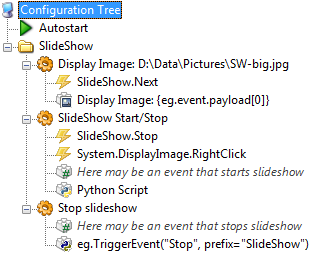
- EG_SlideShow.png (20.74 KiB) Viewed 7451 times
Pako
Re: New action System\Display Image
Posted: Fri Feb 17, 2012 9:39 am
by homecontrol
Thx Pako!
Exactly what I am looking for! Works perfect!
Re: New action System\Display Image
Posted: Fri Mar 02, 2012 11:58 am
by Pako
Indeed, no one comments on my English ?
This is weird, I know it's not worth anything.
Indeed, no one here is willing to do something for others for free ?
It's a shame because I would like to soon release a new version of the EG and I thought that there will be a corrected version.
Pako
Re: New action System\Display Image
Posted: Fri Mar 02, 2012 4:29 pm
by noesis
Hi Pako,
Pako wrote:Indeed, no one comments on my English ?
This is weird, I know it's not worth anything.
Indeed, no one here is willing to do something for others for free ?
It's a shame because I would like to soon release a new version of the EG and I thought that there will be a corrected version.
Pako
No offence meant, but since you asked for it, there is one bit of English that could be improved, by looking at the screenshots you posted. (I actually haven't used the Plugin/Code you posted, but I'm sure it works well, otherwise you would have heard about it by now by those that have tried it.)
Anyway, the English used in the initial screenshot, under "Other options" section;
Starts with a Window Border option, which all seems fine however the next line;
"The window automatically to disappear after ..."
in English would be better represented by "The window automatically disappears after ..."
My point is your English is generally good and what I've just pointed out is very pedantic and IMHO not even worth changing, as it makes sense either way, and is clearly not a problem as long as the programming works.

Re: New action System\Display Image
Posted: Sat Mar 03, 2012 3:07 pm
by Pako
noesis wrote:"The window automatically to disappear after ..."
in English would be better represented by "The window automatically disappears after ..."
Thank you very much for your comments.
I will use your modification in System plugin.
Pako
Re: New action System\Display Image
Posted: Fri Jul 20, 2012 11:44 pm
by this-is-me
Bug: if "0" is used as the timeout, there is no way to make the image disappear off the screen. It should be possible to hide an existing image like the "Show Picture" action by specifying no picture to show.
Re: New action System\Display Image
Posted: Sat Aug 18, 2012 11:08 am
by Pako
And that's a problem, right-click on the image?
Pako
Re: New action System\Display Image
Posted: Sat Aug 18, 2012 12:40 pm
by this-is-me
Yes, that's a problem, because the whole idea of EventGhost is that the user doesn't need to interact with things as much. Why should I have to get up from the couch, walk over to the computer, and right click on an image to get rid of it? I need to have EventGhost be able to do this instead of me.
One example is If I display a picture on the screen, and then need to show a more updated picture later (such as album art for the currently playing song). If EventGhost cannot hide the existing album art, then the next album is stacked on top of the previous one. If I was not at the computer, but had music playing for an hour, I might have 20 different pictures to dismiss from the screen. This should be handled in EventGhost, and not by me as a user.
Re: New action System\Display Image
Posted: Sat Aug 18, 2012 4:22 pm
by Pako
Yes, I understand and agree.
But this action is not ready for such use, because you can display an unlimited number of images simultaneously.
I'll have to add an identifier to each image.
Then it will be possible to programmatically close the appropriate window (based on a known identifier).
Pako
Re: New action System\Display Image
Posted: Sun Aug 19, 2012 11:20 am
by Pako
=> 0.4.1.r1582
Added the action Hide Image.
In dialogue of action Display Image you must define the name of the image.
If an image with the same name already exists, it is overwritten with the new image.
Pako
Re: New action System\Display Image
Posted: Fri Aug 31, 2012 12:48 pm
by this-is-me
Thank You.
Re: New action System\Display Image
Posted: Sat Sep 01, 2012 6:35 am
by krambriw
Pako, now really pedantic, it should be "an image",
Very best regards my friend, Walter