Page 1 of 1
xPL Plug-in Use of Variables
Posted: Sun Jul 01, 2012 5:46 pm
by theendisnye
I am trying to find out how to be able to use the variables within an xpl messagewithin other EventGhost events and vice versa.The plug-in website says EG's build in Python scripting features lets you create free form scripts to decode xPL messages on the fly and send responses based on an other EG event, but gives no clue as to how to achieve. Steve
Re: xPL Plug-in Use of Variables
Posted: Sun Jul 01, 2012 6:49 pm
by krambriw
Well, there is even a plugin for xPL available, maybe a good starting point for the continuation...
viewtopic.php?f=9&t=1119
Best regards, Walter
Re: xPL Plug-in Use of Variables
Posted: Mon Jul 02, 2012 5:07 am
by theendisnye
That is the plug-in I am using I can't see how to extract the message content or create specific content dependent upon EG Events. Steve
Re: xPL Plug-in Use of Variables
Posted: Mon Jul 02, 2012 5:49 am
by krambriw
Be more precise and show some examples how it looks like and what you wanna do. I can only guess what you are looking for. Otherwise you could look into the documentation of the eg event and check things like suffix and payload.
http://www.eventghost.net/docs/eg/eg.Ev ... GhostEvent
Re: xPL Plug-in Use of Variables
Posted: Mon Jul 02, 2012 6:05 am
by theendisnye
Ok apologies for not making it clear, the sort of thing I wanted tobe able to do was in an xpl message such as
xPL.xpl-trig:sensor.basic:dhs-xplmem.dyvuhdvg:*:device=xplmem,type=memused,current=87,
I wanted to extract the value 'current' and to then use it in EG or to change the value of current to a different value or be able to react to all messages that start 'xPL.xpl-trig:sensor.basic:dhs-xplmem.dyvuhdvg:'
Steve
Re: xPL Plug-in Use of Variables
Posted: Mon Jul 02, 2012 7:34 am
by krambriw
OK, understood, to extract the value, you can do this in a python script (or in a plugin if you preferre). Here is sample:
Code: Select all
#m = eg.event.suffix
m = 'xPL.xpl-trig:sensor.basic:dhs-xplmem.dyvuhdvg:*:device=xplmem,type=memused,current=87,'
if m.find('current=')>0:
    n = m.split(':')
    o = n[4].split(',')
    current = o[2].split('=')
    current_value = int(current[1])
    print current_value

    #This can of course also be written simpler in one single line
    current_value = int(m.split(':')[4].split(',')[2].split('=')[1])
    print current_value
I have commented out the line that captures the event that later should trigger the script and instead inserted your sample.
To trigger the script, you will have to create a macro where you put this script and an event with Event name "xPL.*"
The script will then run for every xPL event and you can improve the filtering inside the script to catch only what you are looking for.
Once you have the current value, next is to add lines to the script to make something happen depending on the values
Best regards, Walter
Re: xPL Plug-in Use of Variables
Posted: Mon Jul 02, 2012 7:58 am
by theendisnye
Walter, Thank you for this I have set up an event xPL but that doesn't appear to be triggering the script. I basically created a macro, added an event changed the details to be xPL and then added an osd display followed by the python script above. Neither the osd or python scrip gets to run.
Re: xPL Plug-in Use of Variables
Posted: Mon Jul 02, 2012 8:28 am
by krambriw
Did you define it like this?
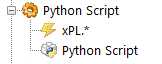
- Image2.jpg (2.44 KiB) Viewed 4168 times
I added the xPL plugin and the macro above and for every xPL event the macro is now executed.
What is your problem?
Re: xPL Plug-in Use of Variables
Posted: Mon Jul 02, 2012 12:44 pm
by theendisnye
Walter thank you for that I have now managed to get that example working and will experiment a bit more, I am new to both Eventghost and to python scripting so I am learning as I, try to, do.
The other thing I want to achieve was to send an xPL message which I created using variables. So I can create a variable that has the content of the message I want to send, how can I then send that as an xPL message?
Steve
Re: xPL Plug-in Use of Variables
Posted: Mon Jul 02, 2012 2:23 pm
by krambriw
To send xPL messages, you need to dig further. It all depends on what type of xPL message you want to send, they have various formats and there are various types. Try to look at the code I wrote for the "RFXCOM for xPL" plugin where you can find how I did it for various message types.
Once you have it figured out, you can use the following typical statement in a python script:
Code: Select all
eg.plugins.xPL.sendxPL(u'Message Type', u'Schema', u'Target', u'Message')
Best regards, Walter
Re: xPL Plug-in Use of Variables
Posted: Mon Jul 02, 2012 7:10 pm
by theendisnye
Walter, thank you this it has been really useful I have managed to progress quite a bit. Steve