Page 1 of 2
Re: New version 4.0.1.r1638 is out!
Posted: Mon Sep 02, 2013 1:56 pm
by Snowbird
Hello,
I'm using Win7 x64, and since I installed the latest version r1638 I have an error on EG startup (the previous version r1630 was OK there was no errors), see below :
15:47:53 ---> Welcome to EventGhost <---
15:47:53 Traceback (most recent call last) (1638):
15:47:53 File "C:\Program Files (x86)\EventGhost\eg\Classes\ActionThread.py", line 33, in StartSession
15:47:53 pluginInfo.instance.__start__()
15:47:53 File "C:\Program Files (x86)\EventGhost\plugins\System\__init__.py", line 270, in __start__
15:47:53 import VistaVolEvents as vistaVolumeDll
15:47:53 ImportError: DLL load failed: The specified module could not be found.
15:47:53 Autostart
15:47:53 Plugin: Keyboard
15:47:53 Main.OnInit
By the way, would it be possible to include the date in the log in the next release ? for example, instead of :
15:47:53 ---> Welcome to EventGhost <---
15:47:53 Traceback (most recent call last) (1638):
it would be like this :
2013-09-02 15:47:53 ---> Welcome to EventGhost <---
2013-09-02 15:47:53 Traceback (most recent call last) (1638):
Many thanks for this great tool and all the support you're providing on your spare time !
--
Ray
Re: New version 4.0.1.r1638 is out!
Posted: Mon Sep 02, 2013 4:25 pm
by kkl
I'm also getting the exact same error message at startup that I wasn't getting with r1610. Win8 x64
Edit: Actually, I'm getting the error on one PC, but not the other; both Win8 x64.
Re: New version 4.0.1.r1638 is out!
Posted: Mon Sep 02, 2013 5:30 pm
by kalia
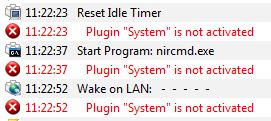
In addition to the above error, I am unable to use any action under
System.
- Capture.JPG (19.62 KiB) Viewed 13456 times
I have Win 7 Pro x64 and EventGhost 0.4.1.r1630 did not have this problem.
Re: New version 4.0.1.r1638 is out!
Posted: Mon Sep 02, 2013 5:42 pm
by Sem;colon
Hello,
I get the ERROR too (both)..
Plugin "System" ist nicht aktiviert
which means "Plugin "System" is not activated"
It happens, for example, when I try to run an application from EventGhost.(like kalia just showed)
Also I have Two "System" loaded somehow, and none of them work...
EDIT: I have Win 8 Pro x64 - v4.0.1.r1630 worked
Re: New version 4.0.1.r1638 is out!
Posted: Mon Sep 02, 2013 6:23 pm
by Pako
It is interesting, but I do not know how to help. For me, nothing like that happens.
Moreover, I am not aware of any changes that could they somehow be related.
Maybe some of the changes from blackwind?
But it is not certain. At the moment I have no other idea ... I'm sorry, blackwind.
I do not want to throw at you. Maybe just I did something wrong.
Pako
Re: New version 4.0.1.r1638 is out!
Posted: Mon Sep 02, 2013 7:50 pm
by kkl
This is pretty disconcerting. If Pako doesn't know what the problem is, the rest of us are in real trouble.

Fortunately, the exact same error with solution was
posted earlier. Download/extract the attachment and "copy VistaVolEvents.pyd to the plugins\system folder." It worked for me. I'll leave it to the experts to figure out why the error cropped up with this release.
Re: New version 4.0.1.r1638 is out!
Posted: Tue Sep 03, 2013 1:00 am
by blackwind
As noted by kkl, this has nothing to do with the changes I made -- it's simply a matter of VistaVolEvents.pyd not being present, which suggests an installer issue. That said, both an upgrade and a clean installation installed the file in question on my system, so I'm unable to shed any additional light.
Re: New version 4.0.1.r1638 is out!
Posted: Tue Sep 03, 2013 1:25 am
by blackwind
Alright, got it -- the original author of VistaVolEvents didn't enable static linking in the project configuration, and because I built it with a newer version of Visual Studio than he did, the version in r1638 requires a dependency that some may not have.
Attached is a statically linked version that should work everywhere. I suggest you push this out immediately as r1639, Pako.
Re: New version 4.0.1.r1638 is out!
Posted: Tue Sep 03, 2013 6:27 am
by Pako
Re: New version 4.0.1.r1638 is out!
Posted: Tue Sep 03, 2013 7:05 am
by Snowbird
Thanks Pako & Blackwind ! r1640 is working now with no errors ! Thank you !
Do you think you can do something about my other question ? (i know it's not the right place to ask, but since we're at it)
Would it be possible to include the date in the log in the next release ? for example, instead of :
15:47:53 ---> Welcome to EventGhost <---
15:47:53 Traceback (most recent call last) (1638):
it would be like this :
2013-09-02 15:47:53 ---> Welcome to EventGhost <---
2013-09-02 15:47:53 Traceback (most recent call last) (1638):
Re: New version 4.0.1.r1638 is out!
Posted: Tue Sep 03, 2013 8:52 am
by Pako
Snowbird wrote:Would it be possible to include the date in the log in the next release ?
Yes, of course it would have been possible.
But I do not think it is appropriate.
Date would unnecessarily occupy space in each row.
I know that this could be done as a option.
But it would unnecessarily complicate the menu ...
If you want to know the date, then you can use the plugin
Log redirector.
Do you know it?
Pako
Re: New version 4.0.1.r1638 is out!
Posted: Tue Sep 03, 2013 9:04 am
by Snowbird
Thanks Pako for your quick reply.
No I didn't know about "Log redirector" I will have a look, thanks

I know by adding the date it would use more space on the screen, but not that much, only 11 characters more : "yyyy-mm-dd ", I'm sure you agree it's not that much
It's useful to know when an a special event occurred when you leave EG running for weeks, I'm sure I'm not the only that has thought about this. You would made more people happy than you think with the addition of this little information.
Thanks for your time Pako.
Re: New version 4.0.1.r1638 is out!
Posted: Tue Sep 03, 2013 6:42 pm
by Sem;colon
Snowbird wrote:I'm sure I'm not the only that has thought about this.
I agree that this could be useful in some situations - I write myself a custom log with the "file interactions" plugin, I configured it so, that I can see when a specific action took place, and that works with time and date.
All in all I agree with Pako, it would need some effort to implement this function which I don't think much people will use.
Did you know that the Log is limited? The events in the logger don't keep there forever but until the log is "full". In my log, for example, I can only see the last two hours when I'm working on the PC; a date would there be kinda useless.
I think the log redirector is what you are looking for, try it, you will like it

Re: New version 4.0.1.r1638 is out!
Posted: Wed Sep 04, 2013 5:01 am
by kalia
I have another problem with the recent versions (0.4.1.r1640, 0.4.1.r1638, and 0.4.1.r1630). I use macros that involve several actions. I noticed in the last three versions that not all actions are processed (i.e. macro suddenly stops processing without error). It took a while for me to figure out the cause but I think it has to do with using nircmd (
http://www.nirsoft.net/utils/nircmd.html).
For example, consider the following macro:
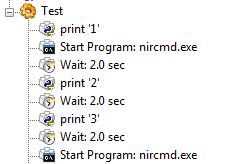
- Capture1.JPG (16.42 KiB) Viewed 13379 times
When the above macro is executed, it seems to stop processing after the display resolution change.
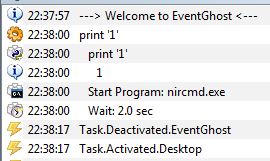
- Capture.JPG (21.14 KiB) Viewed 13379 times
Code for above macro is:
Code: Select all
<?xml version="1.0" encoding="UTF-8" ?>
<EventGhost Version="1640">
    <Macro Name="Test" Expanded="True">
        <Action>
            EventGhost.PythonCommand(u"print '1'")
        </Action>
        <Action>
            System.Execute(u'nircmd.exe', u'help', 0, False, 2, u'', False, False)
        </Action>
        <Action>
            EventGhost.Wait(2.0)
        </Action>
        <Action>
            EventGhost.PythonCommand(u"print '2'")
        </Action>
        <Action>
            EventGhost.Wait(2.0)
        </Action>
        <Action>
            EventGhost.PythonCommand(u"print '3'")
        </Action>
        <Action>
            EventGhost.Wait(2.0)
        </Action>
        <Action>
            System.Execute(u'nircmd.exe', u'help', 0, False, 2, u'', False, False)
        </Action>
    </Macro>
</EventGhost>
kalia
Re: New version 4.0.1.r1638 is out!
Posted: Wed Sep 04, 2013 6:56 am
by Pako
Are you sure that the version r1610 did not behave this way?
If yes, then we must look for the cause in some of the changes that happened between r1610 and r1630.
You are right that it has to do with the program nirmd.exe. I tried exactly the same sequence, only instead of nircmd.exe I used notepad.exe.
In this case, everything went as expected.
Pako