Page 1 of 2
Counter
Posted: Thu Sep 26, 2013 3:27 am
by nikus_v13
Hi can you add a counter which counts event and responsa by event ? For exsample : counter 1# -> lg: counter1# 1... counter1# 2...3....10 (the counter counts forward and backward). Sorry for my weak english
Re: Counter
Posted: Thu Sep 26, 2013 3:48 am
by Pako
I unfortunately did not understand what you mean.
Pako
Re: Counter
Posted: Thu Sep 26, 2013 4:22 am
by nikus_v13
I mean counter count event ex: keyboard button pres and trigger curent macro at set number.
Re: Counter
Posted: Sat Sep 28, 2013 6:52 pm
by Pako
Have you tried the Multitap plugin - specifically Single Key mode?
Pako
Re: Counter
Posted: Sun Sep 29, 2013 5:43 pm
by nikus_v13
Hi yes i try to use it. I want to make something like this:
https://www.youtube.com/watch?v=M_X-KrfMF-4
and use eventghost to count visitors. For exsample keyboard 1 then 2 counts as one next 1 then 2 count as 2 then3...4...5
but 2 then 1 counts backwards.
Re: Counter
Posted: Mon Sep 30, 2013 6:43 am
by Pako
Yes, now I finally understand.
In this case, we do not need a new feature.
Similar things you can do using EventGhost for many years.
This can be solved in different ways.
Here you see one of them (you may need to add the Webserver plugin to your configuration):
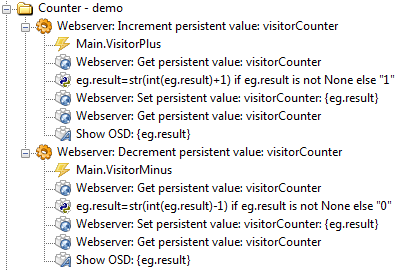
- Counter-demo.png (18.29 KiB) Viewed 11835 times
Here's a copy of that part of the tree (you can do copy / paste to tree):
Code: Select all
<?xml version="1.0" encoding="UTF-8" ?>
<EventGhost Version="1640">
    <Folder Name="Counter - demo" Expanded="True">
        <Macro Name="Webserver: Increment persistent value: visitorCounter" Expanded="True">
            <Event Name="Main.VisitorPlus" />
            <Action>
                Webserver.GetPersistentValue(u'visitorCounter')
            </Action>
            <Action>
                EventGhost.PythonCommand(u'eg.result=str(int(eg.result)+1) if eg.result is not None else "1"')
            </Action>
            <Action>
                Webserver.SetPersistentValue(u'visitorCounter', u'{eg.result}')
            </Action>
            <Action>
                Webserver.GetPersistentValue(u'visitorCounter')
            </Action>
            <Action>
                EventGhost.ShowOSD(u'{eg.result}', u'0;-48;0;0;0;700;0;0;0;0;3;2;1;66;Comic Sans MS', (255, 0, 0), (0, 0, 0), 1, (5, 5), 0, 0.0, True)
            </Action>
        </Macro>
        <Macro Name="Webserver: Decrement persistent value: visitorCounter" Expanded="True">
            <Event Name="Main.VisitorMinus" />
            <Action>
                Webserver.GetPersistentValue(u'visitorCounter')
            </Action>
            <Action>
                EventGhost.PythonCommand(u'eg.result=str(int(eg.result)-1) if eg.result is not None else "0"')
            </Action>
            <Action>
                Webserver.SetPersistentValue(u'visitorCounter', u'{eg.result}')
            </Action>
            <Action>
                Webserver.GetPersistentValue(u'visitorCounter')
            </Action>
            <Action>
                EventGhost.ShowOSD(u'{eg.result}', u'0;-48;0;0;0;700;0;0;0;0;3;2;1;66;Comic Sans MS', (255, 0, 0), (0, 0, 0), 1, (5, 5), 0, 0.0, True)
            </Action>
        </Macro>
    </Folder>
</EventGhost>
Pako
Re: Counter
Posted: Wed Oct 02, 2013 5:48 pm
by nikus_v13
I can't use version 1640. Maybe you have another solution ?
Re: Counter
Posted: Thu Oct 03, 2013 3:33 am
by Pako
nikus_v13 wrote:I can't use version 1640. Maybe you have another solution ?
You can find several solutions. For example:
1) You can try to use the latest version of the Webserver plugin in your program version.
2) You can use global variables instead of persistent variables of Webserver plugin
Pako
Re: Counter
Posted: Fri Oct 11, 2013 6:08 pm
by nikus_v13
OK I make a counter but what I have to do to eventghost respond to 1 and 0 fo ex send comand by winlirc plugin ?
Re: Counter
Posted: Sat Oct 12, 2013 5:36 am
by Pako
I'm sorry, but I do not understand your question.
What do you mean by "fo ex send comand"?
Pako
Re: Counter
Posted: Sat Oct 12, 2013 2:37 pm
by nikus_v13
Sorry... for exsample send code I want to mak something to turn on or off the lights if some one enter or leaves a room I'v got almost entire house controled by eventghost and winlirc.
Re: Counter
Posted: Sat Oct 12, 2013 4:26 pm
by Pako
I have a lack of information from you. I do not know your situation and I do not know how you can to control light using WinLIRC.
However, I understand that you need an event when the first visitor comes into the room and an event when the last visitor leaves.
So you can do such as the following:
1) Use
Python Script actions instead of
Python Command actions
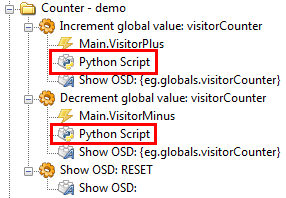
- Counter-Modification.png (9.81 KiB) Viewed 11590 times
Code for incrementation:
Code: Select all
eg.globals.visitorCounter = 1 if not "visitorCounter" in eg.globals.__dict__  else eg.globals.visitorCounter + 1
if eg.globals.visitorCounter == 1:
    eg.TriggerEvent("Turn.On", prefix = "Light")
Code for decrementation:
Code: Select all
eg.globals.visitorCounter = 0 if not "visitorCounter" in eg.globals.__dict__  else eg.globals.visitorCounter - 1
if eg.globals.visitorCounter == 0:
    eg.TriggerEvent("Turn.Off", prefix = "Light")
2) Then you get the necessary events:
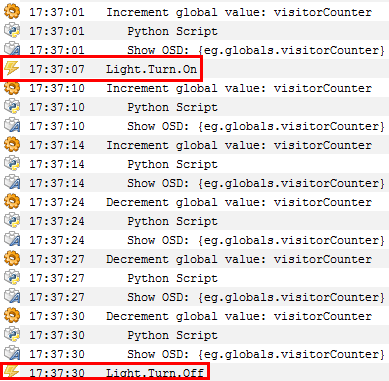
- Counter-Events.png (26.77 KiB) Viewed 11590 times
Pako
Re: Counter
Posted: Sat Oct 12, 2013 7:24 pm
by nikus_v13
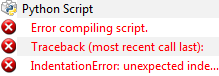
- Przechwytywanie2.PNG (4.27 KiB) Viewed 11581 times
I not working... Light is controled by winLIRC by ir codes
https://www.youtube.com/watch?v=TKNPElUFtpM one of the rooms
Re: Counter
Posted: Sun Oct 13, 2013 6:40 am
by Pako
It WORKS.
I tried it and then I used the copy / paste.
And BTW - next time please include FULL error message.
According to this piece, I can not say exactly where you made a mistake.
But it is certain that it is a problem indentation.
Find information about the Python indentation on the Internet !
One more note:
I have a feeling that you are behaving as when this is a paid support.
I see very little effort on your part (including writing posts here).
You're the one who wants to solve something and it seems that you spend less of your time than I do.
Pako
Re: Counter
Posted: Sun Oct 13, 2013 10:33 am
by nikus_v13
You are right it's working! I had got too many spaces when i copy/paste code. THANKS for your help !