Page 1 of 1

Multitap Setup (Please help this fundraising project) {PIC!}

Posted: Tue Jan 07, 2014 4:23 pm
by stisev
Hello,

I own a Firefly RF remote and am trying to host a Karaoke fundraiser at my place for a good cause. Basically, what I want to do is useEventGhost (Multitap plugin) to use the numpad on my firefly remote SMS-style to key in letters to choose the karaoke sogns
Here is a pic of the remote
Image


I am at a loss even with those instructions on where to start or what to do. Can someone please help us out?

We will be using the following keys reserved for this task.

Firefly.Num0
Firefly.Num1
Firefly.Num2
Firefly.Num3
Firefly.Num4
Firefly.Num5
Firefly.Num6
Firefly.Num7
Firefly.Num8
Firefly.Num9


Firefly.Num1 example code:

Code: Select all

<?xml version="1.0" encoding="UTF-8" ?>
<EventGhost Version="1640">
    <Event Name="Firefly.Num1" />
</EventGhost>

Can anyone help us for this cause?
Re: Multitap Setup (Please help this fundraising project) {P

Posted: Sun Jan 12, 2014 10:07 am
by Pako
Unfortunately, I absolutely do not understand your problem.
Can you please write in other words?

BTW, have you read the documentation ?

Pako

Re: Multitap Setup (Please help this fundraising project) {P

Posted: Sun Jan 12, 2014 2:32 pm
by stisev
Wow Pako! Long time No See!! I hope things are well and I very glad to see you active here.


OK, here is another explanation:

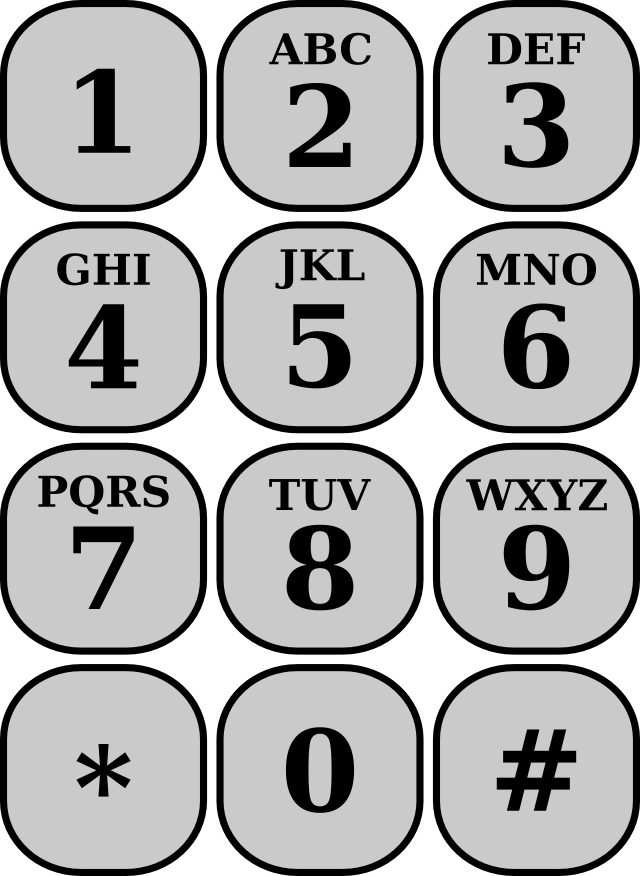
We are hosting a karaoke session in our living room. I don't have, nor want a keyboard there to type the first letters of the song. I want to use my Snapstream Firefly remote's num keys (Firefly.Num0, Num1, etc...) to use as a keyboard. If you look at a phone keyboard, you will notice each number has 3 letters associated with it.

Image


Basically, I want to be able to enter the letters using the numbers. Some phones have this, where if you press the same number twice, it will give you box and let you change the "Letter". For example, If I pressed 2+2 twice very fast, it will popup a box and let me chose The letter B, if I tap once more quickly, it will choose C.
I thought this was what Multitap's "SMS" mode was?

Do you understand now Pako? I could have sworn there was something like this on EG I seen before, but I cannot find anymore

Re: Multitap Setup (Please help this fundraising project) {P

Posted: Sun Jan 12, 2014 4:19 pm
by Pako
:D :D :D
Yes, you can follow the documentation,
like there described Example 1 - keystroke emulation in SMS mode.

Pako

Re: Multitap Setup (Please help this fundraising project) {P

Posted: Mon Jan 13, 2014 5:15 pm
by stisev
Yay! I think I figured it out.

Code: Select all

<?xml version="1.0" encoding="UTF-8" ?>
<EventGhost Version="1640">
    <Folder Name="Winamp (Karaoke) **Multitap**" Expanded="True">
        <Macro Name="Multitap: Key: SMS: 1!@#, 1!@#">
            <Event Name="Firefly.Num1" />
            <Action>
                Multitap.Key(u'SMS', [u'1!@#', u'1!@#'])
            </Action>
        </Macro>
        <Macro Name="Multitap: Key: SMS: abc2, ABC2">
            <Event Name="Firefly.Num2" />
            <Action>
                Multitap.Key(u'SMS', [u'abc2', u'ABC2'])
            </Action>
        </Macro>
        <Macro Name="Multitap: Key: SMS: def3, DEF3">
            <Event Name="Firefly.Num3" />
            <Action>
                Multitap.Key(u'SMS', [u'def3', u'DEF3'])
            </Action>
        </Macro>
        <Macro Name="Multitap: Key: SMS: ghi4, GHI4">
            <Event Name="Firefly.Num4" />
            <Action>
                Multitap.Key(u'SMS', [u'ghi4', u'GHI4'])
            </Action>
        </Macro>
        <Macro Name="Multitap: Key: SMS: jkl5, JKL5">
            <Event Name="Firefly.Num5" />
            <Action>
                Multitap.Key(u'SMS', [u'jkl5', u'JKL5'])
            </Action>
        </Macro>
        <Macro Name="Multitap: Key: SMS: mno6, MNO6">
            <Event Name="Firefly.Num6" />
            <Action>
                Multitap.Key(u'SMS', [u'mno6', u'MNO6'])
            </Action>
        </Macro>
        <Macro Name="Multitap: Key: SMS: pqrs7, PQRS7">
            <Event Name="Firefly.Num7" />
            <Action>
                Multitap.Key(u'SMS', [u'pqrs7', u'PQRS7'])
            </Action>
        </Macro>
        <Macro Name="Multitap: Key: SMS: tuv8, TUV8">
            <Event Name="Firefly.Num8" />
            <Action>
                Multitap.Key(u'SMS', [u'tuv8', u'TUV8'])
            </Action>
        </Macro>
        <Macro Name="Multitap: Key: SMS: wxyz9, WXYZ9">
            <Event Name="Firefly.Num9" />
            <Action>
                Multitap.Key(u'SMS', [u'wxyz9', u'WXYZ9'])
            </Action>
        </Macro>
        <Macro Name="Multitap: Left">
            <Event Name="Firefly.Left" />
            <Action>
                Multitap.Left()
            </Action>
        </Macro>
        <Macro Name="Multitap: Right">
            <Event Name="Firefly.Right" />
            <Action>
                Multitap.Right()
            </Action>
        </Macro>
        <Macro Name="Multitap: Back Space">
            <Event Name="Firefly.Up" />
            <Action>
                Multitap.BackSpace()
            </Action>
        </Macro>
        <Macro Name="Multitap: Enter">
            <Event Name="Firefly.Ok" />
            <Action>
                Multitap.Enter()
            </Action>
        </Macro>
        <Macro Name="Multitap: Cancel">
            <Event Name="Firefly.Info" />
            <Action>
                Multitap.Cancel()
            </Action>
        </Macro>
        <Macro Name="Emulate Keystrokes: {eg.event.payload}">
            <Event Name="Multitap.SMS" />
            <Action>
                Window.SendKeys(u'{eg.event.payload}', False)
            </Action>
            <Action Enabled="False">
                Window.FindWindow(u'winamp.exe', None, None, u'', u'#32770', 1, False, 0.0, 0)
            </Action>
            <Action Enabled="False">
                Window.BringToFront()
            </Action>
        </Macro>
    </Folder>
</EventGhost>

Re: Multitap Setup (Please help this fundraising project) {P

Posted: Mon Jan 13, 2014 5:16 pm
by stisev
Pako,

Can you pretty pretty pleaaase help with one more thing. I am almost certain you were the one originally who helped me with this, but it broke in Windows 8


Here's the thread
viewtopic.php?f=2&t=5967


Is there a way to do ALT+TAB in Windows 8.1? I really need this functionality :(