Page 1 of 1
iTunes (plugin) and Pushbullet (plugin)?
Posted: Tue Aug 05, 2014 9:06 pm
by juanpg
Yesterday I found and installed the wonderful plugin by Pako for Pushbullet. It's just great! Now, I wanted to see if it's possible to combine two different plugins in one macro.
I have some macros that are called through the webserver to control iTunes (Pause, Play, Next Song, Previous Song), and what I wanted to do was use the information that the iTunes plugin generates (When a new track is playing, a "TrackChanged" event is fired with information about the Album, Artist, Duration and Name of the song) and send that through Pushbullet.
I tried reading the iTunes code, and that, from what I understood, puts in the Payload object the previous four properties. But I don't know how to read them in the Pushbullet action.
Any help?
Re: iTunes (plugin) and Pushbullet (plugin)?
Posted: Wed Aug 06, 2014 5:49 am
by Pako
iTunes - it's not my favorite program (I think MusicBee is much better).
And therefore I have no experience with iTunes plugin. It follows that my solution may be wrong.
However - you can try:
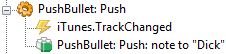
- PB-iTunes_1.png (3.41 KiB) Viewed 2811 times
Here is the entire code of macros - you can use copy / paste directly into your configuration:
Code: Select all
<?xml version="1.0" encoding="UTF-8" ?>
<EventGhost Version="1669">
    <Macro Name="PushBullet: Push" Expanded="True">
        <Event Name="iTunes.TrackChanged" />
        <Action>
            PushBullet.Push(0, [[u'Dick', u'[email protected]', 'user', True]], [u'iTunes: {eg.event.payload["name"]}', u'{eg.event.payload["artist"]}\n{eg.event.payload["album"]}'], u'')
        </Action>
    </Macro>
</EventGhost>
Pako
Re: iTunes (plugin) and Pushbullet (plugin)?
Posted: Wed Aug 06, 2014 9:18 pm
by juanpg
Thanks Pako for your help. I know that iTunes isn't the best, but I have enough stuff running on my PC already

I tried your suggestion but didn't work. I get the following errors.
I found the relevant portion of the iTunes code where the TrackChanged event is fired. I noticed the "Payload" variable there is with an uppercase P, and tried that as well, but didn't work either.
Code: Select all
class iTunesEvents():
    def OnPlayerPlayEvent(self, iTrack):
        track = self.comInstance.CurrentTrack
        Payload = {}
        Payload["name"] = track.Name
        Payload["artist"] = track.Artist
        Payload["album"] = track.Album
        Payload["duration"] = track.Duration
        self.plugin.TriggerEvent("TrackChanged",Payload)
Here's what my macro looks like right now:
Code: Select all
    <Macro Name="iTunes: Next track" Expanded="True">
        <Event Name="HTTP.iTunesNext" />
        <Action>
            iTunes.Skip()
        </Action>
        <Action>
            PushBullet.Push(0, [[u'Guille', u'xxxxxxxxxxxxx', 'pc', True]],  [u'iTunes: {eg.event.payload["name"]}', u'{eg.event.payload["artist"]}\n{eg.event.payload["album"]}'], u'')
        </Action>
    </Macro>
Again, thanks for the assistance and for your great work with the Pushbullet plugin.
Re: iTunes (plugin) and Pushbullet (plugin)?
Posted: Thu Aug 07, 2014 4:30 am
by Pako
You can not run a macro using the event iTunes.Next, because there is no payload.
You must use the event iTunes.TrackChanged.
Strictly speaking - you have to have two macros.
One macro for the action iTunes: Next track and second macro for the action PushBullet: Push.
Pako
Re: iTunes (plugin) and Pushbullet (plugin)?
Posted: Thu Aug 07, 2014 1:00 pm
by juanpg
I see. I got it to work now. With that understanding I created two more macros, triggered by the System.Idle and System.UnIdle, in order to enable/disable the PushBullet action. That way I only get the notifications when I'm away from my PC.
Thanks a lot for your help!