Page 1 of 1
Multiply events
Posted: Tue Nov 11, 2014 4:38 pm
by eddiex666
I searched thru the forum, and there is only 1 other with this problem... from 2013...
so please...
My Nexa door sensor sende 3-4 signals everytime is open/closes....
My EventGhost execute commands on event triggers...
I wounder, how can I simple filter so I only execute the command 1 time (in the time of 10 seconds)
Any tips???
Eddie
Re: Multiply events
Posted: Tue Nov 11, 2014 7:20 pm
by Pako
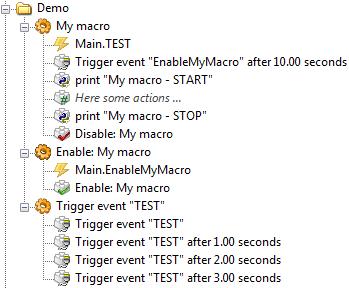
Here is one possible solution:
- bunch_event_filter.jpg (22.72 KiB) Viewed 6912 times
Pako
Re: Multiply events
Posted: Tue Nov 11, 2014 8:10 pm
by eddiex666
Hi,
tnx, it did not work.. I am executing an "bat" file... and i tried to disable the event, macro, and also the action...
whatever I do, it "ques" the event.. and when the event, marco og action is enable again, it runs it...
Eddie
Re: Multiply events
Posted: Tue Nov 11, 2014 9:20 pm
by Pako
1) I do not understand English well. Can you write a normal understandable sentences (which have a beginning and an end with a dot)?
2) My example works. However, I do not have any information from you, so I can not really customize it more.
Re: Multiply events
Posted: Wed Nov 12, 2014 7:58 am
by eddiex666
- Nexa Magnet sensor
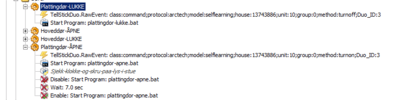
So I have 4 Nexa Magnet sensor..
If the connector breaks og connectes it sends 4 Event / signals...
My EG is starting a BAT file when it triggers...
I tryed to have a ...
Macro: Sensor
Event: Megnet1
Action: run command
Action: disable Event - Magnet1
Action: wait 7 sec
Action: enable Event - Magnet1
The problem is that the sensor sends 4 events....
Eddie
Re: Multiply events
Posted: Wed Nov 12, 2014 8:00 am
by eddiex666
This is the "normal macro...."
<?xml version="1.0" encoding="UTF-8" ?>
<EventGhost Version="1669">
<Macro Name="Plattingd├â┬©r-LUKKE" Expanded="True">
<Event Name="TellStickDuo.RawEvent: class:command;protocol:arctech;model:selflearning;house:13743886;unit:10;group:0;method:turnoff;Duo_ID:3" />
<Action id="106">
System.Execute(u'C:\\sendsms\\plattingdor-lukke.bat', u'', 0, False, 2, u'', False, False)
</Action>
</Macro>
</EventGhost>
this is the macro with "disable" and "enable"...
<?xml version="1.0" encoding="UTF-8" ?>
<EventGhost Version="1669">
<Macro Name="Plattingd├â┬©r-├âÔǪPNE" id="101" Expanded="True">
<Event Name="TellStickDuo.RawEvent: class:command;protocol:arctech;model:selflearning;house:13743886;unit:10;group:0;method:turnon;Duo_ID:3" />
<Action id="103">
System.Execute(u'C:\\sendsms\\plattingdor-apne.bat', u'', 0, False, 2, u'', False, False)
</Action>
<Action Name="Sjekk-klokke-og-skru-paa-lys-i-stue">
EventGhost.PythonScript(u'print eg.result\neg.result = "False"\n\nimport time\nnow = time.localtime()\nprint now.tm_hour\nif now.tm_hour in [20,21,22,23,0,1,2,3,4,5,6,7,8,9]:\n print "Skrur paa lys i stue"\n eg.plugins.TellStickDuo.TurnOn(33)\n eg.plugins.TellStickDuo.TurnOn(34)\n \n\n\n')
</Action>
<Action Enabled="False">
EventGhost.DisableItem(XmlIdLink(103))
</Action>
<Action Enabled="False">
EventGhost.Wait(7.0)
</Action>
<Action Enabled="False">
EventGhost.EnableItem(XmlIdLink(103))
</Action>
</Macro>
</EventGhost>
Re: Multiply events
Posted: Wed Nov 12, 2014 8:19 am
by Pako
I still do not understand your situation, unfortunately.
What is "Megnet1" event?
I do not see it anywhere in your picture.
Please see my example carefully.
The macro with several events "TriggerEvent", it is only for testing purposes.
Actions that you want to execute, should be in the macro "My macro".
You must use the correct event there (of course, not an event Main.TEST).
Only the first of the events is accepted because the macro is disabled during it.
Will be automatically enabled when 10 seconds has elapsed.
Therefore, you need a helper macro "Enable: My macro".
Pako
Re: Multiply events
Posted: Wed Nov 12, 2014 8:29 am
by krambriw
The support to solve this issue is already supported by the TellStickDuo plugin
1) Do NOT use raw events, use the normal device events
2) In Telldus Center, configure your Nexa magnetic contact sensors as self learning devices. Verify in Telldus Center that your devices are updating correctly when you are opening/closing the contacts
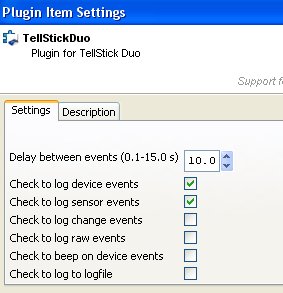
3) Set the desired delay for repeated events in the plugin setting (select 10 seconds in your case) as in the example below
You should now see the events coming into EG log but only repeated every ten seconds
- Image1.jpg (22.12 KiB) Viewed 6897 times
Re: Multiply events
Posted: Wed Nov 12, 2014 9:04 am
by Pako
Dear Walter !
I thank you for your tween. This is obviously a better solution.
However, I am sure that my solution must also work.
Or I got there a mistake? Or it is not clear enough?
Best regards,
Luboš
Re: Multiply events
Posted: Wed Nov 12, 2014 10:28 am
by eddiex666
Hi Pako and krambriw
Tnx for good help...
krambriw: I updated my tellstick plugin, and I got the settings you show me
I just have to test it...
Pako: I does sometimes things the old way

so my ide was:
Macro: Door alarm
Event: Raw / Device event from door sensor...
Action: sendSMS.bat
Eddie
Re: Multiply events
Posted: Wed Nov 12, 2014 11:09 am
by eddiex666
So I testet with "LOG Sensor events", but now I cannot se any events from the magnet connector...
the "magnet"
witch is a door sensor..
if it opens, it sends a signal, if it closes it sends a signal...
http://www.nexa.se/LMST606.htm
Eddie
Re: Multiply events
Posted: Wed Nov 12, 2014 11:39 am
by krambriw
Due to that Telldus does not handle magnet-contacs as sensors, it is easy to misunderstand. And that you have.
In the Telldus world, it is NOT considered a sensor (even if it should be more logical). It is a DEVICE!!!!
So you have to configure it as a DEVICE in the Telldus Center. Please consult the Telldus forum if you are uncertain. You have to do the basic configuration in Telldus Center first otherwise it is useless to even think of EventGhost
Re: Multiply events
Posted: Wed Nov 12, 2014 4:56 pm
by eddiex666
Hi Kri...
Nice. I figure it out... I definitly like to use Device event.. not raw event...
I got it working...
I have asked you about temprature sensors...
I have 5 and I use (old way) PY script to check temp from the log files, and then turn on / off heat...
For example...
I get this event in EG....
TellStickDuo.oregon.1A2D.244.Temperature.Humidity '18.5|52'
How can I turn on heat when its below 18.5 ???
Eddie
Re: Multiply events
Posted: Thu Nov 13, 2014 8:00 am
by krambriw