Page 1 of 11
Media Player Classic
Posted: Sat Jan 12, 2008 5:12 pm
by MonsterMagnet
New maintainer wanted !
Repository link
To download, use the right mouse button.
Re: Media Player Classic
Posted: Wed Jul 30, 2008 5:23 pm
by CHeitkamp
Added german translation to SVN
Re: Media Player Classic
Posted: Sun May 03, 2009 11:25 am
by nova77
I have added support to 3 custom Pan&Scan settings in MediaPlayerClassic:
Scale to 16:9 TV
Zoom to Widescreen
Zoom to Ultra-Widescreen
Attached you'll find the updated plugin.
Re: Media Player Classic
Posted: Sat Jun 20, 2009 2:54 pm
by maxxxim
Can someone add "Remaining time" (default: CTRL+I, virtual key 32778) to this plugin, please?
Re: Media Player Classic
Posted: Sat Mar 20, 2010 2:34 am
by molitar
Is it possible to add Open Directory to this plugin?
Re: Media Player Classic
Posted: Sat Mar 20, 2010 11:32 am
by Pako
To the MPC plugin I have added several actions:
1)
Toggle OSD Elapsed Time
2)
Open Directory
3)
Send user's message
4)
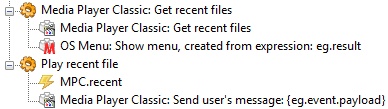
Get recent files
Using the last two actions, you can easily open the
On screen menu with the most recent open files:
- OSM_example_1.jpg (20.91 KiB) Viewed 25823 times
Warning: Some new actions only works with the version of MPC Home Cinema.
The new version of the plugin you can download
here.
Pako
Re: Media Player Classic
Posted: Sat Apr 24, 2010 1:29 pm
by maxxxim
I couldn't get it work until I deleted this:
guid = "{DD75104D-D586-438A-B63D-3AD01A4D4BD3}",
Thank you, OSD elapsed time now working!
Re: Media Player Classic
Posted: Sun Apr 25, 2010 3:16 pm
by molitar
I could not get this to work at all. Show OSD does not show anything.. and get recent files reports..
Error in Action: "Media Player Classic: Get recent files"
Traceback (most recent call last) (1462):
File "C:\Program Files\EventGhost\eg\Classes\ActionBase.py", line 168, in CallWrapper
File "C:\Program Files\EventGhost\plugins\MediaPlayerClassic\__init__.py", line 276, in __call__
error: (1401, 'GetSubMenu', 'Invalid menu handle.')
What maybe wrong here Pako? Am I missing something?
Re: Media Player Classic
Posted: Mon Apr 26, 2010 5:20 pm
by Pako
molitar wrote:I could not get this to work at all. Show OSD does not show anything.. and get recent files reports..
Error in Action: "Media Player Classic: Get recent files"
Traceback (most recent call last) (1462):
File "C:\Program Files\EventGhost\eg\Classes\ActionBase.py", line 168, in CallWrapper
File "C:\Program Files\EventGhost\plugins\MediaPlayerClassic\__init__.py", line 276, in __call__
error: (1401, 'GetSubMenu', 'Invalid menu handle.')?
Yes, I know.
This error occurs if the menu is not visible (such as fullscreen or compact view).
I currently have almost completed two significant improvements of MPC plugin.
One of them is the
On Screen Menu - this means that you can browse the entire MPC menu using the remote control.
Here, this problem is also. I found only one solution: if the plugin finds that the menu is not visible, switches display MPC in order to see it.
Then you can browse the menu. Once the user closes the menu browsing, the plugin will return the display to its original state.
A second enhancement is the
On Screen Go To ... This means that you can (using the remote keys Up, Down, Left, Right) to set the desired time and jump on it.
Pako
Re: Media Player Classic
Posted: Sun May 16, 2010 7:39 am
by Pako
Here is the promised improvements MPC plugin:
- __init__.py
- Version 1.3 experimental
- (78.57 KiB) Downloaded 847 times
There are new actions Get Times, Show Menu and On Screen GoTo:
1) Get Times
This action returns (as eg.result) elapsed, remaining and total times.
2) Show MenuThis action allows with use the remote control browse a MPC-HC menu.
It turned out that the menu can only browse when the MPC is in the "window mode" and his menu is visible.
If not, the plugin before opening the menu to switch the MPC window to "window mode" and after closing menu MPC window again to return to its original form.
I am in this case also used a "revolutionary" method. All the events needed to control the menu, now allocated in a special dialog box.
At the opening menu is triggered event
MPC.OSD.Opened and at the closing menu is triggered event
MPC.OSD.Closed.
These events can be used for disable or enable required elements in the configuration tree.
3) On-Screen GoToThis action allows you to use the GoTo... function just using the remote control.
There is using the same dialog for events such as in the case of the action "Show Menu".
Likewise, the events
MPC.OSD.Opened and
MPC.OSD.Closed are triggered.
I'm still not save this version to the SVN repository. I'll wait for your response. I need to know how you will enjoy these new actions.
Pako
Re: Media Player Classic
Posted: Mon May 31, 2010 3:30 am
by molitar
Been away for a while. OK would be nice to see some example configs of how to use the new features. Secondly when I tried showing menu when full screen got an error it did not change the window to windowed mode. Also how to use the Get Times and On Screen Goto how do I use that and the background is cut off so the seconds are half cut off.
Re: Media Player Classic
Posted: Mon May 31, 2010 9:36 am
by Pako
molitar wrote:Secondly when I tried showing menu when full screen got an error it did not change the window to windowed mode.
What error you get? What version of MPC-HC you use?
molitar wrote:Also how to use the Get Times
The function GetTimes You can use the following steps:

- GetTimes_1.jpg (7.84 KiB) Viewed 25302 times
molitar wrote:and On Screen Goto how do I use that and the background is cut off so the seconds are half cut off.
What is the font you use? Try using another one. I tried many different fonts, but I never did not notice anything like that.
I found that version v1.3.1249 this function does not work (even in normal use with hot-key Ctrl-G). You must use a newer version.
I now have version v1.3.1824 and it is working properly.
Pako
Edit 2010-06-01: In reply, I was slightly confused, but now it's okay.
Re: Media Player Classic
Posted: Tue Jun 01, 2010 12:04 pm
by molitar
Pako wrote:molitar wrote:Secondly when I tried showing menu when full screen got an error it did not change the window to windowed mode.
What error you get? What version of MPC-HC you use?
molitar wrote:Also how to use the Get Times
The function GetTimes You can use the following steps:
GetTimes_1.jpg
GetTimes_2.jpg
molitar wrote:and On Screen Goto how do I use that and the background is cut off so the seconds are half cut off.
What is the font you use? Try using another one. I tried many different fonts, but I never did not notice anything like that.
I found that version v1.3.1249 this function does not work (even in normal use with hot-key Ctrl-G). You must use a newer version.
I now have version v1.3.1824 and it is working properly.
Pako
Edit 2010-06-01: In reply, I was slightly confused, but now it's okay.
The error I get is encountered and improper argument. The version I am using is build 1.3.1264.0. So I need to get a newer version of mpc-hc than the one than I have now than?
Re: Media Player Classic
Posted: Tue Jun 01, 2010 1:23 pm
by Pako
1. Menu problem
I think to try a newer version could possibly solve the problem.
Still, I wonder if it works correctly when you use the preset "Minimal" (not fullscreen).
It is possible (but I do not know why), that in your case is not properly recognized full-screen mode.
2. GoTo problem
2.1. I think that version 1.3.1264 is already working correctly (you can try it with hot-key Ctrl-G).
2.2. You tried a different font? Solved the problem with the cut-off?
Pako
Re: Media Player Classic
Posted: Wed Jun 02, 2010 1:43 am
by molitar
Pako wrote:1. Menu problem
I think to try a newer version could possibly solve the problem.
Still, I wonder if it works correctly when you use the preset "Minimal" (not fullscreen).
It is possible (but I do not know why), that in your case is not properly recognized full-screen mode.
2. GoTo problem
2.1. I think that version 1.3.1264 is already working correctly (you can try it with hot-key Ctrl-G).
2.2. You tried a different font? Solved the problem with the cut-off?
Pako
OK I need to go find newer version.. CTRL+G pulls up the Goto.. The error I get when I try show MPC menu is..
Code: Select all
 Traceback (most recent call last):
        File "wx\_core.pyc", line 14618, in <lambda>
        File "C:\Program Files\EventGhost\plugins\MediaPlayerClassic\__init__.py", line 1238, in ShowMenu
          self.DrawMenu(ix)
        File "C:\Program Files\EventGhost\plugins\MediaPlayerClassic\__init__.py", line 1113, in DrawMenu
          width = max(width_lst)+8
      ValueError: max() arg is an empty sequence
works fine when not in full screen.. now my fullscreen is on different display so don't know if that is making the difference or not. Changing font to one of the asian font types solved the cut off problem.. the japanese font is skinnier than the the New Courier so font is not cut off with it.
Code: Select all
Media Player Classic: On Screen Go To ...
   Media Player Classic: On Screen Go To ...