Page 1 of 2
Webserver, displaying variables
Posted: Fri Sep 16, 2016 9:07 pm
by Pliind
Hi!
Sorry if this has been asked before, but I have'nt found an answer specifically to my question.
I'm using the webserver-plugin and i have built a remote-ui with jQuery Mobile. So far so good, I have a remote that scales to any device etc and needs no installation to use.
But now I'd like to go the next step and display temperatures, notifications and other good to have info.
I'm a copy-paster so I cannot code from the ground up, now asking if i can with jQuery Mobile display eg variables? or am I out on thin ice?
Re: Webserver, displaying variables
Posted: Sat Sep 17, 2016 4:46 am
by krambriw
Websocket?
Does jQuery Mobile support websockets? If so, there are examples on this forum "how to"
Another alternative spells MQTT
Re: Webserver, displaying variables
Posted: Sat Sep 17, 2016 11:54 am
by Pliind
Hi,
What i could make out of this
http://jwebsocket.org/documentation/ref ... ntegration I guess support is there, but I don't know what to do with this info

And the "how to" about webserver and sockets I don't either know what parts to take out for me to be able to understand it fully.
Re: Webserver, displaying variables
Posted: Mon Sep 19, 2016 1:47 pm
by yokel22
JQuery supports websockets. I'm getting ready to post a short JQuery mobile demo with basic functions for comm. With EG. In short what you want to do is, give your webpage elements an ID="yourvariable" tag. Then with the eg webserver plugin set that variable. Then broadcast that value to the webpage.
Re: Webserver, displaying variables
Posted: Mon Sep 19, 2016 3:26 pm
by Pliind
Sounds promesing!

looking forward to it!
Re: Webserver, displaying variables
Posted: Tue Sep 20, 2016 1:15 pm
by yokel22
Okay, this should get you going:
https://www.dropbox.com/s/7iwxo8c0nomtk ... o.zip?dl=0
It supports swipe gestures & orientation changes on mobile devices. Jquery mobile works a bit different than most html, in that all pages are contained within one html document. Each page is given a ID value, to navigate pages use typical html href="#pageID". Ctrl+f is your friend. All Global functions are contained within the script.js file. All other JS will be in the index.html document. The WS functions were written by Pako & Sebastion, without there examples I wouldn't likely have had a clue where to start. So, thanks for posting your examples. The Calculator function was written by rock'n'coder. The Weather portion requires a api key from Weather Underground, which can be acquired for free here:
https://www.wunderground.com/weather/api/. Once you have a key, open the set key/zipcode macro within the Weather/Actions folder. Enter your key into the python script. Run it Once(then your good to go). If you want to change weather locations, you can by clicking the header on the weather page. The iTunes portionrequires this updated plugin:
https://www.dropbox.com/s/srvd91zf3dxqn ... __.py?dl=0 . I haven't quite worked out the coverart for itunes yet & am relying on my own images. Your coverart can be added to the images/artSM folder, they need to be in this format (artist-album.jpg). The Demo page should explain how to go about using the global functions. If not just pm me.
A few screenshots:
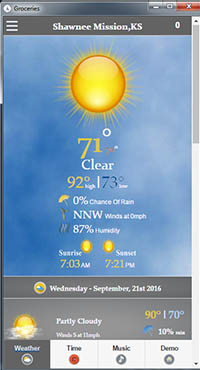
- screenshot3.jpg (29.96 KiB) Viewed 5250 times
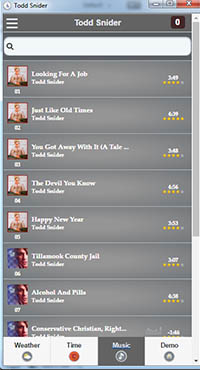
- screenshot2.jpg (30.46 KiB) Viewed 5250 times

- screenshot1.jpg (30.01 KiB) Viewed 5250 times
If these links die, an updated version is here:
http://eventghost.net/forum/viewtopic.php?f=13&t=9487
Re: Webserver, displaying variables
Posted: Wed Sep 21, 2016 6:25 pm
by Pliind
Ok I'm getting there, still a bit confused, I already have my own site up and running so what parts do I take from the server you sent? I've tested it also and i like the possibility of showing status/notifications of stuff. But don't know what to do to get there. When Java get's in the picture i zone out since I don't know it to well.
So i already have the EG server and Mobile Jquery files, what do i add / modify?
Re: Webserver, displaying variables
Posted: Wed Sep 21, 2016 8:14 pm
by yokel22
I included the non demo stuff just as further examples of how to go about using the functions for you and anyone else that looks at it. Here's a very short version. Just the demo page, navbars, panels, & swipe gestures for said panels. You can overwrite the existing content on the demo page with your content, or i included a 2nd page. Just paste your content on page 2 where it says "Your stuff goes here".
https://www.dropbox.com/s/02no7663i2jqv ... t.zip?dl=0
Re: Webserver, displaying variables
Posted: Wed Sep 21, 2016 9:04 pm
by Pliind
Alright, got some work to do migrating the old with the new
But how do i display a variable? what is needed to do in EG and what do i need to do in the html?
Re: Webserver, displaying variables
Posted: Thu Sep 22, 2016 1:22 am
by yokel22
Oh, i guess you didn't see the xml file there. Open this file in eventghost: EG.WS.demoshort.xml . There are some commands that are setup to run the demo page. If you haven't already, open the webserver plugin config & point it to the html folder. I had it set to port 5163 also, change that to your preferred port. When you have that done navigate to the webpage. It should explain how to setup the html end.
Re: Webserver, displaying variables
Posted: Thu Sep 22, 2016 5:42 am
by Pliind
Oh damn never saw those settings :p
Ok so last thing I want to understand. When I try your page i get "WSclientCOnnected" but when I use my page i don't.
Why? and what do I do about it?
Also for the Toggle button, I can't seem to toggle different events.{ "Flip.DemoSwitchselect u "True" } is the event but when dragged it's only {Flip.DemoSwitchselect} thus triggering both macros.
Re: Webserver, displaying variables
Posted: Thu Sep 22, 2016 3:28 pm
by Pliind
Regarding the Clientconnected, I found the code needed. So for anybody else being puzzled about this, the solution is to include
" <script src="js/JQ.js"></script>
<script src="js/script.js"></script>
<script src="js/countid.js"></script>" in the header
(and have those files in the correct location from the dropbox ofcourse)
Why I'm diverting from your code is because I want to learn aswell, so at the moment I'm taking huge chunks of your code into mine, when i think it's ready i can post mine for anybody to use.
Re: Webserver, displaying variables
Posted: Thu Sep 22, 2016 3:48 pm
by yokel22
Yes, it is the scripts.js that is handling the WS functions. If you add that to the head section it should work. As for the flipswitch, when you see (u 'something') after an event. That indicates it is a payload value, it will not show up when you drag it to your macro. To learn more about payloads see here:
http://www.eventghost.org/docs/eg/eg.Ev ... nt.payload . In cases where you can have different payloads on the same event they generally need to be evaluated via python script(don't let that scare you, it's pretty simple). I updated the xml tree to add some examples of how to do that. To get the python for a action, right click on it and choose "copy as python". This will give you something similar to this: "eg.plugins.EventGhost.ShowOSD(u''FlipSwitch value = True', u'0;-24;0;0;0;700;0;0;0;1;0;0;2;32;Arial', (0, 0, 0), None, 0, (500, 300), 0, 4.0, False)"
Then you can create a script like this:
Code: Select all
payload = eg.event.payload
if payload == "True":
    eg.plugins.EventGhost.ShowOSD(u'FlipSwitch value = True', u'0;-37;0;0;0;700;0;0;0;0;3;2;1;34;Arial', (0, 0, 0), None, 0, (500, 300), 0, 4.0, False)
    eg.plugins.Webserver.SetValue(u'DemoSwitchselect', u'True', False, False, 1)
elif payload == "False":
    eg.plugins.EventGhost.ShowOSD(u'FlipSwitch value = False', u'0;-37;0;0;0;700;0;0;0;0;3;2;1;34;Arial', (0, 0, 0), None, 0, (500, 300), 0, 4.0, False)
    eg.plugins.Webserver.SetValue(u'DemoSwitchselect', u'False', False, False, 1)
eg.plugins.Webserver.BroadcastValue(u'DemoSwitchselect', None, u'', None)
The updated EG.tree is included in the zip file or can be downloaded separate here:
Re: Webserver, displaying variables
Posted: Thu Sep 22, 2016 3:53 pm
by Pliind
Awesome just what I was looking for. I have experience with payloads from Tasker etc so I'm following
Thanks so much for the help btw
Re: Webserver, displaying variables
Posted: Thu Sep 22, 2016 4:45 pm
by Pliind
Hmm I'm going crazy with the flipswitch.
I'm setting the switch to False or True with persistan variables, but after refreshing page the switch is set to "on" even though the variable is set to be "false" (off) broadcasting does not do the trick either, is there something I'm missing? would be sweet to always have lights with correct status.