Page 1 of 1
AxialControl: Home Automation Server (Formerly InControl)
Posted: Fri Dec 30, 2016 6:13 am
by yokel22
This is a plugin for AxialControl Home Automation Server
http://www.axialcontrol.com/. Right now it's just basic one way communication, but i plan on adding events in the next version. I've tested things pretty well but only on my system. If something isn't working properly, LMK.
** added v1.0.1: fix a dumb bug stopping macro from proceeding. **
Re: AxialControl: Home Automation Server (Formerly InControl
Posted: Sun Jan 22, 2017 1:26 am
by yokel22
Added Event Generation, Calling it v1.0. I plan on switching things over to a websocket connection when i can figure out the commands. But for the time being it's setup with a polling thread. This is optional and the polling time is configurable. It will generate event's in this format. "AxialControlHA.deviceName({'type': xxx, 'deviceID': 'xxx', 'value': 'xxx'}). I'm open to suggestion on the formatting of this but if you want to get the value for the event it can be parsed out like this:
deviceName:
deviceValue:
deviceType:
deviceID:
Or you can do something like this in the screenshot(copy/paste this into your eg.tree):
Code: Select all
<?xml version="1.0" encoding="UTF-8" ?>
<EventGhost Version="1722">
    <Macro Name="Python Script" Expanded="True">
        <Event Name="AxialControlHA.*" />
        <Action>
            EventGhost.PythonCommand(u'print eg.event.suffix + " = " + str(eg.event.payload[\'value\'])')
        </Action>
    </Macro>
</EventGhost>
Re: AxialControl: Home Automation Server (Formerly InControl
Posted: Fri Jan 27, 2017 9:47 pm
by yokel22
This is a simple web app that uses this plugin and the webserver plugin. It still has a few small bugs to fix but is in pretty good working order if anyone feels like playing around with it. There are a few screenshots attached at the bottom of this post.
Step 1:
You will need version 1.0 or higher installed of the AxialControlHA plugin.
Step 2:
Open the attached eventghost tree.
Step 3:
Configure the AxialControl plugin with your server credentials. Also enable Event polling, i usually set my polling time to 5 seconds.
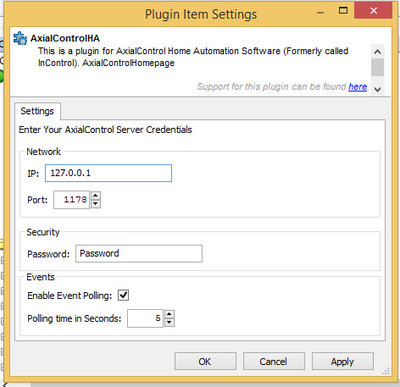
- AxialControlHA config
Step 4: Configure the Webserver plugin to point to the supplied html folder. Also set your prefferred port to run the webserver off of. (Note: if you experience any errors with the webserver plugin. Update to the newest version here:
viewtopic.php?f=9&t=1663)
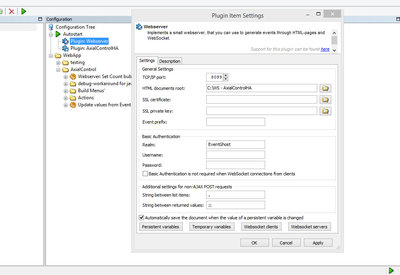
- Webserver Config
Step 5: Load the webpage in your prefferred web browser(Your PC's ip that runs EG and the port set in the webserver plugin. Example: 127.0.0.1:8099). You can run this in fullscreen on chrome by saving the link to desktop and choosing open in window.
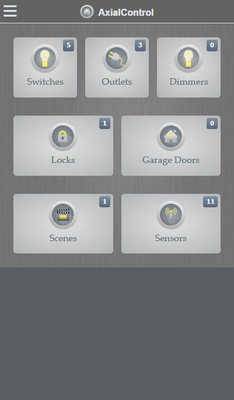
- Axial home
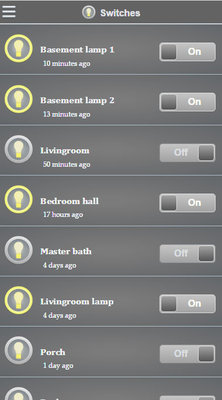
- Axial switches
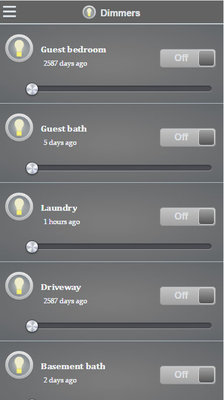
- Axial dimmers
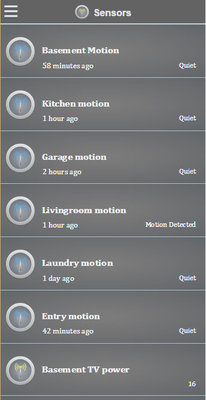
- Axial Sensors
Re: AxialControl: Home Automation Server (Formerly InControl)
Posted: Fri Jul 06, 2018 6:12 am
by kgschlosser
Here is an updated index.html to handle images not properly loading when viewing the file as a local file in a browser.
Re: AxialControl: Home Automation Server (Formerly InControl)
Posted: Fri Jul 06, 2018 11:58 am
by yokel22
Cool, I'll update the file in the zip. Just out of curiosity.
What did you add?
Re: AxialControl: Home Automation Server (Formerly InControl)
Posted: Fri Jul 06, 2018 4:11 pm
by kgschlosser
it's what i removed..
the "/" before all of the image paths.
I am sure that is the correct thing to do. give it a test first to see.